

Token Auto-Refresher: Solving Auth Failures in Burp Suite
Intro
Modern web application security testing increasingly relies on automated scanning tools to identify vulnerabilities efficiently. However, as a team, we consistently faced a persistent challenge with bearer token expiration during automated scans. When tokens expired mid-scan, our automated tools encountered authentication failures, resulting in incomplete coverage and requiring manual intervention to update tokens and restart scans.
While Burp Suite provides session handling rules and macros to address this, we needed a faster, simpler and flexible approach.
The Token Auto-Refresher extension was born from this need. Implemented as a Burp Suite extension using the Montoya API, it automatically captures, stores and injects fresh tokens into Burp's various tools, providing a streamlined alternative to complex macros and rules while ensuring continuous authentication throughout security assessments.
Token Capture Mechanisms
The extension supports two distinct token capture strategies, each suited to different testing scenarios.
Proxy History Capture
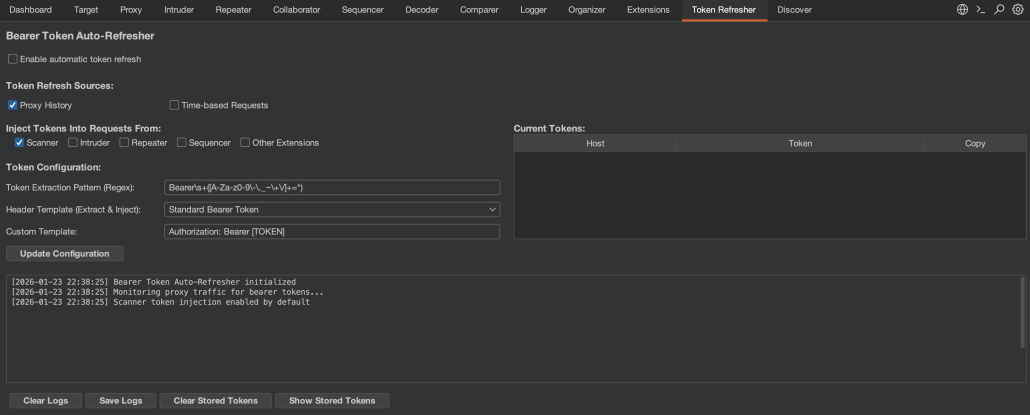
The default capture mechanism monitors all traffic flowing through Burp's proxy. The extraction behavior is controlled by two key configuration settings:
Token Extraction Pattern (Regex): Defines how to extract the token value from header contents. The default pattern Bearers+([A-Za-z0-9-._~+/]+=*) captures standard RFC 6750 bearer tokens, but can be customized for non-standard formats or different character sets.
Header Template (Extract & Inject): Specifies which header to check and how tokens should be formatted. The template uses the format HeaderName: Prefix [TOKEN] Suffix, where [TOKEN] is replaced with the actual token value. Common presets include:
Authorization: Bearer [TOKEN]- Standard RFC 6750 bearer tokensAuthorization: [TOKEN]- Raw tokens without prefixX-Api-Key: [TOKEN]- Custom API key headersAccess-Token: [TOKEN]- Alternative authentication headers
You can also define your own custom header template for any authentication scheme your application uses.
This unified approach ensures that the extension extracts tokens from the same header it injects them into, providing consistency and flexibility for various authentication schemes.
When proxy capture is active, the extension monitors traffic flowing through Burp's proxy to capture tokens. As you browse the application, it checks both outgoing requests and incoming responses. For requests, it applies the configured regex pattern to the header specified in your template (e.g., if your template is X-Api-Key: Bearer [TOKEN], it checks the X-Api-Key header), capturing tokens your browser or application is already using. For responses (e.g., after login), it first looks in the header specified by your template, then falls back to checking common authentication headers (Authorization, X-Auth-Token, X-Access-Token, X-Api-Key) if the template header isn't found, ensuring tokens are captured when the server issues them regardless of which header the application uses.
The extraction logic applies an important optimization by capturing tokens exclusively from Proxy traffic and not from the Scanner or other automated tools. This prevents the extension from getting potentially stale tokens that other tools might be sending. Additionally, if a host is configured for time-based refresh (discussed below), proxy capture is automatically disabled for that host to prevent newer time-based tokens from being overwritten by potentially older proxy tokens.
Time-Based Automated Refresh
For applications requiring periodic token renewal (e.g. long running scans) the extension provides a sophisticated time-based refresh mechanism. This feature allows defining a complete HTTP request that will be executed at configurable intervals to obtain fresh tokens.

The time-based configuration requires several parameters:
Host: The target authentication endpoint (e.g., auth.example.com)
Interval: Refresh frequency in seconds (minimum 10 seconds)
HTTP Method: GET, POST, or PUT
Request Configuration: A complete HTTP request template, including headers and body.
Token Extraction Configuration: Specifies how to extract the new token from the response, supporting two methods:
- Header Extraction: Extracts the token from a specified response header (e.g.,
Authorization,X-Auth-Token) - Response Body Extraction: Extracts tokens from JSON or XML responses using start and end patterns
For example, to extract a JWT from a JSON response, the configuration would be:
- Extract from:
Response Body - Start pattern:
"access_token":" - End pattern:
"
The time-based refresh is implemented using a scheduled executor service that executes the configured request at the specified interval. When time-based refresh is active for a host, it takes priority over proxy capture for that host, ensuring the most current programmatically-refreshed token is always used.
Token Injection
Once tokens are captured and stored, the extension automatically injects them into requests from enabled Burp tools. The injection logic is tool-aware, allowing selective enablement for Scanner, Intruder, Repeater, Sequencer, and other Extensions.
By default, only Scanner injection is enabled, as this is the most common use case for automated token refresh. The injection behavior is controlled by a configurable header template that specifies both the header name and format. For example, Authorization: Bearer [TOKEN] injects tokens into the Authorization header with a "Bearer" prefix, while X-Api-Key: [TOKEN] injects directly into a custom header without any prefix.
Importantly, the extension only injects tokens into requests that already contain the specified header. This prevents accidentally adding authentication to public endpoints that don't require it.
To reduce log noise during high-volume scanning, the extension implements intelligent logging that only records the first and then every 500th injection per host.
Token Management UI
The extension provides real-time visibility into captured tokens through a dedicated table in the UI. It stores tokens separately per host, allowing concurrent testing of multiple applications while managing each host’s token independently.
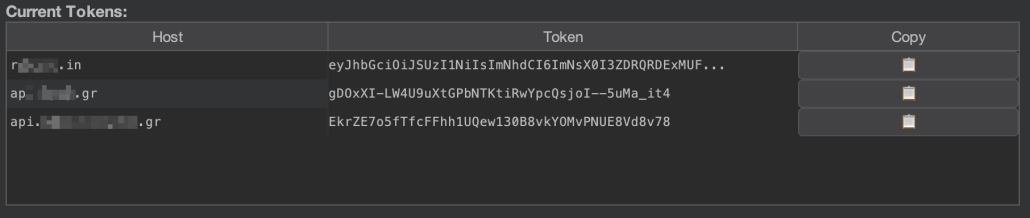
The table displays three columns:
- Host: The hostname associated with the token
- Token: A truncated view of the token
- Copy: A clipboard button (📋) to copy the full token
The table is updated in real-time as new tokens are captured, with existing entries being updated when a new token is captured for an already-tracked host.
Activity Logging
All token capture and injection events are logged with timestamps in a dedicated log area:
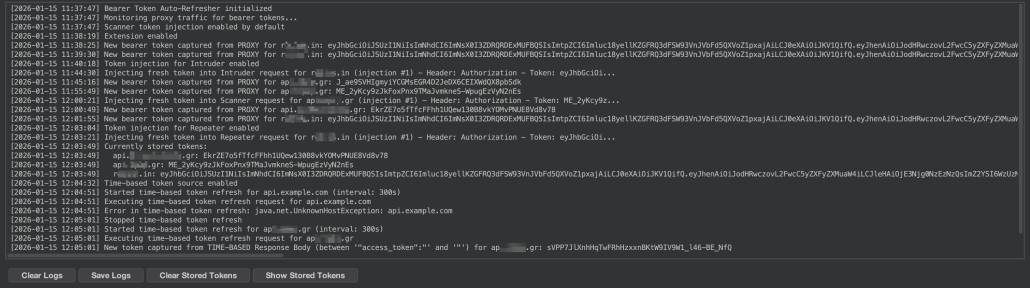
The logs provide visibility into:
- Token capture events (from proxy or time-based refresh)
- Token injection events (with injection counts)
- Time-based refresh execution
- Configuration changes
- Errors and warnings
For debugging time-based refresh configurations, the extension includes a "Show Response" button that displays the complete HTTP response from the most recent refresh request, including headers and body (truncated to 2000 characters to prevent log overflow).
Logs can be exported to a text file for later analysis or documentation purposes.
Project Persistence
A critical feature for professional security testing workflows is the extension's project persistence capability. All configuration settings are automatically saved to the current Burp project file. Persisted settings include:
- Extension enabled/disabled state
- Tool injection preferences (Scanner, Intruder, etc.)
- Token source selections (Proxy, Time-based)
- Time-based configuration (host, interval, request template, extraction settings)
- Custom token regex patterns
This ensures that when reopening a project, all token refresh configurations are restored automatically, eliminating the need to reconfigure the extension for each testing session.
For temporary projects (those not saved to disk), the extension gracefully handles the absence of persistence by using default settings.
Outro
Developing this extension has been a rewarding opportunity to give back to the community that has provided us with countless valuable tools over the years. What started as an internal solution has evolved into something that hopefully will benefit security professionals facing similar authentication persistence issues.
The extension is open source and available on GitHub. We welcome contributions from the community whether you have ideas for new features, improvements to existing functionality, or have encountered edge cases we haven't considered, we'd love to hear from you. Feel free to open an issue, submit a pull request, or reach out to us directly.
