fairplay

Fairplay Evolves: Introducing the Web Dashboard and API

Intro

When Fairplay was first released, the focus was clear: to help Red Teams protect their operations by silently monitoring file hashes across multiple online sources and generating timely notifications when payloads are encountered. Since then, we have been steadily expanding the project to make it easier to operate in real engagements, collaborate across a team and keep visibility high without adding overhead.

This post highlights the newest features we added, with an emphasis on operational convenience: a web dashboard, a dedicated API layer and streamlined management of monitored indicators and detections.

Web Dashboard

Fairplay now includes a web frontend that provides a single place to review and manage what the framework is tracking. The dashboard is designed to make simpler use during an engagement, while keeping the data model aligned with Fairplay’s modular backend.

Key capabilities include:

  • Dashboard: Overview of recent activity and quick visibility into what is hot.
  • IOCs: List, detail and create/edit flows (backed by the same JSON definitions under ioc/ that the collectors use, with the database as a mirror for queries).
  • Detections: Llist, detail and create/edit flows aligned with the SQLite model (including soft-delete semantics where applicable).
  • Theme: Light/dark toggle for long sessions.
  • Reset DB: A sidebar action that asks for confirmation, then calls the backend to clear all rows in the SQLite tables used for detections and IOC mirroring.

API Layer

To support the dashboard and enable easier integrations, we added a dedicated API component. The API provides structured endpoints that expose Fairplay data in a predictable way and make it simpler to plug Fairplay into other internal tooling.

SQLite Migration

As part of making Fairplay more reliable and easier to operate over time, we migrated storage from the previous in-memory JSON approach to a SQLite database. This change improves persistence and sets a cleaner foundation for the web dashboard and API.

The upgrade path is designed to be smooth. After pulling the latest version, on the first run of the tool Fairplay will detect existing JSON data and automatically import it into the SQLite database, so you can keep using your existing IOCs and historical detections without having to re-create anything manually. From that point on, Fairplay will continue operating using the database as the source of truth.

CLI Extensions

For operators that prefer to work from the console, Fairplay’s CLI has also been extended with new functionality. The goal is to keep the console-first workflow fully viable: manage and review IOCs and detections in order to get immediate feedback directly in the terminal, without requiring the web dashboard.

Extensibility and Contributions

Fairplay remains a Python3 modular framework at its core and the original goals have not changed: extensibility, quiet monitoring and flexible notifications. The dashboard and API are meant to enhance those goals by making Fairplay easier to operate and easier to integrate.

Contributions are welcome through Pull Requests submitted on the repository, both for new collectors/notifiers and for improvements to the API and web dashboard. If you have ideas for new sources, new notification channels, or workflow improvements that help Red Teams move faster while staying safe, we would love to hear from you.

AI_Cybersecurity

Offensive Cybersecurity Insights: The Spring Edition

AI_Cybersecurity

Hello world!

Welcome to another Hackcraft Newsletter crafted by our researchers.

If we had to describe the past two months in one phrase:

Cybersecurity chaos, accelerated by AI.

Let’s dive into the stories that stood out and what they mean for you, plus blogs worth your time, and a few tools we think deserve your attention.


🔥 News

🐧 Ubuntu Privilege Escalation (March 2026)

CVE-2026-3888

A local privilege escalation in snapd allows attackers to gain root by abusing how /tmp is handled and recreated via systemd-tmpfiles.

Why it matters:

Once an attacker gets in, this turns access into full system takeover.

https://discourse.ubuntu.com/t/snapd-local-privilege-escalation-cve-2026-3888/78627


🔓LiteLLM Critical SQL Injection (April 2026)

CVE-2026-42208

A critical pre-auth SQL injection in LiteLLM allows attackers to execute arbitrary SQL queries and access backend data.

Why it matters:

AI infrastructure is now a real attack surface, and it’s often deployed without proper security controls.

https://www.tenable.com/cve/CVE-2026-42208

🧠 GitHub Actions Supply Chain Risk (April 2026)

Security issues in GitHub Actions workflows can lead to:

  • code injection
  • secret leakage
  • pipeline compromise

Misconfigurations and unsafe practices expose CI/CD pipelines directly to attackers.

Why it matters:

Compromising the pipeline means compromising everything you ship.

Software delivery pipelines are becoming a prime target for attackers, and many organizations are more exposed than they realize. Security gaps in tools like GitHub Actions can allow threat actors to inject malicious code, steal sensitive credentials, or take control of the entire build process. The cybersecurity risk isn’t isolated to development. Ιt extends directly to customers and production systems. As recent supply chain attacks like the SolarWinds supply chain attack have shown, compromising the pipeline means compromising everything you ship.

https://www.elastic.co/security-labs/detecting-cicd-pipeline-abuse-with-llm-augmented-analysis


🤖 AI-Assisted Attacks Are Here (May 2026)

Attackers are actively using AI to improve:

  • phishing & social engineering
  • malware development
  • reconnaissance & targeting

This is not a theoretical scenario. AI is already being used to scale and automate attacks.

Why it matters:

Lower barrier. More attackers. Better attacks. Cybersecurity compromised.

https://thehackernews.com/2026/05/2026-year-of-ai-assisted-attacks.html


✍️ Blogs

🔄 Token Auto-Refresher in Burp Suite

Automating token refresh in Burp Suite removes auth interruptions during testing and keeps sessions alive.

Why it matters:

Less friction? More accurate and efficient testing.

https://www.hackcraft.gr/2026/02/token-auto-refresher-solving-auth-failures-in-burp-suite/


⚡ Race Conditions & Where to Find Them

A breakdown of race condition vulnerabilities, where they appear (payments, account logic, state changes), and how to spot them.

Why it matters:

Often overlooked. However, they can lead to serious business logic abuse.

https://www.hackcraft.gr/2026/04/race-conditions-and-where-to-find-them/


🧠 Insight

Identity is becoming the primary attack surface, with 75% of organizations increasing spending and 46% focusing on attack-path visibility. At the same time, AI adoption (88%) is driving a surge in non-human identities, 97% of which are overprivileged, making access and risk much harder to control. Cybersecurity gets fragile.

Source: Trends in Identity Attack Path Management 2026, SpecterOps & Omdia

🛠️ Tools

A few tools worth checking out this month, focused on OSINT, automation, and modern testing workflows.

LinkedInDumper

Extract LinkedIn data for OSINT and org mapping.

https://github.com/l4rm4nd/LinkedInDumper


Burp Suite Montoya API

Build powerful extensions and automate testing workflows in Burp Suite.

https://portswigger.github.io/burp-extensions-montoya-api/javadoc/burp/api/montoya/MontoyaApi.html


xnldorker

Automate Google dorking to uncover exposed assets and misconfigurations.

https://github.com/xnl-h4ck3r/xnldorker


cewlai

AI-powered wordlist generator for smarter fuzzing and brute-force.

https://github.com/jthack/cewlai


⚡ Closing Thoughts

Attackers are moving faster, scaling smarter, and relying less on traditional exploits.

The gap isn’t tools. Ιt’s how quickly your cybersecurity posture adapts. Secure your assets and your people with continuous Red Teaming and Penetration testing.

Hackcraft always stands by your side.

race conditions

Race Conditions and Where to Find Them

Research and analysis by Themis Zoumpoulakis, Hackcraft’s Senior Cybersecurity Tester.

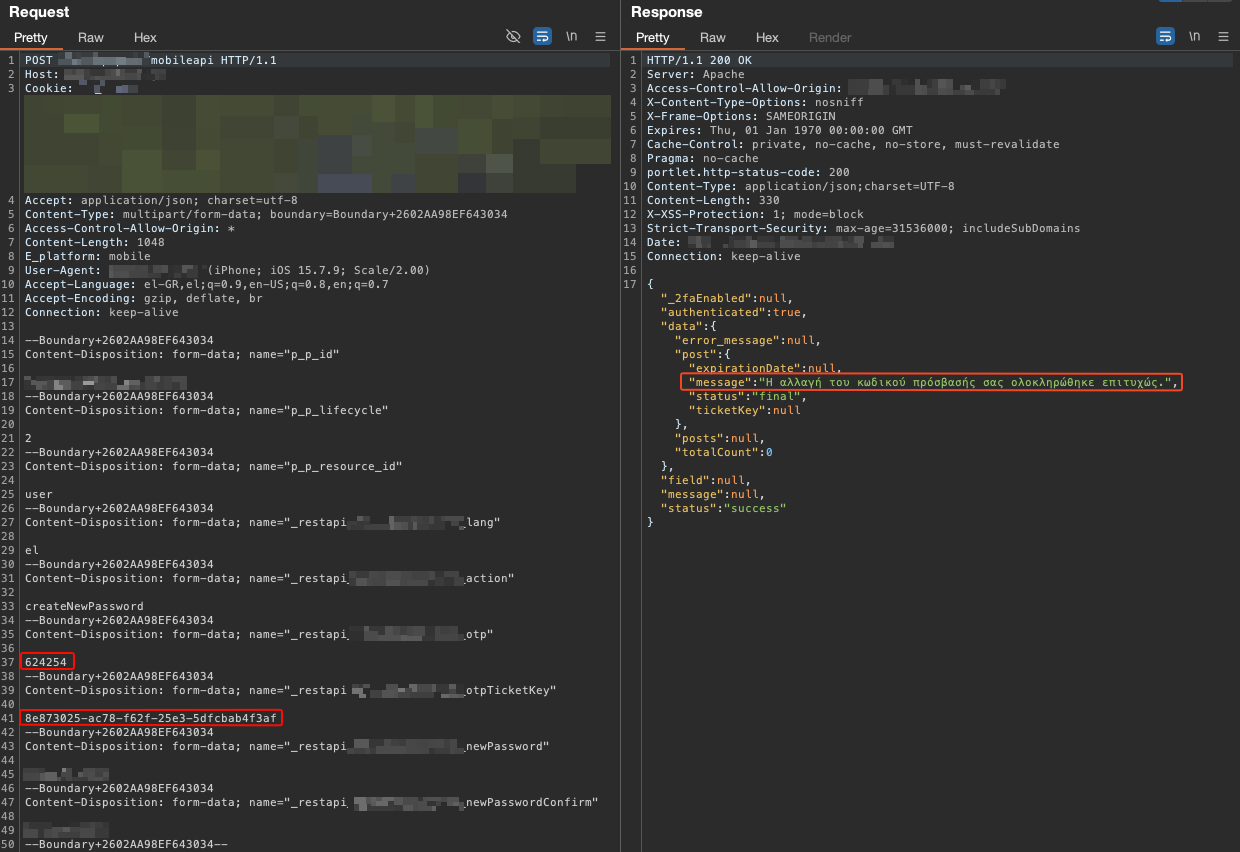
What if the most dangerous bug in your application isn't a bug at all? Every function works as expected, every test passes correctly, access controls work as intended, and parameterized database queries return the right results. Yet, two requests arriving microseconds apart cause the system to bypass a paywall, redeem a discount twice, or confirm an account registration without ever receiving the verification token. Welcome to race conditions, where "correct" code could potentially produce broken outcomes.

This blog post is based on the research presented by James Kettle in Smashing the State Machine: The True Potential of Web Race Conditions, which introduced the single-packet attack technique and the methodology we reference throughout. Our goal is to break down the core concepts, walk through practical exploitation using PortSwigger's labs, and cover some areas we felt were worth expanding on, including Turbo Intruder engine selection and configuration nuances, practical guidance on where to look for race conditions during security assessments and observations from our own testing experience.

Why Race Conditions Fly Under the Radar

Race conditions are frequently overlooked in security assessments. Automated scanners cannot detect them: there is no signature to match, no payload to inject or fuzz. Even experienced testers who rely more on manual approaches tend to skip this vulnerability class, often assuming that exploitation requires a coupon mechanism or similar functionality to be present. If it's not, race conditions never make it onto the testing checklist. Identifying one requires understanding how the application manages to state across concurrent requests, which mandates manual analysis of its business logic and a willingness to consider how any multi-step operation, not just obvious validation checks, can be subverted through timing.

As modern frameworks increasingly abstract away classic attack vectors through safe defaults and parameterized functions, while static analysis and automated testing continue to raise the barrier to traditional injection-based bugs, fewer of these issues survive to production. Race conditions, however, operate at a different level entirely. They live in the gaps between functions that, individually, behave exactly as designed, but collectively produce unintended outcomes when their timing intersects.

Commonly Affected Functionality

The most common pattern is the check-then-act sequence, commonly referred to as a TOCTOU (Time of Check to Time of Use) flaw, in which the application verifies a condition and then executes an operation based on it. But race conditions also arise in multi-step workflows and object-creation processes, where concurrent requests can interfere with intermediate application states.

Coupon and discount code redemption is the classic case. By landing multiple requests within the window between the validation check and the database update, the same single-use code may be redeemed more than once.

Resource creation behind paywalls. Applications that enforce account-tier limits, for example, restricting free-tier users to a maximum number of objects such as dashboards, projects, or workspaces may validate the current count before allowing creation. A race condition in this check allows exceeding the enforced limit without upgrading, effectively bypassing the paywall restriction entirely.

Payment and multi-step workflows. In applications where payment validation and order fulfillment are handled across separate steps or endpoints, a race window may exist between the moment payment is confirmed and the moment the order is finalized. An attacker can modify the cart contents, adding higher-value items or increasing quantities, after the payment check has passed but before the order is actually completed. The application processes the modified order under the assumption that the original payment validation still applies.

Partial object construction. Some applications create objects in multiple database operations, for example, inserting a user record and then setting its API key or confirmation token in a separate query. This introduces a brief window where the object exists but its security-critical fields are uninitialized. An attacker who races a request against this window, supplying an empty or null-equivalent value that matches the uninitialized state, can bypass verification steps entirely, such as confirming an account registration without access to the legitimate token.

Real-World Race Condition Vulnerabilities Exploited in the Wild

  • Multiple payouts on a bug bounty platform. A race condition in the retest feature allowed a researcher to trigger multiple payouts for the same retest by submitting concurrent retest confirmation requests. HackerOne #429026
  • Exceeding monitoring limits in Firefox Monitor. By racing multiple requests to add email addresses, a user could bypass the per-account limit and register more addresses than allowed. HackerOne #1913309
  • CVE-2022-4037 - Email forgery in GitLab. A race condition in GitLab's email verification flow allowed an attacker to forge a verified email address and take over third-party accounts on services using GitLab as an OAuth provider. NVD

Overcoming the Timing Barrier

Exploiting a race condition is fundamentally a timing problem, and the question at its core is: "How can we actually land multiple requests at the exact same moment on the server-side?"

The main obstacle we have to overcome is network jitter, since even a few microseconds of deviation can push a request outside the vulnerability window. Simply sending a burst of concurrent requests, whether through Burp Suite's Intruder, a threaded Python script, or tools like ffuf, and hoping two of them overlap is unreliable, since successful exploitation requires deliberately minimizing this variance.

How we do that depends on the HTTP protocol version supported by our target backend server. HTTP/1.1 and HTTP/2 handle connections and request delivery in fundamentally different ways, and each enables a distinct synchronization technique.
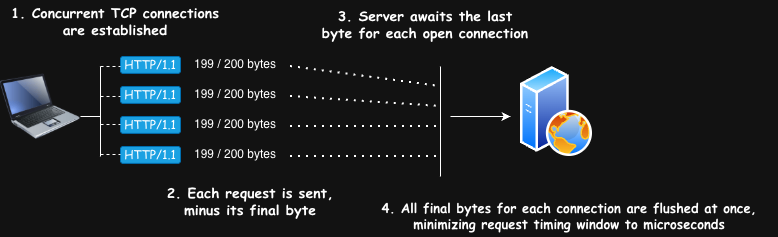
In HTTP/1.1, last-byte synchronization abuses the way TCP processes partial data to align multiple requests across separate connections, reducing jitter to microseconds. In HTTP/2, the single-packet attack goes further, leveraging the protocol's multiplexing capability to pack multiple requests into a single TCP segment, eliminating network-induced jitter entirely.

It's worth noting that neither technique exploits a flaw in the HTTP protocol itself. Both leverage intended protocol behavior, specifically how each version handles connection and request delivery, to achieve the timing precision needed to trigger an application-layer race condition. Understanding both is essential, since the one we use depends on what our target supports.

Last-Byte Synchronization (HTTP/1.1)

HTTP/1.1 enforces strict request ordering. On a single connection, each request must be fully processed and responded to before the next one begins. This head-of-line blocking means that even if we packed multiple requests into one TCP segment, the server would handle them sequentially, making a single-connection approach useless for racing. Instead, we need a separate connection per request and a way to synchronize them. This is where last-byte synchronization comes in.

The technique works as follows:

  1. N separate TCP connections are opened to the target server, one per request to be raced.
  2. Each request is sent minus its final byte. If the POST body is 200 bytes, 199 are sent. The server reads partial data and awaits the rest.
  3. The server has buffered nearly complete requests on all N connections, waiting for that last byte.
  4. All final bytes are flushed at once across every connection, as close together as possible.

race conditions

Single-Packet Attack (HTTP/2)

HTTP/2 changes the picture entirely. Instead of one request per connection, HTTP/2 multiplexes numerous requests as independent streams over a single connection, with no ordering dependency between them. The server processes them concurrently.

Single-packet attack works as follows:

  1. One HTTP/2 connection is established to the target server.
  2. All competing requests are buffered locally as HTTP/2 frames but are not flushed yet.
  3. Buffered requests are written in a single call, so they get packed into one TCP segment.
  4. The server reads all frames from a single buffer and demultiplexes them into concurrent requests.
  5. Jitter is completely eliminated. The only remaining variance is how quickly the server dispatches each request to worker threads.

race conditions

Exploiting Race Conditions with Turbo Intruder

Turbo Intruder is a free Burp Suite extension built for high-volume, timing-sensitive request delivery. It supports both last-byte synchronization and single-packet attacks out of the box, and its Jython scripting engine makes it straightforward to adapt attack templates to whatever workflow we need for our testing scenarios.

Turbo Intruder supports multiple engines; each designed for different use cases. Selecting the right engine is critical, and the choice comes down to which HTTP protocol our target server supports.

To determine which protocol is supported by our target server, we run the following command directly against the target, not through Burp's proxy, since the proxy may downgrade the connection to HTTP/1.1:

curl -s --http2 -o /dev/null -w '%{http_version}' https://target.com

A return value of 2 confirms HTTP/2 support, meaning the single-packet attack is available. A return value of 1.1 indicates the server only supports HTTP/1.1, and last-byte synchronization is the fallback.

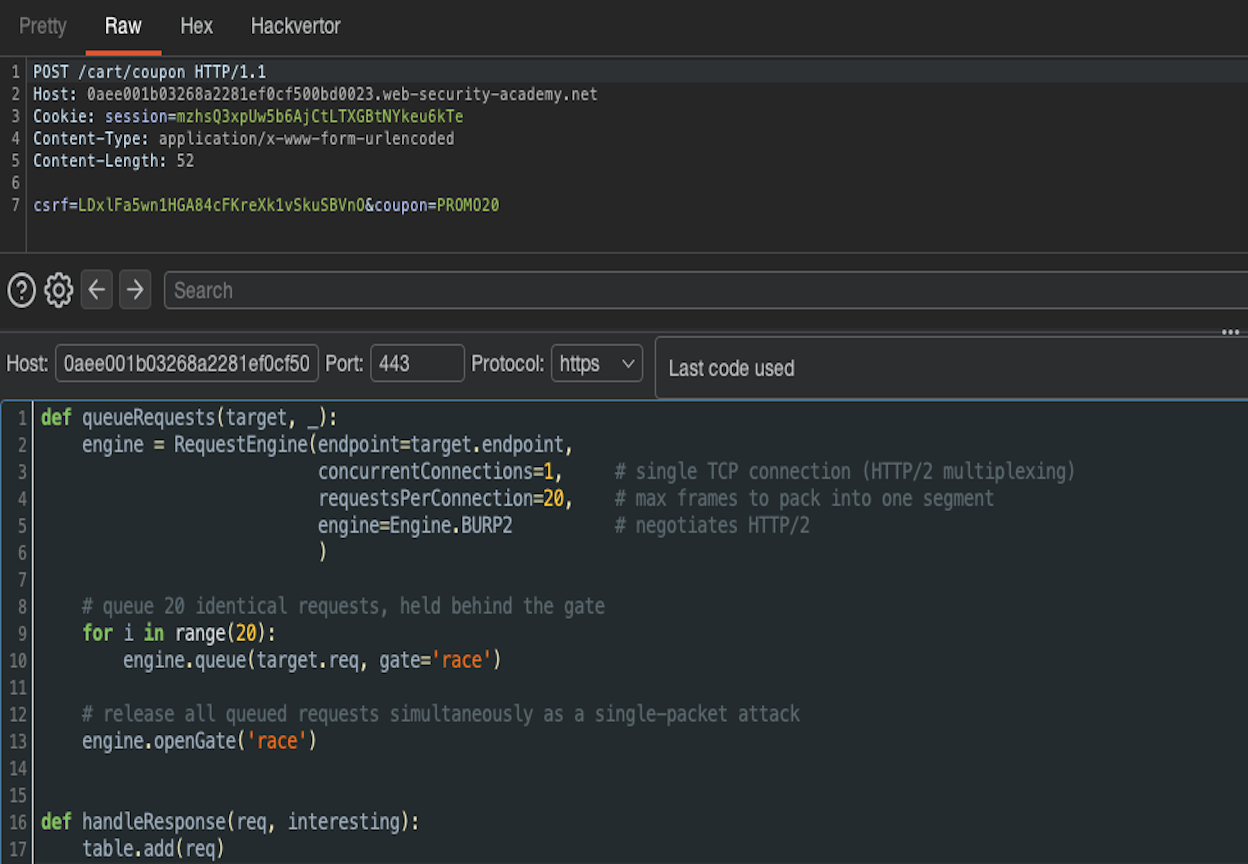
For most cases, Engine. BURP2 is the recommended choice. It connects directly to the target, negotiates the protocol automatically via ALPN, and uses the single-packet attack over HTTP/2 when supported. If the server does not support HTTP/2, it falls back to last-byte synchronization over HTTP/1.1. If no engine is specified, the default is Engine.BURP2.

That said, Engine.BURP2 being protocol-agnostic doesn't mean configuration is irrelevant. The connection parameters must match the technique used to achieve the tightest synchronization. The examples below cover both cases.

 Security Testing Tip
It's worth noting that recent versions of Burp Suite support this natively in Repeater. Grouping requests and selecting "Send group in parallel" uses the same mechanics under the hood, it relies on the BURP2 engine, negotiating the protocol and applying either the single-packet attack or last-byte synchronization depending on what the target supports. For straightforward cases, this is sufficient, but Turbo Intruder remains the more flexible option when you need fine-grained control over the engine and request parameters.

Exploiting a Limit-Overrun

Limit overrun race conditions are the most common and straightforward to demonstrate. To illustrate the full workflow from identification to exploitation, we'll walk through PortSwigger's limit overrun lab.

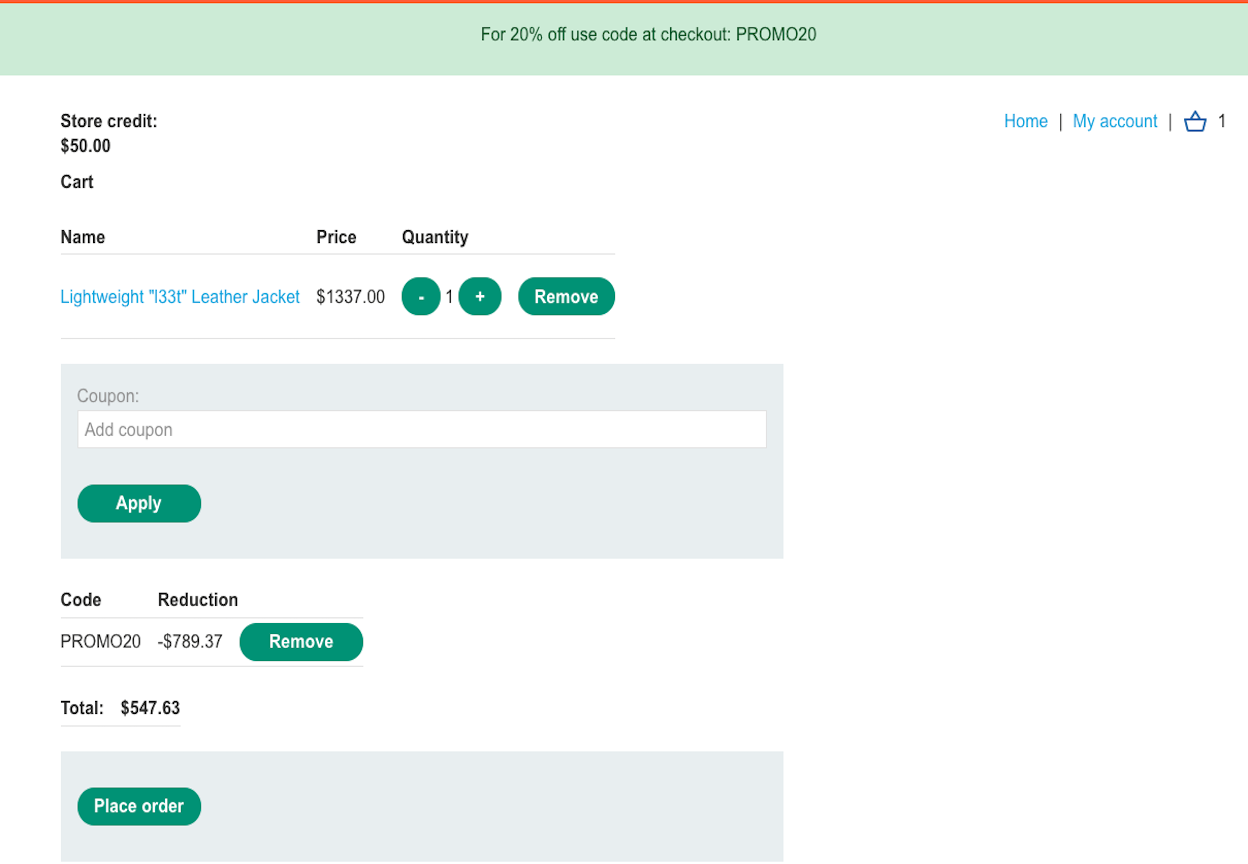
In this lab, the target product costs $1,337, but our account only has $50 in store credit. A single application of the 20% discount code brings the price to $1,069.60, still well beyond our credit. The goal is to exploit a race condition in the coupon redemption logic to apply the same single-use discount code multiple times, stacking the discount until the price drops below our available credit.

race conditions

First, we confirm whether the target supports HTTP/2:

curl -s --http2 -o /dev/null -w '%{http_version}' https://0a15003a030d63d181ef5dbf008a0074.web-security-academy.net/

The output confirms HTTP/2 is supported, so the single-packet attack is the best option. We send the coupon redemption request to Turbo Intruder, strip out some unnecessary headers to keep each HTTP/2 frame lean, and configure the attack:

race conditions

After successfully racing 20 concurrent coupon redemption requests, the discount stacked multiple times, bringing the total price down to $15.40.

race conditions

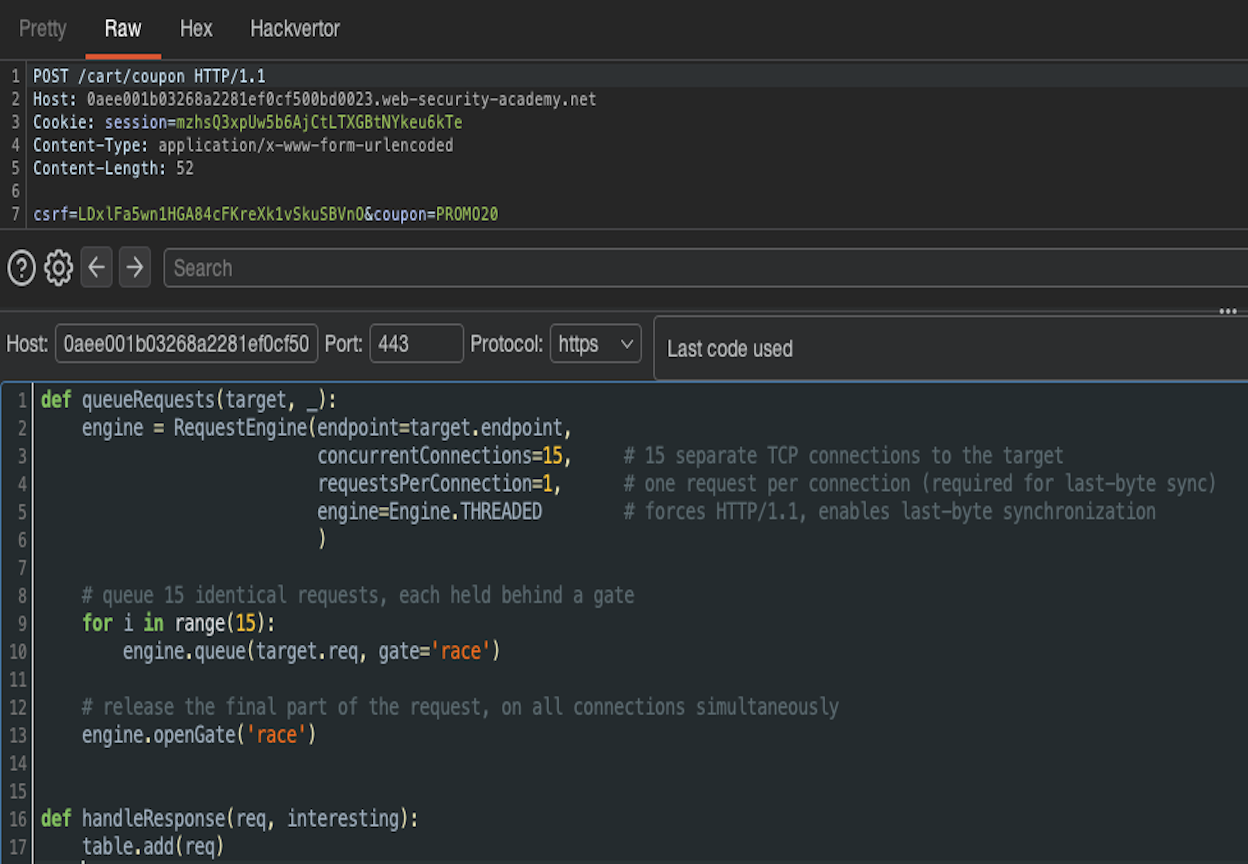
If HTTP/2 is not supported, last-byte synchronization over HTTP/1.1 is the fallback. It doesn't eliminate jitter entirely like the single-packet attack, but it reduces it from milliseconds to microseconds, enough for most race windows. For HTTP/1.1, we switch to Engine.THREADED, which manages individual threads per connection and is designed for this use case. In this particular lab, the server supports both HTTP/1.1 and HTTP/2. Using Engine.BURP2 here would negotiate HTTP/2 and multiplex all requests over a single connection, which defeats the purpose since last-byte synchronization relies on separate connections per request.

It's worth noting that this particular lab was designed with a race window so narrow that exploitation is near-impossible without the single-packet attack. A few extra requests may slip through with last-byte synchronization, but not nearly enough to solve the lab. The technique is demonstrated below for completeness, as it remains the go-to approach when HTTP/2 is unavailable.

Last-Byte Synchronization Forcing HTTP/1.1

race conditions

Achieved result:

race conditions

Multi-Endpoint Race Conditions

Multi-endpoint race conditions are not as widely discussed because they often emerge from business logic and multi-step application flows, making them highly context-dependent. The core idea is to identify hidden sub-states that exist between the moment an action (read, write, delete, etc.) is initiated and when it is actually committed on the backend. This takes considerable manual analysis upfront, and because race windows can be extremely narrow, landing a successful attack often involves a fair amount of trial and error.

Before diving into the exploitation part, we must first understand the thought-process behind this type of vulnerability. The thought-process boils down to asking ourselves one important question:

  • In the endpoint/functionality I am testing, is there any potential for collisions? Meaning, is there a possibility that two different operations/functions operate on the same object/record?

To answer this, we need to evaluate three things:

  1. How is the state stored?
    If the state lives server-side in a persistent data structure like a database, collision potential is high. If the state is entirely client-side (e.g., a JWT), there is nothing to collide on, and the endpoint can be skipped.
  2. What type of operation is targeted?
    Operations that modify existing data (e.g., changing our account's email) are far more likely to produce exploitable collisions than operations that simply add new data (e.g., adding an additional email address). The latter is primarily relevant for limit-overrun attacks.
  3. What is the operation keyed on?
    For a collision to occur, two concurrent operations/functions need to act on the same record. Identifying the key (e.g., sessionid, userid, reset_token) tells us whether two requests will actually compete over the same resource or just operate on separate records in parallel.

If after evaluating these three points the collision potential remains high, the functionality is worth testing. Some common flows where this collision potential frequently exists:

  • Email activation flows
  • Invitation acceptance flows
  • Multi-step flows in e-shops, such as the example we will cover below
  • Multi-step flows where each step is validated server-side

Exploiting a Multi-Endpoint Race Condition

We will walk through PortSwigger's dedicated lab: multi-endpoint race condition.
The scenario models an e-shop where a user adds items to cart, proceeds to checkout if the account balance is sufficient, and finally, the order is completed.

The goal of this lab is to identify and exploit a hidden sub-state, the brief window between when the order is validated and when the order is actually completed. During this window, the cart remains mutable, meaning we can add an extra item to our cart after the balance check has already passed and the order is validated, and have it included in the finalized order. The following diagram illustrates the vulnerability:

race conditions

By doing some preliminary recon on our lab and completing a purchase flow like a regular user, we conclude the following:

  • How is the state stored? The state is handled server-side through a cookie named session, likely backed by a persistent data structure like a database.
  • What type of operation is targeted? Adding an item to the cart adds/appends to the cart object, while the checkout endpoint probably reads the current cart state to validate the balance. If the cart remains mutable while the checkout is being processed, the append can slip in after the validation has already passed.

What is the operation keyed on? Both the add-to-cart and the checkout actions operate on the same session. Since they share the same key, a collision between them is possible. Based on the above observations, we want to achieve the following: when an item in our cart is affordable (e.g., the $10 gift card), trigger checkout and add the L33t Leather Jacket to our cart simultaneously. Since we are utilizing the single packet attack here, requests will arrive at the same time, and it is up to the server to decide the processing order.

The PortSwigger lab solution suggests investigating timing inconsistencies by grouping requests and sending them in sequence over a single connection, prepending a GET request to warm the connection. This is the correct approach for multi-endpoint race conditions — the entire methodology is built around careful benchmarking to determine whether timing delays originate from the backend network architecture or from actual endpoint processing time. Connection warming refers to the observation that the first request sent over a new or idle backend connection typically takes longer due to backend network initialization overhead, not because of the endpoint's actual processing time.

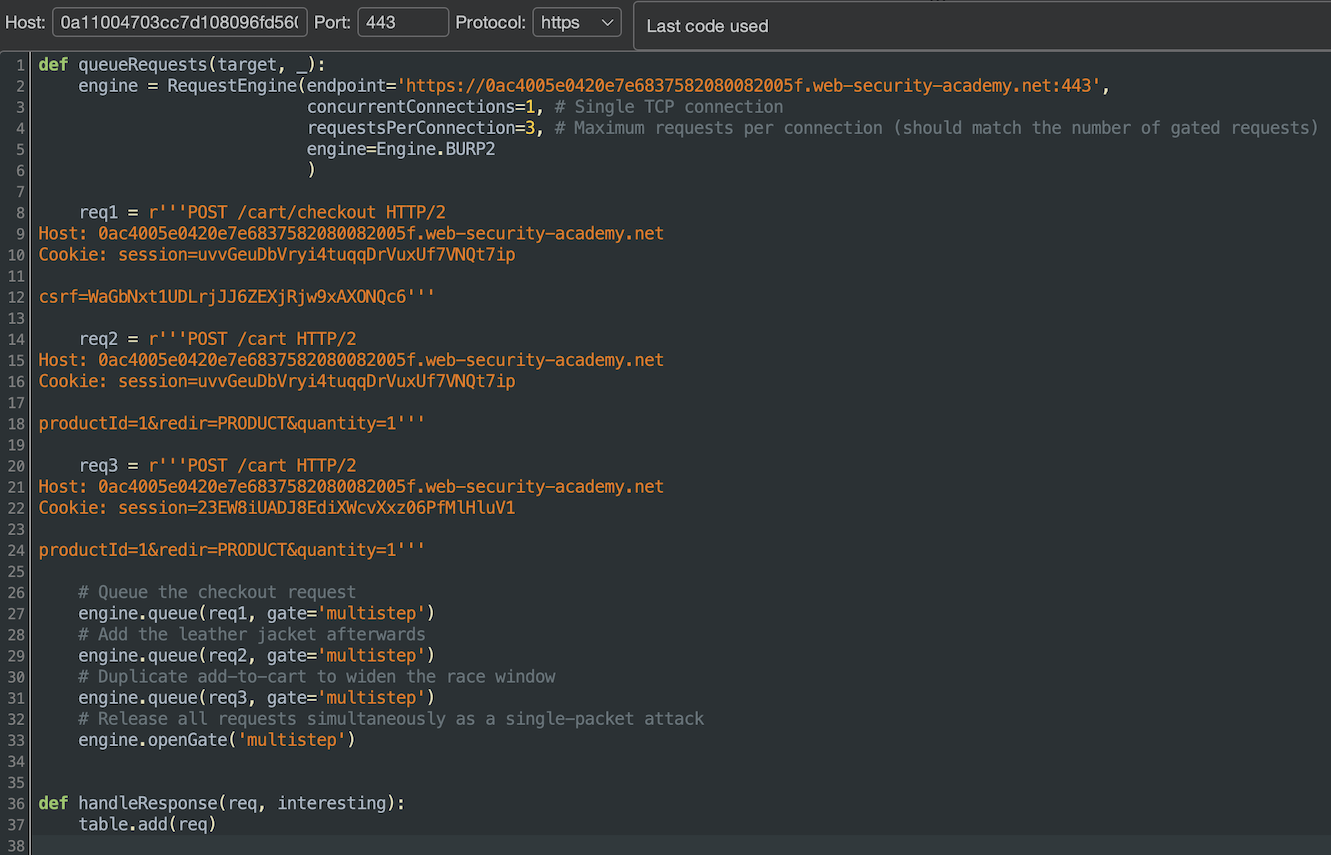
However, during testing, the sequential request grouping in Repeater did not produce sufficiently consistent timing to benchmark reliably. What did work was using Turbo Intruder with the single-packet attack directly. The steps to reproduce are as follows: add the gift card to the cart manually through the browser, then immediately fire the Turbo Intruder script, which sends a checkout and two add-to-cart requests for the L33t Leather Jacket simultaneously.

race conditions

After some attempts, the race condition was successfully exploited. The order was completed with both the gift card and the L33t Leather Jacket included, despite only having $10 in store credit. The resulting store credit of -$1,267.00 confirms the balance check was bypassed during the race window.

race conditions

Some notes on the script: we specify the endpoint and target host manually since we are queueing multiple distinct requests. The requestsPerConnection parameter should match the total number of gated requests, in  the case 3. The order of the requests does not matter: whether checkout is queued first or last is irrelevant, since all requests are released simultaneously via the single-packet attack, and it is up to the server to decide the processing order. We include two add-to-cart requests for the L33t Leather Jacket instead of one to increase the probability that at least one lands inside the race window between validation and order completion. If the first add-to-cart loses the race, the second gets another chance to slip in before the order is finalized.

Security Testing Tip

The constraint with this method is the packet size. Each HTTP/2 frame carries overhead (9-byte frame header + compressed headers), so the number of requests that fit in a single TCP segment depends on how lean each request is. It is recommended to strip everything that doesn't affect server-side processing: Accept, Accept-Language, Accept-Encoding, User-Agent, and any other default headers. With minimal headers, a short POST body and a session cookie, 20 to 30 requests per packet can be realistic. As a sidenote, Content-Length does not need to be set manually, most HTTP/2 tooling handles this automatically. When the target supports HTTP/2, this is always the preferred technique.

Recommendations

Race conditions are architectural issues, not implementation bugs in the traditional sense. Patching them requires ensuring that security-critical operations cannot be subverted by concurrent requests. The following strategies should be considered (where applicable):

  • Use atomic operations. Combine the check and the action into a single indivisible operation. In database terms, this means using constructs like UPDATE ... WHERE balance >= price instead of performing a separate SELECT to check the balance and then a subsequent UPDATE to deduct it.
  • Apply pessimistic locking. Use database-level locks, such as SELECT ... FOR UPDATE to ensure that once a resource is being read for a decision, no other transaction can modify it until the current one is completed. This serializes access to the shared resource and eliminates the race window.
  • Apply optimistic locking. Assign a version number or timestamp to the resource. Before committing a change, verify the version has not changed since the initial read. If it has, reject the operation and force a retry. This avoids holding locks but handles contention at commit time.
  • Enforce idempotency. For operations that should only execute once, such as payment processing or coupon redemption, enforce a unique idempotency key per transaction. If a duplicate request arrives, the server recognizes it and discards it.
  • Serialize critical sections. For multi-step workflows where atomicity is not achievable at the database level, enforce sequential processing of requests that operate on the same resource through application-level mutexes or queues.
  • Keep session and ORM operations internally consistent. Session handlers and ORMs that update variables individually rather than as a batch create exploitable sub-states between writes. If a framework abstracts away transactions, it assumes full responsibility for handling them safely. The abstraction alone does not eliminate the concurrency risk.
  • Do not rely on one storage layer to secure another. Sessions are not suitable for preventing race conditions that occur at the database layer. Each layer must enforce its own concurrency guarantees independently.
  • Consider eliminating server-side state where appropriate. In some architectures, pushing state client-side using encryption (e.g., signed JWTs) can remove server-side sub-states entirely. This eliminates the shared resource that concurrent requests compete over, though it introduces its own trade-offs around token revocation and payload size.
Burp Suite

Token Auto-Refresher: Solving Auth Failures in Burp Suite

Burp Suite

Intro

Modern web application security testing increasingly relies on automated scanning tools to identify vulnerabilities efficiently. However, as a team, we consistently faced a persistent challenge with bearer token expiration during automated scans. When tokens expired mid-scan, our automated tools encountered authentication failures, resulting in incomplete coverage and requiring manual intervention to update tokens and restart scans.

While Burp Suite provides session handling rules and macros to address this, we needed a faster, simpler and flexible approach.

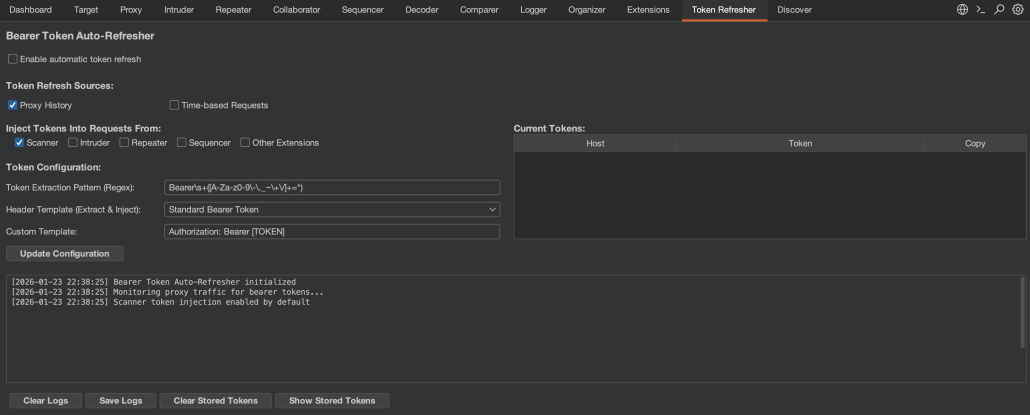
The Token Auto-Refresher extension was born from this need. Implemented as a Burp Suite extension using the Montoya API, it automatically captures, stores and injects fresh tokens into Burp's various tools, providing a streamlined alternative to complex macros and rules while ensuring continuous authentication throughout security assessments.


Token Capture Mechanisms

The extension supports two distinct token capture strategies, each suited to different testing scenarios.

Proxy History Capture

The default capture mechanism monitors all traffic flowing through Burp's proxy. The extraction behavior is controlled by two key configuration settings:

Token Extraction Pattern (Regex): Defines how to extract the token value from header contents. The default pattern Bearers+([A-Za-z0-9-._~+/]+=*) captures standard RFC 6750 bearer tokens, but can be customized for non-standard formats or different character sets.

Header Template (Extract & Inject): Specifies which header to check and how tokens should be formatted. The template uses the format HeaderName: Prefix [TOKEN] Suffix, where [TOKEN] is replaced with the actual token value. Common presets include:

  • Authorization: Bearer [TOKEN] - Standard RFC 6750 bearer tokens
  • Authorization: [TOKEN] - Raw tokens without prefix
  • X-Api-Key: [TOKEN] - Custom API key headers
  • Access-Token: [TOKEN] - Alternative authentication headers

You can also define your own custom header template for any authentication scheme your application uses.

This unified approach ensures that the extension extracts tokens from the same header it injects them into, providing consistency and flexibility for various authentication schemes.

When proxy capture is active, the extension monitors traffic flowing through Burp's proxy to capture tokens. As you browse the application, it checks both outgoing requests and incoming responses. For requests, it applies the configured regex pattern to the header specified in your template (e.g., if your template is X-Api-Key: Bearer [TOKEN], it checks the X-Api-Key header), capturing tokens your browser or application is already using. For responses (e.g., after login), it first looks in the header specified by your template, then falls back to checking common authentication headers (Authorization, X-Auth-Token, X-Access-Token, X-Api-Key) if the template header isn't found, ensuring tokens are captured when the server issues them regardless of which header the application uses.

The extraction logic applies an important optimization by capturing tokens exclusively from Proxy traffic and not from the Scanner or other automated tools. This prevents the extension from getting potentially stale tokens that other tools might be sending. Additionally, if a host is configured for time-based refresh (discussed below), proxy capture is automatically disabled for that host to prevent newer time-based tokens from being overwritten by potentially older proxy tokens.

Time-Based Automated Refresh

For applications requiring periodic token renewal (e.g. long running scans) the extension provides a sophisticated time-based refresh mechanism. This feature allows defining a complete HTTP request that will be executed at configurable intervals to obtain fresh tokens.

The time-based configuration requires several parameters:

Host: The target authentication endpoint (e.g., auth.example.com)

Interval: Refresh frequency in seconds (minimum 10 seconds)

HTTP Method: GET, POST, or PUT

Request Configuration: A complete HTTP request template, including headers and body.

Token Extraction Configuration: Specifies how to extract the new token from the response, supporting two methods:

  1. Header Extraction: Extracts the token from a specified response header (e.g., Authorization, X-Auth-Token)
  2. Response Body Extraction: Extracts tokens from JSON or XML responses using start and end patterns

For example, to extract a JWT from a JSON response, the configuration would be:

  • Extract from: Response Body
  • Start pattern: "access_token":"
  • End pattern: "

The time-based refresh is implemented using a scheduled executor service that executes the configured request at the specified interval. When time-based refresh is active for a host, it takes priority over proxy capture for that host, ensuring the most current programmatically-refreshed token is always used.

Token Injection

Once tokens are captured and stored, the extension automatically injects them into requests from enabled Burp tools. The injection logic is tool-aware, allowing selective enablement for Scanner, Intruder, Repeater, Sequencer, and other Extensions.

By default, only Scanner injection is enabled, as this is the most common use case for automated token refresh. The injection behavior is controlled by a configurable header template that specifies both the header name and format. For example, Authorization: Bearer [TOKEN] injects tokens into the Authorization header with a "Bearer" prefix, while X-Api-Key: [TOKEN] injects directly into a custom header without any prefix.

Importantly, the extension only injects tokens into requests that already contain the specified header. This prevents accidentally adding authentication to public endpoints that don't require it.

To reduce log noise during high-volume scanning, the extension implements intelligent logging that only records the first and then every 500th injection per host.

Token Management UI

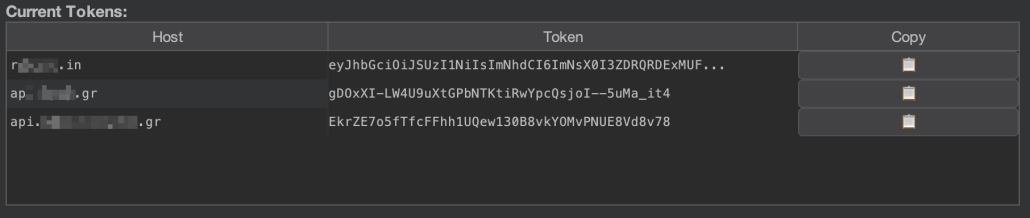
The extension provides real-time visibility into captured tokens through a dedicated table in the UI. It stores tokens separately per host, allowing concurrent testing of multiple applications while managing each host’s token independently.

The table displays three columns:

  • Host: The hostname associated with the token
  • Token: A truncated view of the token
  • Copy: A clipboard button (📋) to copy the full token

The table is updated in real-time as new tokens are captured, with existing entries being updated when a new token is captured for an already-tracked host.

Activity Logging

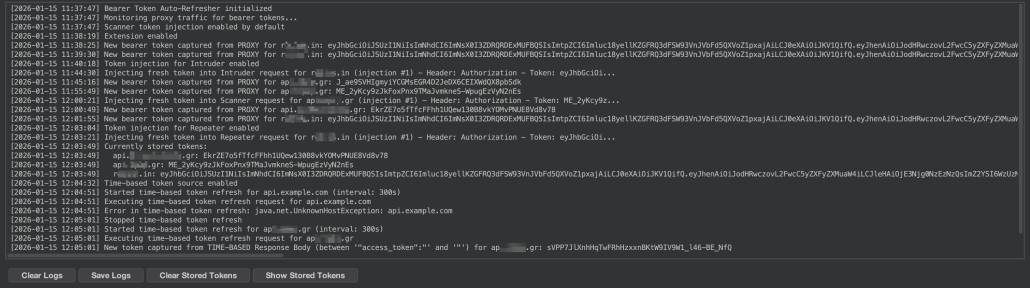
All token capture and injection events are logged with timestamps in a dedicated log area:

The logs provide visibility into:

  • Token capture events (from proxy or time-based refresh)
  • Token injection events (with injection counts)
  • Time-based refresh execution
  • Configuration changes
  • Errors and warnings

For debugging time-based refresh configurations, the extension includes a "Show Response" button that displays the complete HTTP response from the most recent refresh request, including headers and body (truncated to 2000 characters to prevent log overflow).

Logs can be exported to a text file for later analysis or documentation purposes.

Project Persistence

A critical feature for professional security testing workflows is the extension's project persistence capability. All configuration settings are automatically saved to the current Burp project file. Persisted settings include:

  • Extension enabled/disabled state
  • Tool injection preferences (Scanner, Intruder, etc.)
  • Token source selections (Proxy, Time-based)
  • Time-based configuration (host, interval, request template, extraction settings)
  • Custom token regex patterns

This ensures that when reopening a project, all token refresh configurations are restored automatically, eliminating the need to reconfigure the extension for each testing session.

For temporary projects (those not saved to disk), the extension gracefully handles the absence of persistence by using default settings.

Outro

Developing this extension has been a rewarding opportunity to give back to the community that has provided us with countless valuable tools over the years. What started as an internal solution has evolved into something that hopefully will benefit security professionals facing similar authentication persistence issues.

The extension is open source and available on GitHub. We welcome contributions from the community whether you have ideas for new features, improvements to existing functionality, or have encountered edge cases we haven't considered, we'd love to hear from you. Feel free to open an issue, submit a pull request, or reach out to us directly.

Offensive Cybersecurity Insights: A New Year Compilation

cybersecurity

Hello world!

This is Hackcraft’s Team Newsletter, aka our official excuse to share what we’ve been researching, noticing, debating and bookmarking obsessively over the past two months. Are you looking for community or cybersecurity business insights? You‘re at the right place.

Blogs


Let’s start with Hackcraft’s two blogs, which we’d like you to take a look at.

Microsoft SQL Server Hacking

The first piece comes from one of our amazing researchers and penetration testers, diving into Microsoft SQL Server hacking via its TDS protocol. You might be asking, "What on earth is TDS?" TDS, or Tabular Data Stream, is the protocol Microsoft SQL Server uses to connect with clients, particularly thick-client applications. Through research, it was found that by manipulating the way TDS handles encryption, it’s possible to capture MSSQL account credentials.

Explore it: https://www.hackcraft.gr/2026/01/microsoft-sql-server-hacking-tds-downgrade-attack/

Red Teaming and Industry Pitfalls

In this article, our team wanted to highlight the differences between true red teaming,  social engineering, assume breach, tabletop exercises and internal security assessments, shedding light on the gap between how these practices are understood and how they are actually applied! Many of these cybersecurity services test individual aspects of a red team exercise, but they don’t offer the same value, scope, or level of protection. So, if you want to understand what red teaming really is, the value it brings, and when these services make sense for your organization, this article is worth a read!

Explore it: https://www.hackcraft.gr/2026/01/red-teaming-and-industry-pitfalls/

Industry News in a Nutshell

AI-Driven Attacks Are Becoming Mainstream

Well, AI attacks…what else? A Gartner survey of 302 cybersecurity leaders conducted in early-to-mid 2025 found that 62% of organizations reported experiencing a deepfake attack involving social engineering or automated impersonation in the past year, and 32% said they faced attacks on AI applications.

Explore it: https://www.gartner.com/en/newsroom/press-releases/2025-09-22-gartner-survey-reveals-generative-artificial-intelligence-attacks-are-on-the-rise

Massive Instagram Data Exposure

As we like to say, privacy is an illusion, but this is quite a compromise. Sensitive data tied to roughly 17.5 million Instagram accounts, including usernames, email addresses, phone numbers, and other contact information, has been circulating on dark web forums following an alleged leak. While Instagram’s parent company has publicly denied a system breach, cybersecurity researchers verified the dataset’s presence online.

Explore it: https://www.bleepingcomputer.com/news/security/instagram-denies-breach-amid-claims-of-17-million-account-data-leak/

Crypto Theft Linked to the 2022 LastPass Breach Continues – Report Dec 2025
TRM Labs traced $35M+ in stolen crypto to the 2022 LastPass breach, showing attackers are still draining wallets years later by cracking weak master passwords and laundering funds through mixers and Russia-linked exchanges. Why it matters: Breaches don’t end when the headlines do. Stolen encrypted data can fuel long-tail theft for years, especially in crypto. Weak passwords and reused secrets turn old cybersecurity incidents into ongoing financial losses.

Explore it: https://www.trmlabs.com/resources/blog/trm-traces-stolen-crypto-from-2022-lastpass-breach-on-chain-indicators-suggest-russian-cybercriminal-involvement

Community Tools & Articles Worth a Read


Hacking Humans: Social Engineering and the Psychology

This article stands out not only because it's written by the Specterops team, but also because it explains how, as biometric cybersecurity and access controls become increasingly hardened, attackers continue to bypass them by exploiting the human element!

Explore it: https://specterops.io/blog/2026/01/23/hacking-humans-social-engineering-and-the-psychology/

Bypassing Windows Administrator Protection

This awe-inspiring article, by the one and only James Forsaw of Google’s Project Zero, dives into Windows 11’s new Administrator Protection, a feature meant to replace User Account Control (UAC) with a stronger cybersecurity boundary. In an exceptionally detailed piece of research –exactly what we’ve come to expect- they explain how the new elevation model works, why legacy behaviors still matter, and describe ways the protection could be bypassed in early builds.

Explore it: https://projectzero.google/2026/26/windows-administrator-protection.html

A Powerful Guide to Active Directory Certificate Services and Hacking

Hand-picked by our Principal Red Team Operator, Iosif Choulis, don’t miss this compact but powerful guide to Active Directory Certificate Services (AD CS), showing how certificate misconfigs can turn into real privilege escalation paths. It’s practical, attacker-minded and straight to the point. AD CS is one of those “set it and forget it” features that quietly becomes dangerous…

Explore it: https://swisskyrepo.github.io/InternalAllTheThings/active-directory/ad-adcs-certificate-services/

XSS but Make It Very Small

Some targets deploy hardened defenses against XSS, such as strict input length limits. Tiny XSS Payloads is a cheat sheet that compiles ultra-short payloads of various types, the smallest of which is just 17 characters long!

Explore it: https://tinyxss.terjanq.me/

Frida for Mobile Penetration Testing but with UI

Frida-UI is a lightweight, local web-based user interface for the dynamic instrumentation toolkit Frida, letting you interact with connected devices, running processes, and scripts directly in your browser (no CLI juggling). It shows apps/processes, has a script editor with CodeShare integration, live console/logs, and makes Android app penetration testing and runtime analysis faster.

Explore it: https://github.com/adityatelange/frida-ui

JWT Tokens and Penetration Testing Simplified

JWT_Tool is a Python toolkit for pen testers and cybersecurity researchers to analyze, tamper, test and crack JSON Web Tokens (JWTs) letting you validate tokens, scan for misconfigurations, test for known JWT vulnerabilities (like alg=none bypass, key confusion, ECDSA weaknesses), fuzz claims, brute-force weak secrets, and forge modified tokens to evaluate authentication security in web apps. It’s also handy for CTF practice and auditing JWT usage.

Explore it: https://github.com/ticarpi/jwt_tool

Closing Thoughts

The cybersecurity threats we covered in this Newsletter don’t move in the sphere of theory; they’re already out there. AI-driven social engineering, protocol abuse, identity compromise, and long-tail breach fallout are exactly how real adversaries break in today. Red teaming shows you where they’ll strike before they get the chance.

If you want to discover how your organization would be breached, contact Hackcraft for a red team engagement.


Red Teaming

Red Teaming and Industry Pitfalls

Red Teaming

Cybersecurity isn’t one-size-fits-all, and neither is security testing.
Organizations face different threat landscapes, risk appetites, regulatory pressures and levels of security maturity, yet exercises like red teaming, penetration testing, assume breach, social engineering and tabletop exercises are often grouped together or misunderstood as equivalent. In reality, each of these approaches is designed to validate different risk scenarios. Some measure exposure to technical vulnerability, others assess human and process risk, while others test an organization’s ability to detect, respond and make decisions during a crisis. Choosing the wrong exercise — or the right one at the wrong time — can leave critical risks untested and resources misallocated.

This article clarifies the distinctions between red teaming and other cybersecurity assessments  and explains how organizations can align their testing strategy with real-world threats, business impact and budget, ensuring security testing meaningfully reduces risk rather than simply checking a box.

Red Teaming or Internal Penetration Testing?

Is Red Teaming similar to Internal Penetration Testing? What is the difference and what should you choose? Many people mistakenly believe these two cybersecurity practices are similar and that if you cannot afford a full-blown Red Teaming exercise, an Internal Penetration testing will do the same job for your organization. However, the reality is quite different. While they both play essential roles in enhancing an organization's cybersecurity posture, they serve different purposes and deliver very different insights.

Internal penetration testing is performed within a defined scope from inside the network to identify exploitable vulnerabilities, insecure configurations, and attack paths that could lead to privilege escalation or widespread compromise.  Hackcraft’s Internal Penetration testing is ideal when your goal is to improve controls and harden your environment.

On the other hand, Red Teaming simulates a real attacker with broader goals, using stealthy, multi-step tactics to test not only technical detection and response, but also corporate processes and overall organizational resilience, not just individual vulnerabilities. Hackcraft Red Teaming is ideal when you want to measure your organization’s real resilience against sophisticated threats.

However, the right choice depends on your business objectives, risk appetite and industry requirements.

Red Teaming or Assume Breach exercises?

No, they are not the same. In fact, Assume Breach is part of Red Teaming. Determining which approach aligns better with your security strategy depends on the specific goals you want to achieve.

Red Teaming simulates real-world attacks to assess your organization’s ability to detect and respond to threats. This holistic goal-oriented exercise may include social engineering and physical intrusion techniques, aiming to identify critical gaps in your business processes and security measures that could lead to financial losses, reputational harm and increased risk exposure.

Assume Breach exercises include the full attack lifecycle and are also goal-oriented, but they start with the premise that an attacker is already inside your environment, skipping all the efforts for initial access (Social Engineering/Physical Intrusion).

Both are powerful, but they must be used in conjunction since Assume Breach is a subset of Red Teaming. Consequently, if you are a mature organization that regularly performs Adversary Simulation Exercises and wants to test specific areas of the attack surface choose Hackcraft Assume Breach Exercises. Note that they cannot replace Red Teaming. Besides, if you want to test your resilience against the initial access efforts or find evidence regarding your employee's cybersecurity mindset and culture start with Hackcraft's tailor-made Red Teaming exercises.

Red Teaming or Social Engineering exercises?

Let’s start with a crucial detail: both aim to reduce human risk, but they serve different purposes.

Social Engineering/Phishing exercises are part of the Security Awareness Training lifecycle, but they are definitely not Red Teaming. They focus on employee awareness and behavior. They measure how staff respond to suspicious emails, calls or messages and help strengthen your human firewall through targeted training.

Red Teaming goes further. It simulates a real, multi-layered attack, combining technical compromise, social engineering and physical intrusion to test your organization’s overall resilience, including detection and response capabilities.

The right choice depends on the maturity level of the organization, industry risk and business priorities. If your goal is awareness, start with Neurosoft’s Phishing exercises, part of Security Awareness Services. If you need realism and full-scope resilience testing, turn to Hackcraft Red Teaming.

Red Teaming or Tabletop Exercises?

Both strengthen cyber resilience, but they test it in very different ways.

Tabletop Exercises differ greatly from Red Teaming. They are discussion-based simulations. They validate roles, communication flows, decision-making and incident response plans in a safe, controlled environment. They are ideal for improving preparedness, governance and executive alignment.

Red Teaming, in contrast, is a covert, hands-on simulation of a real attack. It actively attempts to bypass controls, evade detection and compromise assets to test your actual defenses, people and technology.

The right choice depends once more on your business objectives and your organizational maturity. If you aim to validate plans and align stakeholders,  Neurosoft’s Tabletop exercises are the right starting point. If you want to assess how your defenses hold up against a realistic adversary, Hackcraft’s Red Teaming is the answer. And for true readiness? Combine both.

To Conclude…

Hackcraft, the offensive cybersecurity department of Neurosoft, specializes in proactive cyber and physical defense. Our team of experts is dedicated to providing top-notch security assessment services and realistic attack simulations that keep your organization one step ahead of threats.

What sets us apart? Red teaming, penetration testing, assume breach scenarios, social engineering, tabletop exercises are different cybersecurity strategies in our quiver. We're here to guide you in selecting the perfect approach tailored to your unique organizational needs and business objectives.

Let's elevate your security game together! Contact us.

SQL-Hacking

Microsoft SQL Server Hacking — TDS Downgrade Attack

SQL-Hacking

Hey there, fellow hackers!  As we kick off this new year, it's the perfect time to dive into some research. That’s why we wanted to share an intriguing observation from a deep dive into Microsoft SQL Server hacking via its TDS protocol, conducted by our team member NeCro aka Giannis Christodoulakos. While exploring how SQL Server communicates with clients, he uncovered some weaknesses in the TDS protocol that can be exploited to capture MSSQL account credentials.

Intro

You might be asking, "What on earth is TDS?" And you're definitely not alone! TDS, or Tabular Data Stream, is the protocol Microsoft SQL Server uses to connect with clients, particularly thick-client applications. Through research, it was found that by manipulating the way TDS handles encryption, it’s possible to capture MSSQL account credentials.

In this blog, our team member breaks down how TDS works and examines some of its “features” that can be exploited to retrieve MSSQL account credentials. Our aim is to guide you step by step through this MSSQL Server hacking technique from an ethical perspective, while sharing remediation strategies to secure your assets.

The following article is researched and written by Giannis Christodoulakos.

Motivation

What prompted me to dive into this topic? Well, I kept encountering the TDS protocol during various security assessments, particularly during internal penetration testing. Each time, I couldn’t shake the nagging feeling that there was more to discover beneath the surface. So, I decided to dig a little deeper into the protocol, and what I found was eye-opening.

TDS has some security weaknesses (I’m not calling them vulnerabilities) that often fly under the radar. To put it simply, a classic Man-in-the-Middle hacking attack can easily hijack the connection, downgrade the TDS encryption, and snag MSSQL account credentials. It’s a reminder that even well-established protocols can harbor hidden dangers that we need to be aware of.

TDS Overview
What is TDS Protocol?

Tabular Data Stream (TDS) protocol is a communication protocol developed by Microsoft, primarily used to enable seamless interaction between Microsoft SQL Server and various clients, including applications and other SQL servers. Think of TDS as the middleman that ensures data flows smoothly between a SQL server and a client application, taking care of crucial tasks like authentication, data retrieval and query execution.

TDS Authentication

A vital part of the TDS protocol is TDS authentication. This process acts as the gatekeeper for Microsoft SQL Server, ensuring that clients are verified before any data exchange occurs. It also serves as a facilitator for these data exchanges. To kick off these interactions, the client needs to authenticate with the MSSQL server by entering the credentials for a configured MSSQL account.

Here’s a quick breakdown of TDS authentication flow:
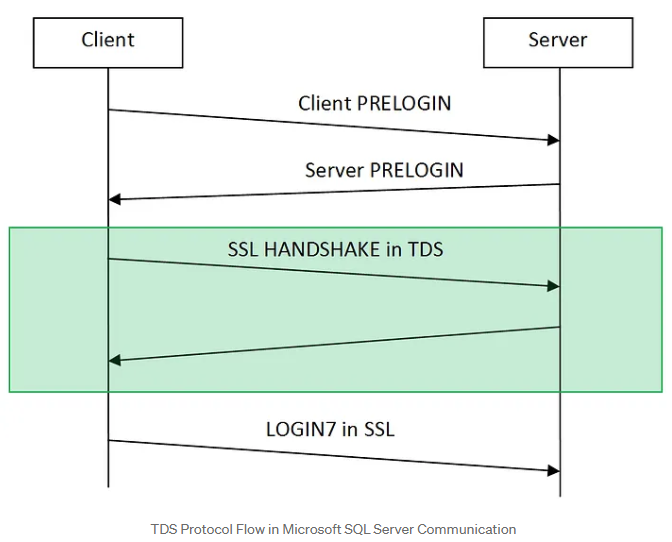
 

  1. PRELOGIN Packet: When a client (like a thick client application) wants to connect to an MSSQL server, it initiates a session with a PRELOGIN packet to establish protocol details like version, encryption preferences and other settings.
  2. PRELOGIN Response Packet: The server replies with a PRELOGIN packet of its own, responding to the client’s settings and confirming parameters for the session. Key fields in the server’s response include version, encryption preferences, and other compatibility information.
  3. SSL Handshake (Optional): If encryption is available on both ends, the client and server perform an SSL handshake to establish a secure connection. This step is wrapped within the TDS protocol and uses the settings established during the PRELOGIN exchange to determine encryption.
  4. Authentication (LOGIN7 Packet): After the initial setup, the client sends a LOGIN7 packet with credentials, including the username and an obfuscated (but easily reversible) password, to authenticate with the server. Whether this packet is encrypted or sent in plain text depends on the encryption preferences agreed upon during the PRELOGIN exchange.

In a nutshell, these steps outline the initial connection flow of TDS authentication.

But wait, there’s more! In the upcoming sections, we’ll dive into ways to manipulate these encryption preferences. Spoiler alert: we might just find a way to trick the client into handing over those cleartext MSSQL account credentials, all while skipping that whole SSL handshake— rude, I know, but who has time for handshakes anyway? Let’s dig in!

How Encryption on TDS Protocol Works

Now, encryption in the TDS protocol is our main enemy to beat if we want those MSSQL account credentials. And, as they say, to defeat your enemy, you’ve got to know its weaknesses. So, let’s dig into how TDS encryption is established.

How to Understand Encryption Settings and Documentation for Hacking

By exploring Microsoft’s protocol documentation, we gain insight into how the client and server determine encryption settings.

When a client initiates a connection to an MSSQL server, both parties must agree on whether to use encryption. This agreement occurs during the PRELOGIN handshake, specifically in the Client and Server Prelogin Response Packet. During this phase, both the client and server share their preferred encryption settings by selecting one of the following four options:
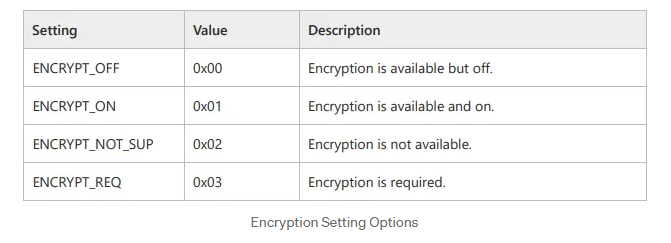
With these options in mind, the client and server exchange their encryption settings through PRELOGIN packets. Based on these options, they decide how to proceed regarding encryption. Assuming the client supports encryption (which is almost always the case), the server expects the client to follow these rules:
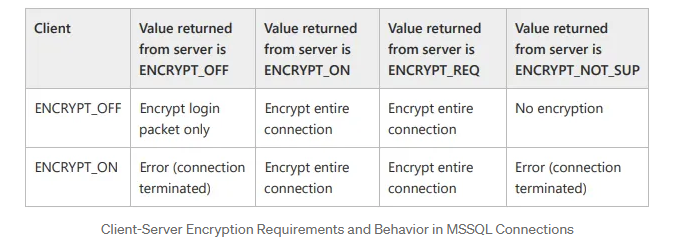
As a result, based on the encryption settings outlined in the table above, both ends will determine the appropriate encryption preference for the connection.

It’s important to note that the default encryption settings for both the client application and the MSSQL server is ENCRYPT_OFF. By default, since both sides support encryption, they will establish an encrypted connection to securely exchange the Login packet data (Based on the table above).

TDS Authentication Flow

Now, let’s break down this process with a practical example. I’ve put together a dummy thick client application to vividly illustrate the connection flow in its default state:

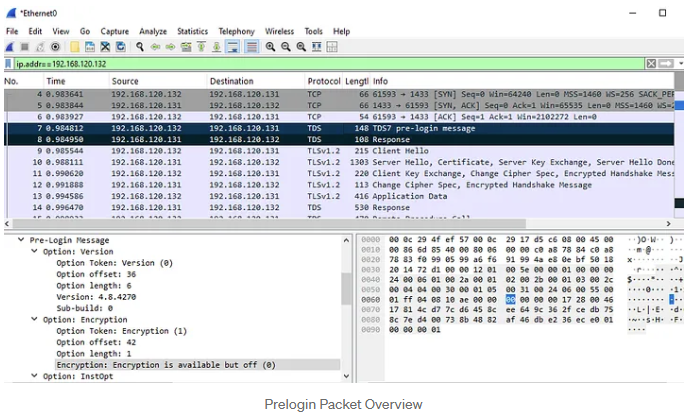
1.When a client connects to the MSSQL server, it sends a TDS7 pre-login message with the default encryption setting, ENCRYPT_OFF (0x00).
2.In the server's Prelogin Response Packet, which has a similar structure to the client's packet, we also see the default encryption preference.
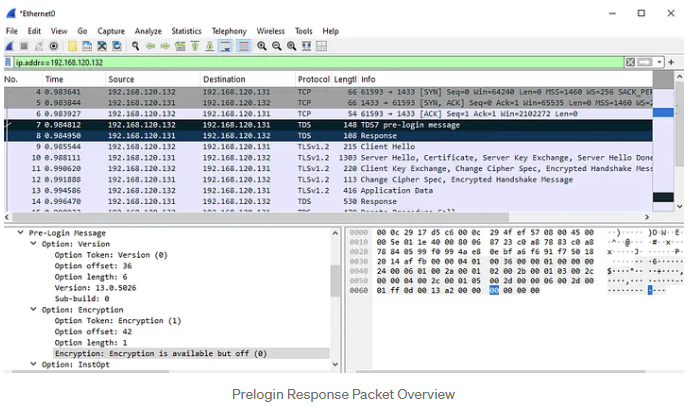
According to the encryption settings outlined in the table above, we expect the application to create an encrypted connection during the Login Packet. This expectation is validated by the subsequent packets (9–12), which demonstrate the establishment of an SSL session using TLSv1.2. The Login Packet is represented as packet 13 in the screenshots and contains the encrypted application data.

The Challenge and the Solution

Our primary challenge on our way to the MSSQL server hacking is determining how to bypass encryption to capture the Login packet containing the credentials we are seeking. As noted earlier, the application and server communicate their encryption preferences through the PRELOGIN packet. Based on this exchange, we can identify four potential scenarios that could allow us to downgrade the encryption on the Login packet and successfully capture the credentials.

Scenario 1 (Default State)

Client: ENCRYPT_OFF
MSSQL Server: ENCRYPT_OFF

This is the most common scenario where both the client and server are in their default configurations. In this state, while encryption is supported, it is not required. Typically, both parties will agree to encrypt the login packet. However, in the event of a man-in-the-middle (MITM) attack, we can intercept the server's PRELOGIN response and modify its encryption setting to ENCRYPT_NOT_SUP, which forces the connection to proceed without encryption.

When the client receives this altered PRELOGIN response, it checks the encryption setting. Seeing that encryption is reported as "not supported" (based on the modified value) and being configured with ENCRYPT_OFF, the client sends the login packet without encryption. This lack of encryption allows us to capture the login packet in plaintext.

It's important to note that the server initially recognizes the client's ENCRYPT_OFF setting and responds accordingly (with ENCRYPT_OFF). However, due to our MITM modification, the client believes that encryption is not supported (ENCRYPT_NOT_SUP). Nevertheless, the server still expects encrypted communication. As a result, when the client sends its credentials in clear text, the server will terminate the connection because it is waiting for encrypted data. Consequently, further communication cannot take place, and no additional packets can be captured through the MITM attack. Therefore, to sustain the attack or manipulate the connection further during this hacking process, we would need to modify the client’s PRELOGIN packet to align with the altered encryption setting (ENCRYPT_NOT_SUP).

Scenario 2

Client: ENCRYPT_ON
MSSQL Server: ENCRYPT_OFF

In this hacking use case, the client enforces encryption, meaning the connection is encrypted by default. If an attempt is made to downgrade encryption, the client will terminate the connection. To bypass this restriction, we would need to modify the client application’s configuration (connection string), changing its encryption setting to ENCRYPT_OFF. Once this change is made, we can proceed with the downgrade attack as described in Scenario 1.

Scenario 3

Client: ENCRYPT_OFF
MSSQL Server: ENCRYPT_ON

In our third hacking scenario, the server enforces encryption, meaning the connection will be encrypted unless tampered with. We can try hacking it with a MITM attack and modify the server's response to set encryption to ENCRYPT_OFF (similar to Scenario 1), which would force the client to send credentials in plaintext. However, there is a limitation: because the server enforces encryption, if we attempt to forward an unencrypted connection to the server, the client will disconnect, as the server will not accept it. Nevertheless, this still allows us to capture the credentials from the login attempt, as we can trick the client into believing that the server does not support encryption.

Scenario 4

Client: ENCRYPT_ON
MSSQL Server: ENCRYPT_ON

In this case, both the client and server enforce encryption, which may initially seem to make downgrading impossible. However, if we have access to modify the client configuration (as in Scenario 2), we can change the client’s setting to ENCRYPT_OFF and subsequently proceed with the downgrade using the approach from Scenario 3. This allows us to force a plaintext connection even when both ends initially enforce encryption.

Conclusion

In our exploration, we’ve delved into four intriguing scenarios for downgrading the TDS protocol's encryption, each offering a creative ethical hacking solution to sidestep its encryption requirements. The main hurdle we face? If the client adamantly enforces encryption, our success hinges on our ability to tweak either the client’s encryption settings or the source code.

Putting It All Together: A Hacking Review

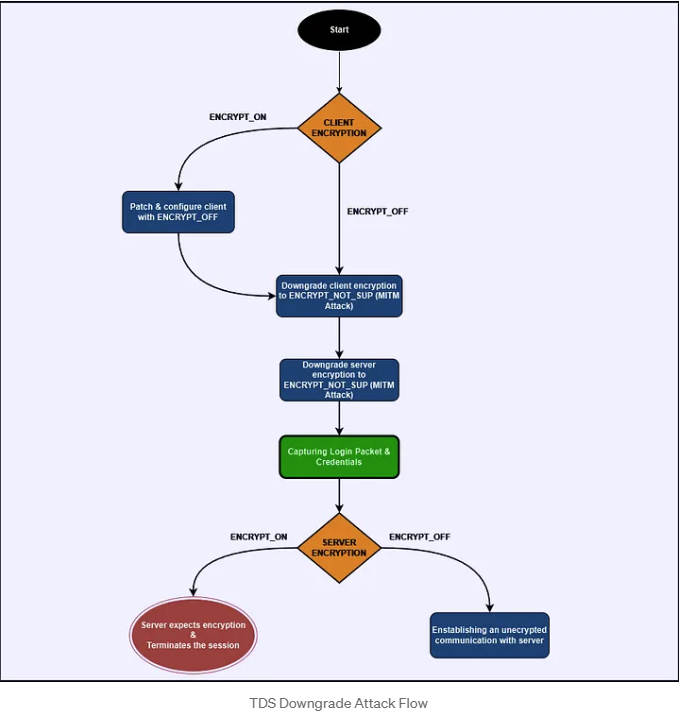
In summary, by demystifying how TDS encryption operates and skillfully utilizing the PRELOGIN handshake, we can manipulate the encryption preferences to gain access to valuable MSSQL credentials. Here’s how the process unfolds:

  1. Identify Encryption Settings: Start by checking the client’s encryption settings as outlined in the Prelogin packet.
  2. Alter Client Encryption Setting (Optional): If the situation calls for it, modify the application's encryption setting. This allows you to send the Login packet unencrypted, even if the client has set it to ENCRYPT_ON.
  3. Man-in-the-Middle Attack: Set the stage for a MITM attack between the client and the MSSQL server. Intercept the PRELOGIN packet and take the opportunity to adjust the server’s encryption response to ENCRYPT_NOT_SUP.
  4. Capture the Credentials: With encryption now disabled, the LOGIN7 packet—containing those all-important credentials—will be transmitted in plaintext. Capture this packet to retrieve the MSSQL credentials.
  5. Establishing Unencrypted Communication: If the server isn’t enforcing strict encryption policies (i.e., it does not require the ENCRYPT_ON option), an unencrypted connection can be established between the client and the server. This opens the door to passive sniffing of unencrypted data flowing between them without further interference.
Practical Attack: A Hands-On Hacking Approach

In this section, we'll walk you through how to address the scenarios we've discussed effectively. For this case, we've got a demo thick-client application at our disposal, along with a tailored Python exploit NeCro crafted to execute a downgrade on the TDS. This hacking script orchestrates a Man-in-the-Middle attack, exploiting the server’s Prelogin encryption options to compel an unencrypted connection. If you're curious to see the actual code in action, you can check it out in my GitHub repository here:
 

Client IP192.168.120.132
Kali Machine IP192.168.120.129
MSSQL Server IP: 192.168.120.131

Scenario 1

Client: ENCRYPT_OFF
MSSQL Server: ENCRYPT_OFF

In this hacking use case, we simulate a thick-client application that communicates with an MSSQL server. By inspecting the traffic through Wireshark, as we did in previous sections, we confirm that neither the client nor the server enforces encryption, as it is set to the default value ENCRYPT_OFF. To exploit this weakness, we use the Python script `tds_downgrade.py`.

Execute the script with sudo privileges, as elevated permissions are required for the iptables and arpspoof tools to redirect our traffic during the man-in-the-middle (MITM) attack.
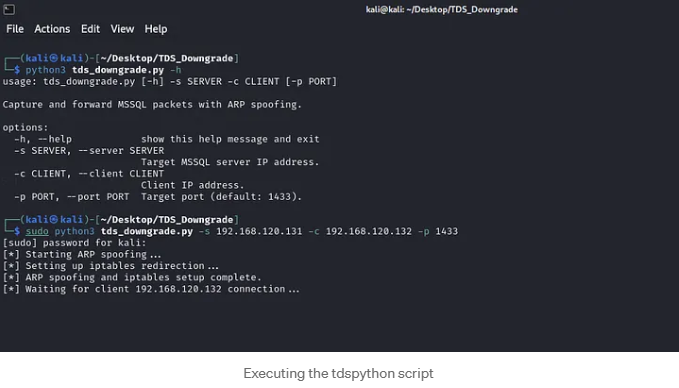
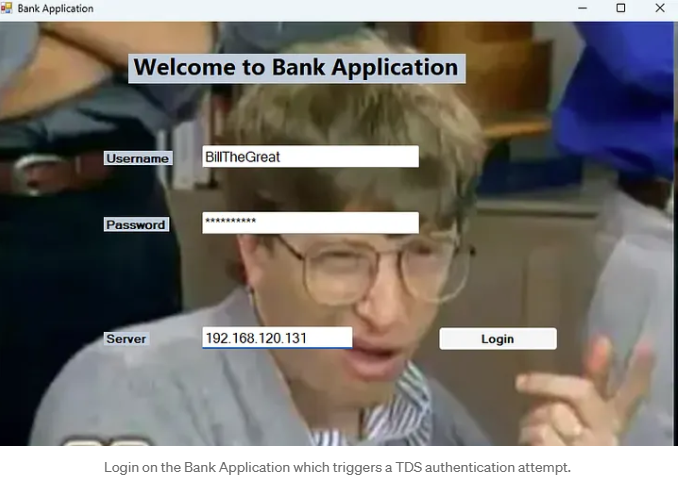
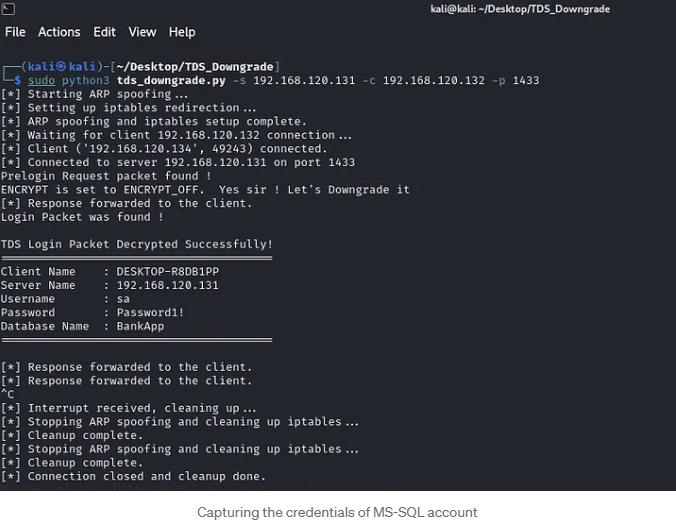
While running the script, we wait to capture a connection to the MSSQL server. We then trigger a connection from the thick client application running on the client host, and voilà! We successfully captured the credentials for the MSSQL account, which belongs to the system administrator.
 

Scenario 2

Imagine you're trying to connect to an application that enforces encryption right from the start, specifically during the initial connection (the PRELOGIN packet). In this case, any attempt at a downgrade attack will hit a brick wall because the application simply won't allow connections that can't establish secure encryption. But don’t bother. There’s an exciting hacking workaround!

Before we roll up our sleeves, let’s pinpoint when an application mandates encryption versus when it doesn’t. It all boils down to the connection string! This string is crucial as it outlines the parameters we use to connect to the database. Here’s a quick peek into the structure of a connection string:

Server=myServerAddress;Database=myDataBase;User Id=myUsername;Password=myPassword;
Forcing an Encrypted Connection

To ensure your connection is secure, the connection string must include the Encrypt parameter set to True. This tells SQL Server to activate SSL/TLS, ensuring that all data transmission between the client and the database is encrypted.

Server=myServerAddress;Database=myDataBase;User Id=myUsername;Password=myPassword;Encrypt=True;
Leaving Encryption as Optional

To make encryption optional, you can either set Encrypt=False in the connection string or omit the Encrypt parameter altogether:

Server=myServerAddress;Database=myDataBase;User Id=myUsername;Password=myPassword;
Where to Find the Connection String

When you're on the hunt for that connection string, you’ll typically uncover it in one of two handy spots:

  • Hardcoded in the application’s source code
  • Stored in one of the application’s configuration files

If the connection string is found in a configuration file, you can easily edit it to remove or adjust the `Encrypt` parameter. However, if the connection string is embedded in the source code, you will need to use a decompilation tool to extract the code, find the connection string, and modify the encryption settings.

Patching Connection String with dnSpy

For this specific case, we will be using dnSpy. This tool is a popular open-source .NET debugger and assembly editor that allows users to decompile, edit, and debug .NET applications. You can find dnSpy available for download here:
Step 1: Open the Application in dnSpy
  • Launch dnSpy.
  • Go to File > Open and select the .exe or .dll file of the application you want to decompile. In our case, we select the BankApplication.exe.
Step 2: Locate the Connection String and Edit the Class
  • Right-click on the method containing the connection string and select Edit Class(C#). This opens the class in dnSpy’s built-in editor.
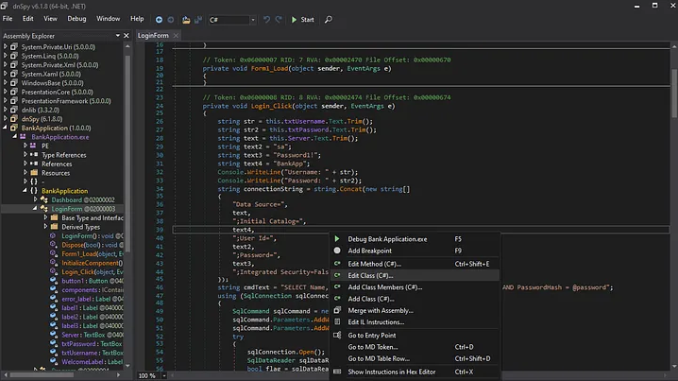
 

Step 3: Edit the Connection String to Modify Encryption

  • Find the Encrypt=True portion within the connection string and change it to Encrypt=False to make encryption optional
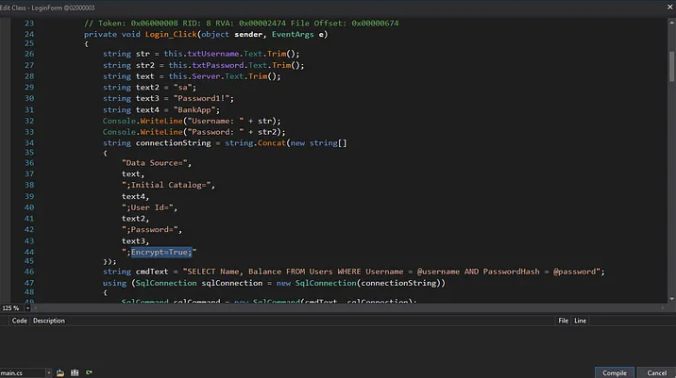
Step 4: Compile and Save Changes

  • After editing, click Compile in the editor window to apply the changes. To save the modified assembly go to File > Save Module.
  • Choose to Save the modified assembly. This will overwrite the original file by default, or you can specify a new path to keep the original.

Now that the application has been patched to use the ENCRYPT_OFF setting, you can proceed as outlined in Scenario 1 to capture the credentials.

Scenario 3–4

Client: ENCRYPT_OFF | ENCRYPT_ON
MSSQL Server: ENCRYPT_ON

In scenarios where the server enforces encryption, downgrading the client's encryption settings will not suffice, as the server will reject any unencrypted connection. This means that while we may intercept and capture the initial login credentials, we will be unable to maintain a continuous connection to the actual MSSQL server to capture further queries, sensitive data, or any ongoing traffic.

Therefore, our primary focus is only on capturing the credentials. To achieve this, we need to replicate what we did in Scenario 1. However, if the client application is enforcing encryption, we’ll first need to modify the encryption settings as we did in Scenario 2 by patching the connection string to set it to ENCRYPT_OFF. Once that’s done, we’re ready to execute the hacking attack as we did.

With everything set up, trigger a connection attempt from the client application to the MSSQL server, and capture the plaintext credentials!

A Few Quick Tips

For demonstration purposes, we used an input field in the thick-client application to select the MSSQL server. In real-world penetration tests, this option may not always be available. If it is, you can skip the entire MITM setup. Just swap the MSSQL server’s IP address with that of the attacking host while running Responder to capture those valuable credentials.

If you encounter a client enforcing encryption, remember: patch that connection string to turn off encryption before you proceed to snatch the credentials.

Post-Attack Strategy

Once you’ve captured the MSSQL account credentials, it’s time to assess the privileges tied to that account. Connect to the database using those credentials to check if you’ve got admin rights or some high-level privileges. If it does, verify whether xp_cmdshell, a stored procedure that allows executing shell commands directly from SQL Server is enabled. If it’s disabled—don’t worry, you can work to enable it. Once xp_cmdshell is active, you can leverage it to execute commands on the underlying host, potentially gaining remote code execution and expanding your access within the target environment.

Recommended Remediation: Strengthening MSSQL Security

To keep MSSQL credentials secure and prevent potential attacks, consider implementing the following strategies:

Use Integrated (Windows) Authentication: Switch to Windows Authentication instead of SQL Server’s native authentication, which reduces the need to transmit SQL credentials over the network. Integrated Authentication relies on Windows credentials, adding a layer of security against credential interception.

If enforcing this option isn’t feasible, it’s crucial to implement all the following rules carefully to mitigate the impact of the issue:

  1. Set Both Client and Server to Enforce Full Encryption (ENCRYPT_ON)
  • Ensure that both the MSSQL server and all client applications are configured with ENCRYPT_ON. This prevents any downgrading of encryption, securing the session from the initial connection through data exchange.
  1. Restrict Access to Connection Configuration
  • Prevent unauthorized modifications to connection configuration settings. Limit permissions on configuration files or embedded connection strings within the application to reduce the risk of encryption settings being altered to ENCRYPT_OFF.
  • For compiled applications, obfuscate or encrypt connection strings within the source code to make tampering with settings more difficult.
  1. Validate SSL Certificates on Both Ends
  • Enforce strict SSL certificate validation on both the client and server during the SSL handshake to prevent unauthorized systems from impersonating the MSSQL server.
  • Ensure that the SSL certificates used by the MSSQL server are signed by a trusted Certificate Authority (CA) and not self-signed, as this reduces the likelihood of MITM attacks with forged certificates.

Affected Versions

Be aware that the TDS downgrade attack predominantly targets versions of the Tabular Data Stream (TDS) protocol prior to TDS 8.0. These older versions, utilized by Microsoft SQL Server, allow optional encryption and don’t strictly enforce secure communication during the PRELOGIN handshake. Fortunately, Microsoft introduced TDS 8.0 in certain MSSQL versions, bringing enhanced encryption and security measures against hacking attempts. As a result, servers using TDS 8.0 or higher are resistant to these downgrade attacks.

TL;DR

Microsoft SQL Server’s TDS protocol allows optional encryption during the PRELOGIN handshake. By abusing this design through a Man-in-the-Middle attack, an attacker can downgrade or disable encryption and force the client to send the LOGIN7 packet in plaintext. This enables the capture of MSSQL credentials, even in environments that appear to support encryption. The attack is especially effective against legacy TDS versions and misconfigured clients that do not strictly enforce ENCRYPT_ON.

 Conclusion: A Hacking Apocalypse

This research highlights a critical, often overlooked reality: supporting encryption is not the same as enforcing encryption. This TDS protocol’s flexibility, which is originally designed for compatibility, creates a fertile ground for downgrade attacks when encryption policies are misconfigured or loosely enforced.

By carefully manipulating the PRELOGIN handshake, an attacker positioned as a Man-in-the-Middle can force client applications into transmitting MSSQL credentials in plaintext. The attack does not rely on zero-day vulnerabilities or exotic exploitation techniques, but instead abuses expected protocol behavior, default settings and real-world operational shortcuts. This makes it both stealthy and highly practical during internal penetration tests and assumed-breach scenarios.

From an offensive perspective, the TDS downgrade hacking attack is a powerful reminder that credential exposure can occur before authentication even completes. Even when a database enforces encryption, credentials can still be harvested if the client is tricked into believing encryption is unavailable. In environments with hardcoded or poorly protected connection strings, this hacking risk increases significantly.

From a defensive standpoint, the takeaway is clear:

  • Optional encryption is a liability.
  • Client-side configuration matters just as much as server-side policy.
  • Legacy protocol versions silently undermine modern security expectations.

Organizations relying on SQL Server must treat database connectivity as part of their threat model, not just the database itself. Therefore:

  • Enforcing ENCRYPT_ON everywhere
  • Validating certificates
  • Protecting connection strings
  • Moving towards Integrated Authentication

are no longer “best practices”; they are baseline requirements.

Ultimately, the TDS Downgrade Attack serves as a case study in how design trade-offs made years ago can still shape today’s attack surface. For attackers, it expands the credential-harvesting playbook. For defenders, it’s a sharp reminder that security controls must be explicit, enforced, validated, and never assumed.


XWizard

XWizard: From XML to ShellExec Using Wizardry

Intro

Red Teaming in the day and age of EDRs often involves finding niche and obscure ways, to perform actions usually under specific constraints, or as we call them internally, bypass primitives. While hunting for such primitives, an interesting small ecosystem became the center of attention for further research, that of XWizard. It should be noted at this point, that XWizard.exe itself, a Microsoft binary shipped with Windows installations is, and has been for quite some time, a known living-off-the-land binary. Detection-wise however, the spotlight falls on the following:

These approaches cover cases that abuse XWizard.exe to sideload DLLs or execute COM objects using RunWizard, one of the available subcommands. While only the related public rules are considered, and there obviously may exist private detection approaches that cover more use-cases of the LOLBin, these observations were enough to kickstart research efforts into other functionalities for more potential primitives.

The Ecosystem

The "Extensible Wizards" ecosystem, or XWizard for short, is comprised of the following three modules:

  • The main functionality (defining, loading and presenting wizards), implemented in XWizards.dll.
  • The executable, XWizard.exe, a thin command-line wrapper around the main functionality.
  • A plethora of predefined wizards, implemented throughout various DLLs, which are declared appropriately in the registry.

Although the ecosystem is mostly undocumented, research observations on each of these modules will be further analyzed below in reverse order of appearence.

Wizards

Wizards in the ecosystem refer to a series of consecutive forms a user is expected to "fill" in order to achieve a specific result. Each step (usually form) triggers the next required step, often passing the necessary context to it, mostly containing data gathered from the user up until that point, or otherwise produced in prior steps.

An intuitive way to think of wizards is the typical "Next", "Next", "Install" dialogues presented during usual Windows software installations, although actual wizards present in default Windows installations may involve tasks like the following:

  • Workspace Setup

Workspace Setup

  • Wireless Connection Setup

Wireless Connection

Such wizards are declared by GUID in the registry, under the key
HKLM\SOFTWARE\Microsoft\Windows\CurrentVersion\XWizards\Components:

Wizards in the registry

The Executable

A quick analysis of the executable XWizards.exe reveals that it is only a thin command line wrapper around the main DLL which contains the actual functionality. First, it verifies that there was at least one argument provided by the user and loads XWizards.dll, behavior which introduces the DLL sideloading opportunity described in the introduction (under constraints which are out of scope of this article):

XWizard.exe DLL load

After verifying a successful DLL load and pushing its activation context structure, it attempts to resolve an export from the DLL, defined by the first user-provided argument:

XWizard.exe export resolution

Finally, it executes the recovered export, passing it a handle to its window, its module, the rest of the command line and its ShowCmd:

XWizard.exe export execution

As a result, subcommands supported when executing XWizard.exe are exports in the DLL file. A caveat that should be mentioned is that, although not shown in the screenshots, the function GetAnsiProcName appends a W character at the end of the first argument, preferring the widechar versions of exports specified in the DLL. Running xwizard.exe RunWizard {GUID_HERE} essentially calls xwizards.dll!RunWizardW.

The DLL

The main DLL file of the ecosystem, XWizards.dll supports the following exports which can be called by XWizard.exe (due to receiving the appropriate parameters):

  • ProcessXMLFileA/W
  • ResetRegistrationA/W
  • RunPropertySheetA/W
  • RunWizardA/W

As discussed in the intro, RunWizardA/W is ecosystem functionality which has been explored previously and also been signatured. Educated guessing as to where interesting functionality may reside focuses attention on ProcessXMLFileA/W, which allows processing of an XML file to (un)register or invoke wizards. While (un)registering wizards essentially wraps editing the wizard components in the registry and thus requires modification of an entry in HKLM (essentially local administrator privileges), invoking wizards requires no special/elevated privileges.

The XML DTD

Microsoft was kind enough to provide the DTD schema for the XML that the ecosystem may process, which resides in C:\Windows\System32\xwizard.dtd. While discussing the complete specifics of the DTD schema is out of the scope of this blog post, a few minor details are presented below.

A valid XWizard XML file begins with an <xwizard> element, which may contain any number of <registry> or <run> elements. The first kind describes actions in regards to the XWizard components described in the registry, such as (un)registering wizards and as previously discussed requires elevation, but the latter allows defining "run" steps for wizards, which will be executed in the same way as running xwizard.exe RunWizard. An example <run> element is presented below:

<?xml version="1.0" standalone="no"?>
<xwizard version="1.0">
  <run>
    <wizard name="ExampleWizard" id="{116ABC1A-F7DB-45A7-ADDA-D5A57A08C6FF}"/>
  </run>
</xwizard>

When xwizard.exe ProcessXMLFile Example.xml is run with the above in Example.xml, the relevant wizard is invoked, exactly replicating the behavior of xwizard.exe RunWizard {116ABC1A-F7DB-45A7-ADDA-D5A57A08C6FF}. However, the DTD schema allows more control over how the wizard is invoked.

The Properties

As discussed above, wizards receive a context containing required information, either computed or fetched from the user in previous steps. This context is normally passed to each wizard "step" by its previous one, but when invoking wizards through XML this context may be directly specified in the XML itself. Each run element can also contain a list of properties, as seen below:

<?xml version="1.0"?>
<xwizard version="1.0">
  <run>
    <properties>
      <property name="ExampleProperty" id="{116ABC1A-F7DB-45A7-ADDA-D5A57A08C6FF}" type="wstr">
        Example property value of type 'wstr'!
      </property>
    </properties>
    <wizard name="ExampleWizard" id="{116ABC1A-F7DB-45A7-ADDA-D5A57A08C6FF}"/>
  </run>
</xwizard>

Properties are matched to their relevant wizard by the id attribute and the type attribute denotes the type of data that will be parsed from the XML value of the property. Lastly, wizards can reference properties by name. In a more pratical example, the wizard {7071ECF1-663B-4BC1-A1FA-B97F3B917C55} (registered as Message Page and implemented in connect.dll) reads a property named FatalErrorDetails to provide content to the error form it presents:

<?xml version="1.0" encoding="UTF-8"?>
<xwizard version="1.0">
  <run onerror="ignore">
    <properties>
      <property name="FatalErrorDetails" id="{7071ECF1-663B-4BC1-A1FA-B97F3B917C55}" type="wstr">Hello, World!</property>
    </properties>
    <wizard name="ExampleWizard" id="{7071ECF1-663B-4BC1-A1FA-B97F3B917C55}"/>
  </run>
</xwizard>

Processing this file presents the following wizard, demonstrating that values of properties can successfully be set in the XML file:

Wizard says hello

At this point, the focus was shifted towards identifying wizard components with interesting functionality, controllable (to an extent) by properties defined in the XML file.

The ISP Confirm Page

The ISP package registration wizard implemented in connect.dll, and more specifically the "ISP Confirm Page" component of the wizard ({7071EC32-663B-4BC1-A1FA-B97F3B917C55}) is one example of such interesting functionality. The method CISPConfirmPage::HrHandleNavigation which is called to handle the navigation to the next "step" (or form, or page, they are equivalent) of the wizard performs the following steps. First, it gets the value of the property ISPOfferData and places a pointer to it in offer.OfferData:
Fetching of the property

While the _ISP_OFFER_ELEMENT structure is not relevant, the definition of the _ISP_OFFER_DATA, which is the type of offer.OfferData is:

typedef struct {
    PWSTR OfferProviderName,
    PVOID Unused1,
    PVOID Unused2,
    PWSTR ShellExecuteTarget
} _ISP_OFFER_DATA;

The next step it does is check whether OfferData.ShellExecuteTarget is a GUID. In case it isn't, as you might have guessed, it calls ShellExecuteExW on OfferData.ShellExecuteTarget with the verb open:

Calling ShellExecuteExW

While at first glance this seems optimal, it is important to understand that only the pointers within the struct are controllable from the XML provided value, not the data they point to. As a result, achieving controlled execution of ShellExecuteExW requires identifying valid (and ideally controllable) data to point to. Although most of the userspace is not a valid target due to ASLR, Microsoft was once again kind enough to provide predictable (but not controllable) data mapped at an also predictable location in the userspace.

User-Shared Data

The KUSER_SHARED_DATA structure is a read-only data structure provided by the kernel, mapped at 0x7FFE0000 for the userspace. It offers widechar string data at offset 0x30, which contains the field NtSystemRoot, containing the path to the root folder of the windows installation (i.e. C:\Windows). Although this string is not controllable, offsets into it could be used to form relative paths. More specifically, starting at 0x7ffe3600 is the widechar string L"Windows", an excellent target to control OfferData.OfferProviderName and/or OfferData.ShellExecuteTarget to.

Structuring the property values

The next step is formatting the XML property value data accordingly, so that they are parsed into the _ISP_OFFER_DATA structure. While the DTD allows for multiple types of property values to be defined, most of them do not cover the length of the target data structure.

Data Types

Due to not being constrained by length, the following value types are interesting candidates:

  • str (ASCII string)
  • wstr (Widechar String)
  • hexbinary

The options of bstr and variant where also considered, but were identified to not allow full control of the structure, again due to length constaints. The value type of hexbinary denotes a string of hex characters which will be parsed while fetching the property. Although it sounds promising, it unfortunately pads combined values, resulting in control of only one of each two consecutive bytes. The remaining string related options are valid candidates, but come with a very specific constraint, they do not support null-bytes. More specifically, plain ASCII strings cannot be utilized to denote pointers containing any null-bytes, and widechar strings cannot denote pointers containing any two consecutive null-bytes. The target pointer, 0x7ffe3600, or 0x000000007ffe3600 in x64 land violates both constraints. In x86 land, however...

The WoW Wizard

Processing the XML file with the Windows-on-Windows x86 version of XWizard, located in C:\Windows\Syswow64\XWizard.exe allows utilizing the pointer 0x7ffe3600, which is compatible with the previously described constraints for the wstr data type. As a result, the following XML can be constructed, encoding a pointer to KUSER_SHARED_DATA.NtSystemRoot in the property value for both the OfferProviderName and the ShellExecuteTarget fields of the _ISP_OFFER_DATA structure. The same happens for both the unused fields. Essentially, the bytes of the target pointer, in little endian, are encoded as widechar characters and properly escaped in XML.

<?xml version="1.0"?>
<xwizard version="1.0">
  <run>
    <properties>
      <property name="ISPOfferData" id="{7071EC32-663B-4BC1-A1FA-B97F3B917C55}" type="wstr" action="retrieve" allocation="LocalAlloc">
        &#x0030;&#x7ffe;&#x0030;&#x7ffe;&#x0030;&#x7ffe;&#x0030;&#x7ffe;
      </property>
    </properties>
    <wizard name="ExampleWizard" id="{7071EC32-663B-4BC1-A1FA-B97F3B917C55}"/>
  </run>
</xwizard>

Processing the above with the x86 version of XWizard.exe leads to the following dialogue:

Demonstration of controlled ShellExecuteExW

Upon clicking "Set up", a controlled execution of ShellExecuteExW happens, "opening" the path C:\Windows (KUSER_SHARED_DATA.NtSystemRoot) in explorer.exe.

Execution of Binaries

While launching the Windows Explorer at the system root is an interesting proof-of-concept, execution of actual binaries requires (ab)using a quirk in ShellExecute(Ex)A/W. These variants of ShellExecute, when provided with the "open" verb and a relative path, will first verify that the relative path exists, and then utilize PATHEXT for the execution part. This in turn means that when a relative path example is attempted to be opened, if example.exe exists next to it, it will be executed instead. By adjusting the pointer to KUSER_SHARED_DATA.NtSystemRoot, essentially skipping bytes off its start, the absolute path can be turned into a relative path:

<?xml version="1.0"?>
<xwizard version="1.0">
  <run>
    <properties>
      <property name="ISPOfferData" id="{7071EC32-663B-4BC1-A1FA-B97F3B917C55}" type="wstr" action="retrieve" allocation="LocalAlloc">        &#x0036;&#x7ffe;&#x0036;&#x7ffe;&#x0036;&#x7ffe;&#x0036;&#x7ffe;
      </property>
    </properties>
    <wizard name="ExampleWizard" id="{7071EC32-663B-4BC1-A1FA-B97F3B917C55}"/>
  </run>
</xwizard>

Processing this file leads to an attempt to "open" the relative path ./windows (KUSER_SHARED_DATA.NtSystemRoot + 6). Executing this from a directory which contains a windows directory and a windows.exe binary, will result in the following wizard:

Demo Wizard

As a proof-of-concept executable, C:\Windows\System32\calc.exe was copied to the current directory as windows.exe. Upon clicking "Set up", a hard-earned calculator pops up:

Demo Calculator

Outro

A rather appropriate TL;DR version of this article would be "Parsing of malicious XML files with the x86 variant of XWizard.exe from a controlled path may lead to command execution". Although the above statement on its own does not sound very exciting or useful in a Red Teaming context, the test system used for this research contains 177 potential wizard components defined in the registry which were analyzed, a subset of which was further analyzed manually to identify the ISPConfirmPage Wizard Component used in this proof-of-concept. The goal of this article is to shed some light on any previously unexplored attack surface on the XWizard ecosystem and spark ideas and research which may lead to the discovery of further primitives.

Thanks for reading, and happy hunting!

Red Teaming

Red Teaming: Beyond Compliance to Real Cyber Resilience

Red Teaming

In today's ever-evolving cybersecurity landscape, organizations face an overwhelming array of threats that demand not just robust defenses but also a heightened state of readiness against potential attacks. Gone are the days when simply ticking off compliance boxes was enough to protect digital assets. Red Teaming offers a powerful approach that pushes beyond checkboxes to build true cyber resilience — the ability to prepare for, withstand and recover from cyber attacks. But how does Red Teaming transform cybersecurity strategies from compliance-driven to resilient defenses?

What Is Red Teaming?

Red Teaming is a comprehensive, adversary-focused security exercise where a group of cybersecurity professionals simulates real-world attacks on an organization’s infrastructure, people and processes. Unlike penetration testing, which typically focuses on technical vulnerabilities in isolation, Red Teaming emulates sophisticated threat actors by testing detection, response and recovery capabilities in realistic scenarios.

A Red Team utilizes tactics, techniques and procedures (TTPs) used by cybercriminals, as well as novel in-house research, enabling organizations to identify subtle weaknesses across the entire security posture. This holistic adversarial simulation helps organizations understand how an attacker might breach defenses and move laterally within their environment.

Compliance vs. Real Cyber Resilience

Many organizations invest heavily in compliance frameworks such as GDPR, NIST or NIS 2 standards to meet regulatory requirements. While compliance is critical, it often focuses on controls that are necessary but not always sufficient for strong cybersecurity. Especially when faced as a mere “check-the-box” procedure, it tends to be a static approach that may not reflect current or emerging threats.

Studies show that compliance-driven efforts do not guarantee protection against sophisticated attacks, as compliance primarily ensures minimum cybersecurity standards rather than readiness for complex threat scenarios. This creates a false sense of security, leaving critical gaps unaddressed.

How Hackcraft Red Teaming Builds Real Cyber Resilience

Hackcraft Red Teaming drives organizations beyond baseline compliance by continuously challenging defenses, simulating real-world adversarial tactics, techniques and procedures, with the objective of evaluating your organization's capability to prevent, identify and address both cyber and physical assaults. Our proactive approach and genuine, advanced, tailor-made exercises uncover weaknesses that audits and automated tools might miss, such as social engineering vulnerabilities, misconfigurations and gaps in incident response. Additionally, after each simulated attack, the Hackcraft Red Team provides valuable metrics to help organizations refine their incident response processes. Thorough documentation of findings and remediation actions drives organizational learning and compliance reporting. Integrating these findings into your incident response plans will test and improve your organization's ability to detect and respond to attacks.

For example, Hackcraft Red Team might simulate a phishing campaign combined with network infiltration, testing how quickly teams detect and respond to lateral movement. The findings help organizations improve monitoring, strengthen response playbooks and enhance employee training.

Iterative Red Teaming exercises promote a culture of continuous improvement, where lessons learned feed back into security controls, policies and technology investments, building resilience against evolving threats.

Key Benefits of Hackcraft Red Teaming Beyond Compliance
  • Enhanced threat awareness: Our Red Team reveals attack vectors previously unknown, increasing organizational understanding of real threats.
  • Improved incident response: Testing response plans under pressure helps teams sharpen detection and mitigation skills.
  • Stronger cybersecurity culture: Simulations engage all levels of the organization, reinforcing security awareness and accountability.
  • Informed investments: Concrete evidence from Red Team findings supports better decision-making in cybersecurity budgets.
Implementing Red Teaming Effectively

To maximize value, Red Teaming must be planned and integrated thoughtfully:

  • Define clear objectives: Align exercises with organizational risks and business priorities.
  • Collaborate with blue teams: Pipeline exercise results to defensive/security engineering teams to achieve holistic security operations.
  • Ensure executive support: Visibility and buy-in at the leadership level enable swift remediation efforts.
  • Leverage results continuously: Use Red Team insights to update policies, technologies and training iteratively.

Red Teaming represents a shift from simple compliance with regulations to proactive cyber resilience. By simulating realistic attacks, organizations gain insights that help close security gaps, enhance response capabilities and foster a security-first culture. As cyber threats grow more sophisticated, Red Teaming is essential to stay ahead, protect critical assets and maintain business continuity beyond regulatory checklists.

FAQ

Q: How does Red Teaming differ from Penetration Testing?
A: Penetration Testing focuses on finding specific vulnerabilities, often in isolation, while Red Teaming simulates full adversarial attacks to test detection, response and resilience across technical and human layers.

A useful analogy to understand how various (not just cyber) security models function is the Swiss cheese model. Penetration Testing typically examines just one layer of this model, while Red Teaming usually assesses all layers to identify −hopefully− potential bypasses throughout the entire system.

Q: Is Red Teaming necessary for small businesses?
A: While resource-intensive, smaller organizations can benefit from scaled Red Teaming exercises or third-party services to evaluate critical risks and improve defenses proactively.

Q: How often should Red Teaming be conducted?
A: It depends on the organization’s risk profile, but regular exercises (e.g. annually or biannually) combined with continuous monitoring provide the best resilience-building approach.

Q: Can Red Teaming help with regulatory compliance?
A:
Yes, Red Teaming complements compliance efforts by verifying that controls are effective against real-world threats, often exceeding baseline requirements.

Red Teaming

Offensive X: Why Offense Is the New Defense?

Offensive Cybersecurity

The pulse of Offensive Cybersecurity was alive and thriving last week at the Athens Conservatoire during an incredible event, Offensive X!  What about Offensive X? An electrifying journey into the heart of Offensive Cybersecurity that brought together some of the brightest minds in the field. Participants exchanged insights and explored the latest developments, fueling inspiration and reigniting the passion that drives every member of the Hackcraft team!

Inspirational ethical hackers from all over the world, thought-provoking presentations, coffee breaks to connect, catch up and exchange fresh ideas in the Offensive Cybersecurity landscape. And of course, drinks that sparked new insights! We are thrilled to be a platinum sponsor for such an amazing event, and it’s been fantastic to see so many bright minds gathering around our booth, mingling with the Hackcraft team.

Offensive X’s Conclusions: The Landscape

We find ourselves in a black swan world for the Offensive Cybersecurity, where new attack surfaces are popping up and the demand for innovation is skyrocketing. A major shift is already underway. Imagine brain-computer interfaces opening up direct neural attack vectors, quantum computing poised to shatter all existing cryptography, and the blend of digital and physical realms turning everything – yes, even your Tesla- into potential hacking targets.

The reality is crystal clear: attackers are evolving at lightning speed. This is where strategic thinking comes into play: The offensive landscape is a marathon, not a sprint; we need to anticipate threats rather than just react to them. This calls for us to continuously refine our techniques and explore innovative strategies.  Bridging the gap between academic knowledge and real-world application is essential. And above all? We must embrace our passion for creativity and innovation as we craft fresh strategies!

Offensive Cybersecurity


Why Prioritize Offensive Cybersecurity?

Offensive services are not just tests. They are rehearsals. With Security Assessments and Red Teaming, you’ll uncover hidden vulnerabilities that traditional security tools often overlook. These assessments simulate real-world attack scenarios, giving you a clear picture of how well your defenses hold up, assessing your detection capabilities, and measuring your response readiness.

By embracing offensive services, you can:

  • Identify unknown weaknesses before attackers do
  • Validate the effectiveness of existing controls
  • Test your incident response under pressure
  • Prioritize remediation based on business risk
  • Build continuous improvement into your security strategy

In regulated industries and critical infrastructure especially, offensive cybersecurity is vital not only for security but also for compliance, resilience and long-term business continuity.

Why Hackcraft?

Because we are a top-notch Offensive Security Team that is constantly advancing its knowledge and training on the latest adversarial tactics, techniques and procedures (TTPs). We believe that crafting ethical attacks is a piece of art. Each attack is unique. Wearing the attacker’s mask, our two specialized teams dedicated to advanced Security Assessments and real-world Red Teaming exercises, operate with precision and discretion to uncover your blind spots. Backed by continuous research and development, we stay ahead of emerging threats and techniques. We also believe in giving back. Through open-source contributions on our Blog and GitHub, we share tools and insights to strengthen the global security community. As we forge ahead, we view offensive exercises not merely as a security measure, but as a readiness evaluation against the known and the unknown of the threat landscape.

Experience the art behind the attack. Contact us to discover how we can assist your organization.